
Mob Variants
Adds several variants of existing mobs to the game.
Screenshots
About this Mod
The younger sister to my Upgraded Mobs datapack, Mob Variants subtly freshens up your game by adding a few twists on the classic mobs we know and love.
Mob Variants adds a few variant spawns to zombies, piglins, hoglins, slimes, magma cubes, phantoms, and witches for you to come across in your world.
Details
All of the variants in this project are detailed below.
Zombie Horsemen
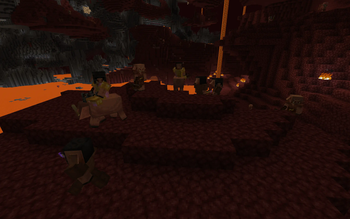
Some zombies have a chance of spawning atop a zombie horse; this is the only way that zombie horses can spawn, as they don't spawn in vanilla Minecraft.Of these horsemen, some will spawn as knights that wield enchanted iron equipment, guarded by several sword-wielding zombies that will defend their master at any cost. This horse is tamed, and is the only way to acquire a zombie horse that you can ride.
Piglin Jockeys
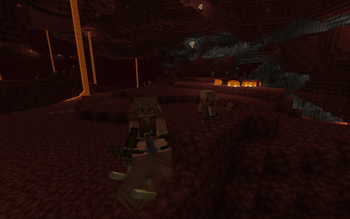
Some piglins will spawn riding hoglins. Much worse than spider jockeys!Of these piglin riders, some will spawn as wither hunters wearing a wither skeleton skull and enchanted golden equipment. These hunters are accompanied by three unmounted minions who are sure to attack you if you aren't wearing any golden armor.
Hoglins
In the Nether, sometimes the natural order of things can go... wrong. Natural hoglin spawns will sometimes be replaced with packs of feral zoglins that slaughter every mob they come across. Watch out!Slimes, Magma Cubes, and Phantoms
All slimes, magma cubes, and phantoms have a chance of being much larger than normally possible. Larger mobs like these have more HP and deal more damage, so be careful!Necromancer Witches
Some witches have delved into the dark arts, and will have particles of Unluck constantly surrounding them. Instead of potions, these necromancers will constantly summon undead to do the dirty work for them.Configuration
Don't like some of the variants listed above? While there is no config file, you can open up the datapack ZIP to edit things yourself:
- If you add a
#symbol in front of a command in anmcfunctionfile, that line will be commented out and won't be ran. - This datapack includes a list of predicates for random probabilities that determine the chance of a variant being spawned. If you want to change a probability, you can replace the associated predicate with a different one, or make your own.
- To prevent a mob from having a chance of being replaced, give it the
mobvariants.blacklisttag.
If you want to uninstall this datapack, you can simply remove it from your world with no issues. However, mob variants that have already been summoned by this datapack will remain in the world until they despawn.
Compatibility
This datapack is compatible with all of my other projects. In particular, many of the variants here use the upgradedmobs.blacklist tag to prevent Mob Variants and Upgraded Mobs from interfering with each other.
Again, remember to give the mobvariants.blacklist tag to any mob that you don't want to be affected by this datapack.
Available Versions
How to Install Mob Variants on Your Server
Order Server
Order a Minecraft Java server with at least 3 GB RAM (4 GB recommended).
Set datapack Loader
In the panel under "Egg", select the datapack loader and matching Minecraft version (1.20.4).
Install Mod
Open the mod browser in the dashboard and search for "Mob Variants". Click "Install" – done! Alternatively, upload the .jar via SFTP to the /mods folder.
Compatibility
Mod Loaders
Minecraft Versions
1.20.4, 1.20.3, 1.20.2 (+12 more)
Server-side
✓ RequiredRecommended RAM
4 GB(min. 3 GB)Frequently Asked Questions
Mob Variants server crashes on startup – what to do?
Most common cause: wrong datapack version or insufficient RAM. Check the server log (latest.log) for "OutOfMemoryError" or "Mixin" errors. With Mado Hosting: ensure at least 3 GB RAM is allocated and the loader matches the mod version (1.20.4). You can switch loaders with one click in the panel.
Is Mob Variants compatible with datapack and fabric and forge and neoforge and quilt?
Mob Variants officially supports datapack, fabric, forge, neoforge, quilt for Minecraft 1.20.4, 1.20.3, 1.20.2. Note: Forge and Fabric mods are NOT cross-compatible – pick one loader and stick with it. The Mado dashboard automatically detects incompatible loader combinations.
Server lagging with Mob Variants – how to optimize performance?
Recommended RAM: 4 GB (per 8 players). Use /spark profiler to check if Mob Variants consumes the most tick time. Common fixes: reduce server view-distance to 8-10, install "performant" or "starlight" as supplementary mods on Forge. With Mado Hosting, your server runs on NVMe SSDs with dedicated CPU cores for minimal latency.
Similar Mods
![[EMF] Entity Model Features](https://cdn.modrinth.com/data/4I1XuqiY/6e5bbd0d06b1741bfdab6c0cfab6de8fdaf0064c_96.webp)


Rent Modded Server
Install Mob Variants with just one click on your server.
Details
- License
- Creative Commons Attribution Non Commercial Share Alike 4.0 International
- Server-side
- Required