
MobBuckets
Clutching with fish and axolotls is boring, clutch with anything your heart desires!
Screenshots
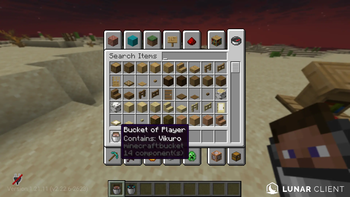
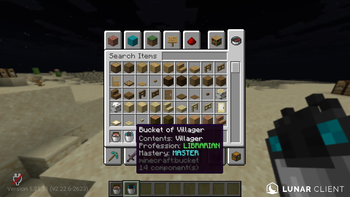
About this Mod

MobBuckets is a fun experience to play around with since the whole premiss of the project is to mimic the mechanics of fish buckets but for any mob. Yes, that includes bosses such as the Wither or Ender Dragon.
- Fabric and Paper Support (Mod version is heavily advised as it will be a more stable enviornment)
- Mod is both Client and Server, meaning if the server has it installed, but you don't have the mod installed textures won't load.
- Shift+Right-Click while holding an empty bucket to capture a mob. (Doesn't work on anything you can capture in a water bucket: Fish, Axolotl, Tadpoles.)
- The ability to clutch with any mob as long as you release the mob and collide with their hitbox before you hit the ground! (Works with the "Bucket of Player" too!)
- Multi-player "Bucket of Player" crafting allows you to craft a "Bucket of Player" with up to 8 different player's playerheads at once!
- The "Bucket of Player" teleports the bound players to where you release them. (Useful for saving or trapping or clutching on them to kill them >:D)
- Data persistence for mobs, such as sheeps or villagers (Don't worry about trades resetting!)
- Players drop their playerheads when they die, these can be used to bind a player to a "Bucket of Player" when crafting a playerhead with a bucket.
Server Managers Read This:
I'm aware of the struggle of having your playerbase download a clientside mod just to load textures, so if you're hosting a server with MobBuckets you can have your players download this resourcepack to avoid clientsided mod conflictions if there were any.
Available Versions
How to Install MobBuckets on Your Server
Order Server
Order a Minecraft Java server with at least 3 GB RAM (4 GB recommended).
Set fabric Loader
In the panel under "Egg", select the fabric loader and matching Minecraft version (1.21.11).
Install Mod
Open the mod browser in the dashboard and search for "MobBuckets". Click "Install" – done! Alternatively, upload the .jar via SFTP to the /mods folder.
Compatibility
Mod Loaders
Minecraft Versions
1.21.11, 1.21.10, 1.21.9 (+9 more)
Server-side
✗ UnsupportedRecommended RAM
4 GB(min. 3 GB)Frequently Asked Questions
MobBuckets server crashes on startup – what to do?
Most common cause: wrong fabric version or insufficient RAM. Check the server log (latest.log) for "OutOfMemoryError" or "Mixin" errors. With Mado Hosting: ensure at least 3 GB RAM is allocated and the loader matches the mod version (1.21.11). You can switch loaders with one click in the panel.
Is MobBuckets compatible with fabric and paper and spigot?
MobBuckets officially supports fabric, paper, spigot for Minecraft 1.21.11, 1.21.10, 1.21.9. The Mado dashboard automatically detects incompatible loader combinations.
Server lagging with MobBuckets – how to optimize performance?
Recommended RAM: 4 GB (per 8 players). Use /spark profiler to check if MobBuckets consumes the most tick time. Common fixes: reduce server view-distance to 8-10, install "performant" or "starlight" as supplementary mods on Forge. With Mado Hosting, your server runs on NVMe SSDs with dedicated CPU cores for minimal latency.
Similar Mods




Rent Modded Server
Install MobBuckets with just one click on your server.