
Mobility Flux
Adds unique and inspired mobility items into Minecraft.
Screenshots
About this Mod
About
Mobility Flux aims to introduce refreshing and fluid new mobility items into the game, making navigation in your world more enjoyable. Some of the introduced mobility items are familiar, drawing inspiration from other games, while others introduce new concepts.
The new mobility methods can aid in: Building, Mining, Adventuring, and even Combat.
New Features

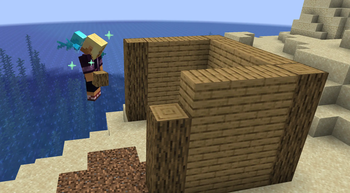
Allays can now be picked up and stored in your inventory by right-clicking them. Additionally, if you shift-right-click an Allay (or an Allay item), it will mount onto your back and magically carry you, granting you temporary flight (lasting between 30 and 45 seconds).


Based on Yoru's Gatecrash ability from the game Valorant, the Gatecrash is a new item that can be crafted with an Ender Pearl and 8 Lapis Lazuli. It allows you to conveniently teleport/recall yourself to a location. It works from any distance and between dimensions. This can be useful for escaping danger and avoiding the need to walk back and forth in your world between builds.
By default, the Gatecrash will continually move forward in the world. However, you can shift-right-click when placing the Gatecrash to prevent it from moving. Gatecrashes are also similar to Enderpearls, in that they load chunks.

Based on Fortnite's Shockwave Grenade item, the Shockwave Grenade is a new explosive projectile that deals zero damage but blasts back any mobs caught in its explosion radius. The explosion can be used to travel great distances and clear large gaps. When being blasted by a Shockwave Grenade, you will have immunity to fall damage until you safely land. The Shockwave Grenade can be crafted with Amethyst and Iron Nuggets.

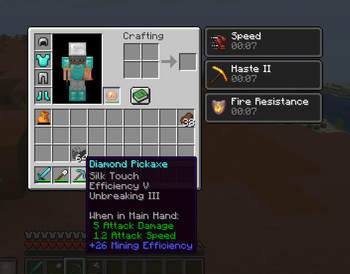
The Thermal Pearl is a new item that is crafted using a lava bucket and a Heart of the Sea. When right-clicked, the Thermal Pearl grants the player Fire Resistance, Haste II, and Speed I, which all last for 10 seconds.
This makes it a highly dynamic item that aids in combat, provides a short burst of speed, and allows for the instant mining of certain blocks (when using Efficiency V), making resource gathering faster.

Available Versions
How to Install Mobility Flux on Your Server
Order Server
Order a Minecraft Java server with at least 3 GB RAM (4 GB recommended).
Set fabric Loader
In the panel under "Egg", select the fabric loader and matching Minecraft version (1.21.10).
Install Mod
Open the mod browser in the dashboard and search for "Mobility Flux". Click "Install" – done! Alternatively, upload the .jar via SFTP to the /mods folder.
Compatibility
Mod Loaders
Minecraft Versions
1.21.10, 1.21.9, 1.21.8 (+2 more)
Server-side
✓ RequiredRecommended RAM
4 GB(min. 3 GB)Frequently Asked Questions
Mobility Flux server crashes on startup – what to do?
Most common cause: wrong fabric version or insufficient RAM. Check the server log (latest.log) for "OutOfMemoryError" or "Mixin" errors. With Mado Hosting: ensure at least 3 GB RAM is allocated and the loader matches the mod version (1.21.10). You can switch loaders with one click in the panel.
Is Mobility Flux compatible with fabric?
Mobility Flux officially supports fabric for Minecraft 1.21.10, 1.21.9, 1.21.8. The Mado dashboard automatically detects incompatible loader combinations.
Server lagging with Mobility Flux – how to optimize performance?
Recommended RAM: 4 GB (per 8 players). Use /spark profiler to check if Mobility Flux consumes the most tick time. Common fixes: reduce server view-distance to 8-10, install "performant" or "starlight" as supplementary mods on Forge. With Mado Hosting, your server runs on NVMe SSDs with dedicated CPU cores for minimal latency.
Similar Mods




Rent Modded Server
Install Mobility Flux with just one click on your server.