
Mobtimizations - Entity Performance Fixes
Optimizes a lot of tasks that Entity AI wastefully performs, minimal effect on gameplay.
Screenshots
About this Mod
Server optimization mod focused on entities, reducing their impact on your server while keeping change in gameplay to a minimum.
Features:
- Reduces the rate of expensive mob wander pathfinding, even more so if far from players.
- Reduces how often the expensive enemy targeting tasks are run.
- For monsters, disables the expensive 3x3x3 hazard scanning that is constantly running every tick while path following, your pets are safe.
- Disables the frequent pathfinds done while already following a path.
- Reduces the expensive searching done to find a turtle egg to crush, for zombies/husks, by default fully disabling it.
- Optimizes the expensive zombie village raid task that scans around a lot for villagers, by default cuts the chance to 1/3.
- Wander pathfinding and enemy targetting are further reduced when the mob is not near a player.
- Each feature can be configured on/off, and some further with chance to cancel an attempt.
Demonstration:
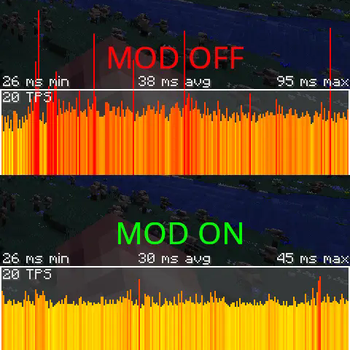
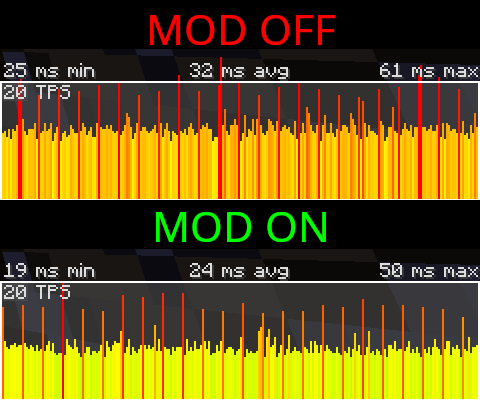
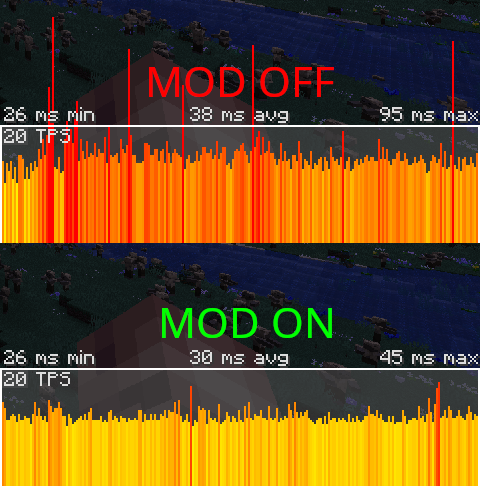
With each test I had lots of extra mobs spawned - On my 20 core i5-13600K I kept 1000 monsters spawned to stress the server.
All the mods 7 - MC 1.18 modpack:
Mod off: 38ms avg - 95ms max
Mod on: 30ms avg (server load cut by 22%) - 45ms max (peak server load cut by over 50%!)
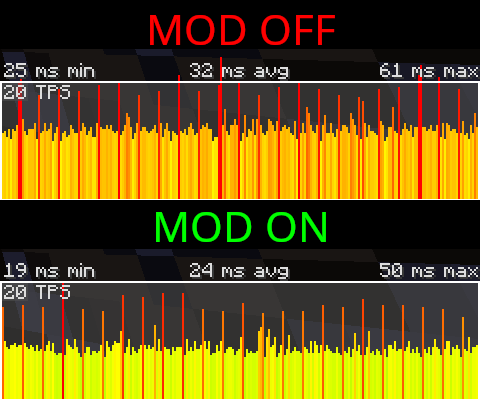
Deceasedcraft - MC 1.18 modpack:
Mod off: 32ms avg - 61ms max
Mod on: 24ms avg (server load cut by 25%) - 50ms max (peak server load cut by 20%)
Requires CoroUtil to run: CoroUtil
Available Versions
How to Install Mobtimizations - Entity Performance Fixes on Your Server
Order Server
Order a Minecraft Java server with at least 3 GB RAM (4 GB recommended).
Set fabric Loader
In the panel under "Egg", select the fabric loader and matching Minecraft version (1.20.1).
Install Mod
Open the mod browser in the dashboard and search for "Mobtimizations - Entity Performance Fixes". Click "Install" – done! Alternatively, upload the .jar via SFTP to the /mods folder.
Compatibility
Mod Loaders
Minecraft Versions
1.20.1, 1.19.2, 1.18.2
Server-side
✓ RequiredRecommended RAM
4 GB(min. 3 GB)Frequently Asked Questions
Mobtimizations - Entity Performance Fixes server crashes on startup – what to do?
Most common cause: wrong fabric version or insufficient RAM. Check the server log (latest.log) for "OutOfMemoryError" or "Mixin" errors. With Mado Hosting: ensure at least 3 GB RAM is allocated and the loader matches the mod version (1.20.1). You can switch loaders with one click in the panel.
Is Mobtimizations - Entity Performance Fixes compatible with fabric and forge and neoforge?
Mobtimizations - Entity Performance Fixes officially supports fabric, forge, neoforge for Minecraft 1.20.1, 1.19.2, 1.18.2. Note: Forge and Fabric mods are NOT cross-compatible – pick one loader and stick with it. The Mado dashboard automatically detects incompatible loader combinations.
Server lagging with Mobtimizations - Entity Performance Fixes – how to optimize performance?
Recommended RAM: 4 GB (per 8 players). Use /spark profiler to check if Mobtimizations - Entity Performance Fixes consumes the most tick time. Common fixes: reduce server view-distance to 8-10, install "performant" or "starlight" as supplementary mods on Forge. With Mado Hosting, your server runs on NVMe SSDs with dedicated CPU cores for minimal latency.
Similar Mods
![[EMF] Entity Model Features](https://cdn.modrinth.com/data/4I1XuqiY/6e5bbd0d06b1741bfdab6c0cfab6de8fdaf0064c_96.webp)


Rent Modded Server
Install Mobtimizations - Entity Performance Fixes with just one click on your server.