
MobXP
Set custom amount for xp to be dropped by mobs when they are killed, includes Ender Dragon's first and subsequent kills. Also allows setting custom amounts for baby mob variants, and chickens that have jockeys
Screenshots
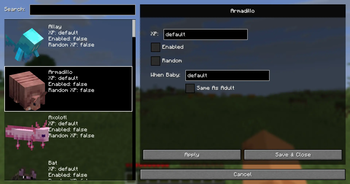
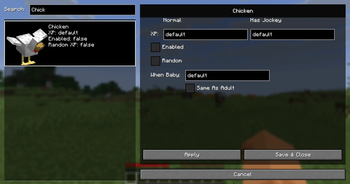
About this Mod
Mob XP
This mod allows setting a custom amount of xp that mobs will drop when killed. This includes being able to change the amount of xp the Ender Dragon drops on the first kill and subsequent kills.
Vanilla Minecraft had different xp amounts for some baby mob variants (e.g. Zombie babies), and chickens that had jockeys. So this mod also allows setting custom amounts for any baby mob variant and chickens with jockeys if wanting to do so.
Permission
Uses the permission mobxp.manageXP (or if the user is OPed / Singleplayer) to check if a user is allowed to edit the custom settings.
GUI
Starting with v1.1.3 there is an ingame GUI that can be used to modify the custom xp amounts and set the various flags. The default key for opening the GUI is the Keypad 5 when loaded in a world.

Configuration (v1.1.3 and above)
Starting with v1.1.3, all custom mob XP settings are stored as NBT data on a per-world basis.
This means each world maintains its own independent XP configuration.
File Location
The configuration file is named:
mob_xp_data.dat
and is stored in the world’s data directory.
Singleplayer worlds
.minecraft/saves/<WorldName>/data/mob_xp_data.dat
Dedicated / Integrated servers
<WorldName>/data/mob_xp_data.dat
NBT Data Structure
Each entry represents custom XP settings for a specific mob.
| Field | Description |
|---|---|
id |
Minecraft entity ID (e.g. minecraft:ender_dragon) |
primaryXP |
Base amount of XP dropped when the mob is killed |
secondaryXP |
Alternate XP value used for special conditions (e.g. chicken jockeys, non-first Ender Dragon kills) |
babyXP |
XP dropped when killing a baby variant of the mob |
enabled |
If true, custom XP values are used; if false, vanilla XP behavior is applied |
random |
If true, XP dropped will be a random value between 0 and the configured XP amount |
usePrimaryXPForBaby |
If true, baby mobs use primaryXP instead of babyXP |
Notes
- If
usePrimaryXPForBabyis enabled,babyXPis ignored. - If
enabledisfalse, all other settings for that mob are ignored and vanilla XP is used. - Any negative number entered for a xp amount will cause it not to be used and vanilla XP will be applied
Commands
View XP Configuration
/mobxp <entity_id>
Displays the current custom XP settings for the specified mob.
Example: /mobxp minecraft:ender_dragon
Modify XP Values
Set primary XP
/mobxp <entity_id> primaryXP <amount>
Example: /mobxp minecraft:ender_dragon primaryXP 12000
Set secondary XP
/mobxp <entity_id> secondaryXP <amount>
Example: /mobxp minecraft:ender_dragon secondaryXP 500
Set baby mob XP
/mobxp <entity_id> babyXP <amount>
Example: /mobxp minecraft:zombie babyXP 100
Toggle Flags
Enable or disable custom XP
/mobxp <entity_id> enabled <true|false>
Example: /mobxp minecraft:sheep enabled true
Enable random XP drops
/mobxp <entity_id> random <true|false>
Example: /mobxp minecraft:warden random true
Use adult XP for baby mobs
/mobxp <entity_id> usePrimaryXPForBaby <true|false>
Example: /mobxp minecraft:zoglin usePrimaryXPForBaby true
Configuration Pre 1.1.3
On first run config file will be generated in config/mobxp.json.
- Find the mob identifier for the mob
- Set the "experiencePoints" to the xp you want for that mob
- Enable it by setting "enabled" to true
- Set "random" to true if you want the xp amount to randomize between 1 and "experiencePoints"
Example config
- Sets Ender Dragon xp drops to 15,000 for both first kill and all other kills
- Sets Villager xp drops to 1,000
{
  "dragonXP": 15000,
  "firstDragonXP": 15000,

  "xp": {
    "minecraft:villager": {
      "enabled": true,
      "experiencePoints": 1000,
      "random": false
    }
  }
}
Available Versions
How to Install MobXP on Your Server
Order Server
Order a Minecraft Java server with at least 3 GB RAM (4 GB recommended).
Set fabric Loader
In the panel under "Egg", select the fabric loader and matching Minecraft version (26.1.1).
Install Mod
Open the mod browser in the dashboard and search for "MobXP". Click "Install" – done! Alternatively, upload the .jar via SFTP to the /mods folder.
Compatibility
Mod Loaders
Minecraft Versions
26.1.1, 26.1, 1.21.11 (+23 more)
Server-side
✓ RequiredRecommended RAM
4 GB(min. 3 GB)Frequently Asked Questions
MobXP server crashes on startup – what to do?
Most common cause: wrong fabric version or insufficient RAM. Check the server log (latest.log) for "OutOfMemoryError" or "Mixin" errors. With Mado Hosting: ensure at least 3 GB RAM is allocated and the loader matches the mod version (26.1.1). You can switch loaders with one click in the panel.
Is MobXP compatible with fabric?
MobXP officially supports fabric for Minecraft 26.1.1, 26.1, 1.21.11. The Mado dashboard automatically detects incompatible loader combinations.
Server lagging with MobXP – how to optimize performance?
Recommended RAM: 4 GB (per 8 players). Use /spark profiler to check if MobXP consumes the most tick time. Common fixes: reduce server view-distance to 8-10, install "performant" or "starlight" as supplementary mods on Forge. With Mado Hosting, your server runs on NVMe SSDs with dedicated CPU cores for minimal latency.
Similar Mods




Rent Modded Server
Install MobXP with just one click on your server.