
Modern Beta Forge
Generate Beta, Alpha, Infdev, and Indev terrain for Minecraft 1.12.2
Screenshots
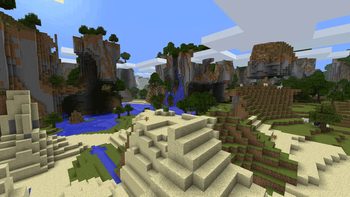
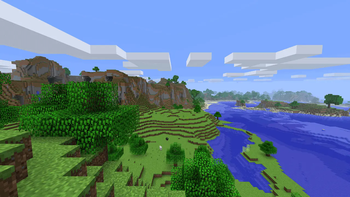
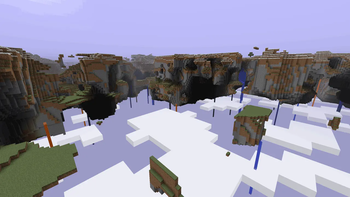
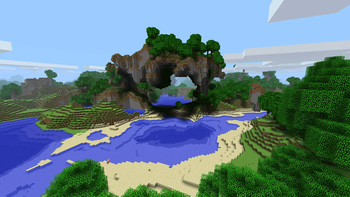
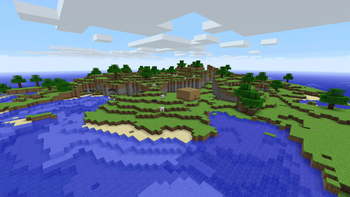
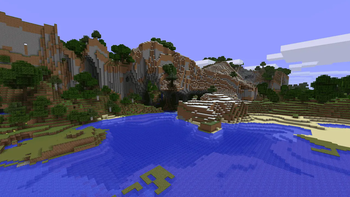
About this Mod

A port of Modern Beta Fabric for Forge 1.12.2!
Enjoy all the toggle-able features of Minecraft 1.12.2 with the faithful re-implementation of the Beta, Alpha, Infdev, and Indev terrain generators. Originally done for a friend's server but now expanded on to match the original Fabric version in feature parity plus additional improvements/fixes. Please don't expect updates beyond bugfixes and minor improvements if I feel like it.
Features
- Terrain generators:
- Beta 1.7.3
- Alpha 1.1.2_01
- Infdev 20100611
- Infdev 20100420
- Infdev 20100415
- Infdev 20100227
- Indev 20100223
- Classic 0.0.23a
- Beta Skylands
- Pocket Edition v0.6.0
- Release (Vanilla) 1.12.2
- The End
- Biome generators:
- Beta 1.7.3
- Pocket Edition v0.6.0 (with Beta biomes)
- Single/Fixed
- Release (Vanilla) 1.12.2 with biome mod support
- Biomes O' Plenty (when Biomes O' Plenty mod is installed)
- Mix and match terrain and biome generators.
- Classic Nether terrain generation.
- Options to substitute Beta biomes with other vanilla or mod biomes for the Beta biome generator.
- In-game world generation customization, based on the vanilla Customized world type.
- Shareable and built-in world generation presets, like with the vanilla Customized world type.
- Toggleable modern structures and decoration features.
- Accurate Beta sky and Beta biome colors when playing in SP.
- Adjustable cloud height for Modern Beta worlds, y108 by default.
- Modified player spawns that place players on beaches like in classic versions.
- In-game terrain/biome generation previewer before world creation.
- Commands for inspecting and editing generator settings in-game.
Server Usage
The following should be done in the server.properties file:
- Set the 'levelType' field to 'modernbeta', without the quotes.
- Set generation options in the 'generator-settings' field. You can create the generator options string using the in-game GUI.
Mod Support
Additional support is provided for these mods:
- Biomes O' Plenty
- Thaumcraft
- Buildcraft Energy
- Dynamic Trees
- Yung's Better Mineshafts
- Millénaire - Download config files here
These mods are known to cause issues:
- Galacticraft - Sky/Fog visual features will be disabled when this is installed.
- Muon - This mod is incompatible.
- Cave Generator - If you are experiencing tick/entity lag, please disable all biome replacement options to improve performance.
Add-ons
Modern Beta supports custom add-ons. Here are a few:
- Modern Beta Forge Release Plus - Adds biome generators from late Beta to early Release versions of Minecraft.
- Modern Beta Forge Islands - Adds island generation for several terrain generators.
- Modern Beta Forge Rivers - Adds river generation for several terrain generators.
- Modern Beta Forge Voronoi Climates - Adds biome generation with customizable biome maps and a visual editor.
Preset Note
For accurate generation for non-Beta chunk sources, please select from the built-in presets first; simply changing the chunk source will not accordingly update the needed noise settings.
Why no Forge version for current versions of Minecraft?
I have no plans on working on current versions of Minecraft at the moment. Please take a look at Moderner Beta for an alternative!
Credits
Thanks to mrburgerUS, SuperCoder7979, Arenovas, Amb0s, PaulEvs, comp500, and the folks behind RetroMCP.
Available Versions
How to Install Modern Beta Forge on Your Server
Order Server
Order a Minecraft Java server with at least 4 GB RAM (6 GB recommended).
Set forge Loader
In the panel under "Egg", select the forge loader and matching Minecraft version (1.12.2).
Install Mod
Open the mod browser in the dashboard and search for "Modern Beta Forge". Click "Install" – done! Alternatively, upload the .jar via SFTP to the /mods folder.
Compatibility
Mod Loaders
Minecraft Versions
1.12.2
Server-side
✓ RequiredRecommended RAM
6 GB(min. 4 GB)Frequently Asked Questions
Modern Beta Forge server crashes on startup – what to do?
Most common cause: wrong forge version or insufficient RAM. Check the server log (latest.log) for "OutOfMemoryError" or "Mixin" errors. With Mado Hosting: ensure at least 4 GB RAM is allocated and the loader matches the mod version (1.12.2). You can switch loaders with one click in the panel.
Is Modern Beta Forge compatible with forge?
Modern Beta Forge officially supports forge for Minecraft 1.12.2. The Mado dashboard automatically detects incompatible loader combinations.
Server lagging with Modern Beta Forge – how to optimize performance?
Recommended RAM: 6 GB (per 5 players). Use /spark profiler to check if Modern Beta Forge consumes the most tick time. Common fixes: reduce server view-distance to 8-10, install "performant" or "starlight" as supplementary mods on Forge. With Mado Hosting, your server runs on NVMe SSDs with dedicated CPU cores for minimal latency.
Similar Mods



Rent Modded Server
Install Modern Beta Forge with just one click on your server.