
ModuloGUI
An all-in-one client-side utility mod for Minecraft 1.21
Screenshots
About this Mod
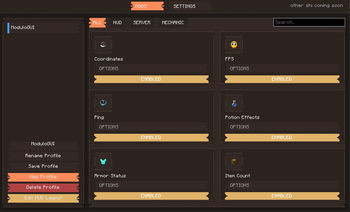
ModuloGUI is an all-in-one client-side utility mod for Minecraft 1.21 (Fabric) featuring a polished in-game GUI for toggling and customizing a wide set of quality-of-life features.
Features
HUD Elements
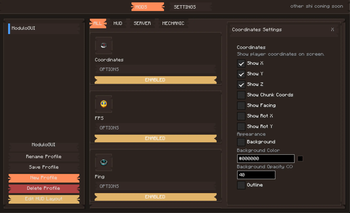
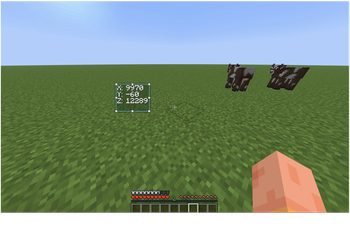
Armor display, item count, held item durability, coordinates, direction compass, day/time clock, FPS, ping, speed, potion effects, horse stats, and minimap — all individually positioned and styled with per-element background, outline, text color, and opacity controls
Keystrokes overlay with live CPS counter
Block info HUD showing the block currently under your crosshair
Inventory
Container preview: hover over any chest, shulker box, or bundle to see its contents as a tooltip — supports scrolling for large containers
Mouse Tweaks: hold shift and drag across slots to batch-transfer matching items in one motion
Menu Opacity: independently control the background darkening behind inventory screens and the opacity of the inventory panel texture itself
Menu Colors: apply one of 20 curated presets (Midnight, Carbon, Nord, Catppuccin, Gruvbox, and more) or set fully custom colors for the ModuloGUI interface and inventory panel tint
Scrollable tooltips
Gameplay
Toggle Sprint and Toggle Sneak
Zoom with smooth, configurable zoom factor and sensitivity
FOV Effects control: independently suppress FOV changes from sprinting, speed potions, elytra, bows, and spyglass; suppress nausea/portal distortion overlay
No fire overlay: hides the fire screen effect without disabling damage
Custom crosshair editor with up to 32×32 pixel grid
AppleSkin integration: food saturation and hunger preview overlays
World Overlays
Light level overlay: colored X markers on surfaces (red = unsafe, yellow = marginal) with configurable radius and colors
Hitbox renderer with configurable color and in-range highlighting
Block outline customizer
Chunk border renderer with configurable colors and thickness for outer and inner grids
Waypoints with automatic death point tracking
Interface
Scoreboard tweaks: hide entirely or show text only without the background panel
Particle effects manager: per-particle visibility, color, and size overrides
Fullbright with configurable gamma value
Performance mode and crystal optimizer
Chat toggle
All features are toggled and configured from an in-game hub (default key: O) with no need to edit config files. Supports multiple profiles.
Available Versions
How to Install ModuloGUI on Your Server
Order Server
Order a Minecraft Java server with at least 3 GB RAM (4 GB recommended).
Set fabric Loader
In the panel under "Egg", select the fabric loader and matching Minecraft version (26.1.2).
Install Mod
Open the mod browser in the dashboard and search for "ModuloGUI". Click "Install" – done! Alternatively, upload the .jar via SFTP to the /mods folder.
Compatibility
Mod Loaders
Minecraft Versions
26.1.2, 1.21.11
Server-side
✗ UnsupportedRecommended RAM
4 GB(min. 3 GB)Frequently Asked Questions
ModuloGUI server crashes on startup – what to do?
Most common cause: wrong fabric version or insufficient RAM. Check the server log (latest.log) for "OutOfMemoryError" or "Mixin" errors. With Mado Hosting: ensure at least 3 GB RAM is allocated and the loader matches the mod version (26.1.2). You can switch loaders with one click in the panel.
Is ModuloGUI compatible with fabric?
ModuloGUI officially supports fabric for Minecraft 26.1.2, 1.21.11. The Mado dashboard automatically detects incompatible loader combinations.
Server lagging with ModuloGUI – how to optimize performance?
Recommended RAM: 4 GB (per 8 players). Use /spark profiler to check if ModuloGUI consumes the most tick time. Common fixes: reduce server view-distance to 8-10, install "performant" or "starlight" as supplementary mods on Forge. With Mado Hosting, your server runs on NVMe SSDs with dedicated CPU cores for minimal latency.
Similar Mods




![[ETF] Entity Texture Features](https://cdn.modrinth.com/data/BVzZfTc1/af683d206d50b05258d865b0d6e4aa2f2cee12f2_96.webp)
![[EMF] Entity Model Features](https://cdn.modrinth.com/data/4I1XuqiY/6e5bbd0d06b1741bfdab6c0cfab6de8fdaf0064c_96.webp)
Rent Modded Server
Install ModuloGUI with just one click on your server.