
Mod Credits
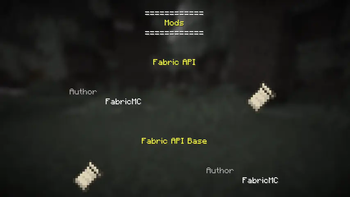
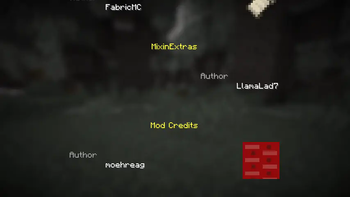
Adds a credit screen for the installed mods in the style of the game credits, but with improved functionality and a custom poem.
Screenshots
About this Mod
Mod Credits screen
With custom poem!
This mod adds a screen in the style of the vanilla credits/win screen, but for the
currently installed mods and with expanded functionality as well as a small custom poem.
Customization options (for modpack devs/users, available starting from version 2.0.0)
The config file is located at <game dir>/config/moehreag_modcredits.json.
Currently, the following options are available:
enable_poem_in_credits_button: Whether to display the poem when the mod credits screen is opened
from the "Credits & Attribution" screen.enable_mod_links: Whether to allow clicking on mod names to go to their homepage/sources/...show_mod_icons: Whether to display mod icons in the credits screen. Note that mod authors are able to
override the default behavior and may not respect this option.compact_mode: Whether to display the list in a more compact form. This option may also not be respected
by mods that implement their own entries (see below).
Customization options (for mod devs)
Custom FMJ property (simple)
Example:
{
  /*...*/
  "custom": {
    "moehreag-modcredits:description": "Your custom text!"
  }
}
Note: This property does not support localization.
Example (using translation keys):
{
  /*...*/
  "custom": {
    "moehreag-modcredits:description-keys": "modid.modcredits.description"
  }
}
Note: For both options, the line length is limited to a width of 256 and will be wrapped.
Custom Entrypoint (more powerful, but also more manual work and likely to break with version updates)
{
  /*...*/
  entrypoints: {
    "moehreag-modcredits": [
      "com.example.modid.modcredits.ModCreditsImpl"
    ]
  },
  /*...*/
}
package com.example.modid.modcredits;

import io.github.moehreag.modcredits.ModCreditsApi;
import io.github.moehreag.modcredits.entries.Entry;

import net.fabricmc.loader.api.ModContainer;

public class ModCreditsImpl implements ModCreditsApi {

	@Override
	public Entry createEntry(ModContainer self, boolean rightText) {
		/* Your code! */
	}
}
Maven coordinates
This mod can be found on https://maven.axolotlclient.com/. Alternatively, the modrinth maven can be used.
build.gradle.kts
repositories {
    maven("https://maven.axolotlclient.com/releases")
}

dependencies {

    modImplementation("io.github.moehreag:modcredits:$VERSION")
}
build.gradle
repositories {
    maven { url = "https://maven.axolotlclient.com/releases" }
}

dependencies {

    modImplementation("io.github.moehreag:modcredits:$VERSION")
}
You want to use this mod in a modpack but it doesn't offer the correct options? Head to the issue tracker and let us know!
Available Versions
How to Install Mod Credits on Your Server
Order Server
Order a Minecraft Java server with at least 3 GB RAM (4 GB recommended).
Set fabric Loader
In the panel under "Egg", select the fabric loader and matching Minecraft version (26.2).
Install Mod
Open the mod browser in the dashboard and search for "Mod Credits". Click "Install" – done! Alternatively, upload the .jar via SFTP to the /mods folder.
Compatibility
Mod Loaders
Minecraft Versions
26.2, 26.2-rc-2, 26.1.1 (+9 more)
Server-side
✗ UnsupportedRecommended RAM
4 GB(min. 3 GB)Frequently Asked Questions
Mod Credits server crashes on startup – what to do?
Most common cause: wrong fabric version or insufficient RAM. Check the server log (latest.log) for "OutOfMemoryError" or "Mixin" errors. With Mado Hosting: ensure at least 3 GB RAM is allocated and the loader matches the mod version (26.2). You can switch loaders with one click in the panel.
Is Mod Credits compatible with fabric and quilt?
Mod Credits officially supports fabric, quilt for Minecraft 26.2, 26.2-rc-2, 26.1.1. The Mado dashboard automatically detects incompatible loader combinations.
Server lagging with Mod Credits – how to optimize performance?
Recommended RAM: 4 GB (per 8 players). Use /spark profiler to check if Mod Credits consumes the most tick time. Common fixes: reduce server view-distance to 8-10, install "performant" or "starlight" as supplementary mods on Forge. With Mado Hosting, your server runs on NVMe SSDs with dedicated CPU cores for minimal latency.
Similar Mods




![[ETF] Entity Texture Features](https://cdn.modrinth.com/data/BVzZfTc1/af683d206d50b05258d865b0d6e4aa2f2cee12f2_96.webp)
![[EMF] Entity Model Features](https://cdn.modrinth.com/data/4I1XuqiY/6e5bbd0d06b1741bfdab6c0cfab6de8fdaf0064c_96.webp)
Rent Modded Server
Install Mod Credits with just one click on your server.