
Mojang Dev Tools
Unlocks the Mojang Development tools, useful for mod devs and players looking to understand more about the game!
Screenshots
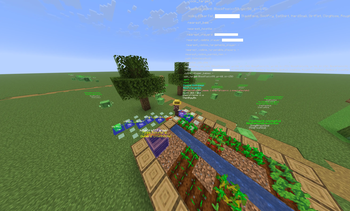
About this Mod
Mojang Dev Tools

Unlocks all hidden developer features normally only available inside Mojang's IDE — with an in-game config menu to toggle each flag individually. ALL TOOLS EXIST IN OFFICIALLY RELEASED MOJANG BINARIES, THIS MOD SIMPLY ENABLES THE FLAGS
Sets SharedConstants.IS_RUNNING_IN_IDE = true and MC_DEBUG_HOTKEYS=true at class-load time, enabling debug overlays, internal commands, and dev-mode keybinds that are shipped in the game but never exposed in production.
Requirements
- Minecraft 26.1.2
- Fabric Loader 0.19.2 or later
Key Features
Debug Keybinds (F3 held)
| Hotkey | Action |
|---|---|
| F3 + Z | Custom debug renderer menu |
| F3 + F6 | Mojang internal debug options menu |
| F3 + E | Chunk section path debug overlay |
| F3 + F | Toggle fog rendering |
| F3 + L | Toggle smart culling |
| F3 + O | Frustum culling octree overlay |
| F3 + U | Freeze/capture frustum at current position |
| F3 + V | Chunk section visibility overlay |
| F3 + W | Wireframe rendering mode |
Note: F3+F with this mod enabled toggles fog instead of cycling render distance — this is the dev-mode override.
Renderer Overlays
Toggle any of these in-game via F3 + F6:
- Pathfinding route overlay
- Block neighbor update overlay
- Structure bounding box overlay
- Mob brain & memory overlay
- AI goal selector overlay
- Point of interest (POI) overlay
- Bee hive/path overlay
- Raid state overlay
- Village section overlay
- Entity hitbox overlay (integrated server)
- Block collision shape overlay
- Sculk catalyst spread overlay
- Breeze mob debug overlay
- Experimental redstone wire update order overlay
World Generation Debug
- Cave carver volume overlay
- Ore vein bounds and type overlay
- Aquifer cell boundary overlay
- Per-chunk feature placement count heatmap
- Large dripstone cluster overlay
- Disable individual world gen passes (fluids, aquifers, surface, carvers, structures, features, ore veins, blending, retrogeneration)
Gameplay & QOL Flags
- All villager trade tiers unlocked immediately
- Ignore mob cap on integrated server
- Open worlds from incompatible versions
- Allow simulation distance below the normal minimum
- Keep jigsaw blocks after structure generation
- Structure edit mode
- Save structures as SNBT text files
- Per-tick timing monitor
- Show all sound subtitles
- Suppress outbound Mojang telemetry
- Cursor position in F3 overlay
- Suppress all world saves (world reverts on exit)
Internal Server Commands
Unlocked when IS_RUNNING_IN_IDE is active:
/raid— Force-start/stop raids, set omen level, spawn raid captains, toggle raider glow/debugpath to <x> <y> <z>— Visualize pathfinding routes in-world/debugmobspawning at <x> <y> <z>— Diagnose mob spawning per category/warden_spawn_tracker— Read/write warden warning levels for nearby players/spawn_armor_trims— Spawn all armor trim combinations on armor stands/serverpack push/pop— Push/pop server resource packs to clients without restarting/chase— Sync camera between two game instances (Mojang QA tool)
Available Versions
How to Install Mojang Dev Tools on Your Server
Order Server
Order a Minecraft Java server with at least 4 GB RAM (6 GB recommended).
Set fabric Loader
In the panel under "Egg", select the fabric loader and matching Minecraft version (26.1.2).
Install Mod
Open the mod browser in the dashboard and search for "Mojang Dev Tools". Click "Install" – done! Alternatively, upload the .jar via SFTP to the /mods folder.
Compatibility
Mod Loaders
Minecraft Versions
26.1.2
Server-side
✗ UnsupportedRecommended RAM
6 GB(min. 4 GB)Frequently Asked Questions
Mojang Dev Tools server crashes on startup – what to do?
Most common cause: wrong fabric version or insufficient RAM. Check the server log (latest.log) for "OutOfMemoryError" or "Mixin" errors. With Mado Hosting: ensure at least 4 GB RAM is allocated and the loader matches the mod version (26.1.2). You can switch loaders with one click in the panel.
Is Mojang Dev Tools compatible with fabric?
Mojang Dev Tools officially supports fabric for Minecraft 26.1.2. The Mado dashboard automatically detects incompatible loader combinations.
Server lagging with Mojang Dev Tools – how to optimize performance?
Recommended RAM: 6 GB (per 5 players). Use /spark profiler to check if Mojang Dev Tools consumes the most tick time. Common fixes: reduce server view-distance to 8-10, install "performant" or "starlight" as supplementary mods on Forge. With Mado Hosting, your server runs on NVMe SSDs with dedicated CPU cores for minimal latency.
Similar Mods




Rent Modded Server
Install Mojang Dev Tools with just one click on your server.