MojangFix StationAPI Edition
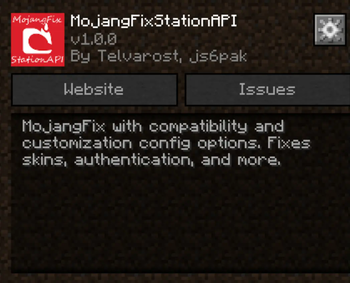
MojangFix with compatibility and customization config options. Fixes skins, authentication, and more.
Screenshots
About this Mod
MojangFixStationAPI
A more compatible version of MojangFix for Minecraft b1.7.3 with GlassConfigAPI configs to increase the mod's compatibility. Fixes skins, authentication, and more.
- For more InventoryTweaks (ex:
left-click + drag) consider : https://modrinth.com/mod/inventorytweaks - For better auth/skin fixes use RetroAuth: https://modrinth.com/mod/retroauth
Features
Skin and cape fix (including 1.8+ outer layers)

- Added ability to raise slim skin shoulders with GlassConfigAPI
- Added ability to toggle rendering the player cape with GlassConfigAPI
Authentication fix

Allows the server to verify that the connecting player is logged in
Multiplayer server list

(server status not implemented yet)
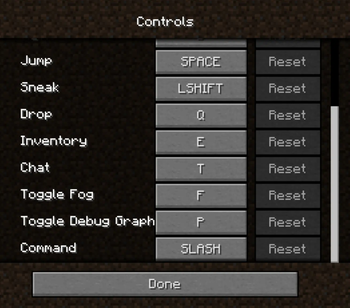
Scrollable keybinds gui

Better text edition

Basic inventory tweaks
Previously unlisted changes
- (New) Disable stats checksum verification
- Allows mods to rearrange stats (for instance when converting a vanilla instance to a StationAPI one)
- Enable Bit Depth Fix
- Enable Command Keybinding
- Used to more quickly open up the chat window and type in a command
- Enable Death Screen Score Fix
- Enable Debug Graph Hidden By Default
- Use the new keybind (default: LCtrl) + F3 to open up debug screen with graph
- Optionally using GCAPI config switch keybind to toggle debug graph whenever pressed
- Enable Displaying World Seed In Debug Menu
- Enable MojangFix Version Text On Title Screen
- Enable Quit Button
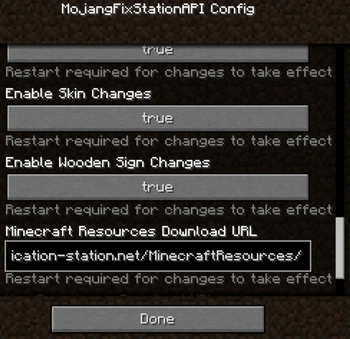
- Change Resources Download URL
- This edition of MojangFix lets you change it yourself as well in the config settings
Installation using Prism Launcher
- Download an instance of Babric for Prism Launcher: https://github.com/Glass-Series/babric-prism-instance
- Install Java 17 and set the instance to use it: https://adoptium.net/temurin/releases/
- Add GlassConfigAPI 3.0.2+ to the mod folder for the instance: https://modrinth.com/mod/glass-config-api
- Add Glass Networking to the mod folder for the instance: https://modrinth.com/mod/glass-networking
- (Optional) Add StationAPI to the mod folder for the instance: https://modrinth.com/mod/stationapi
- (Optional) Add Mod Menu to the mod folder for the instance: https://modrinth.com/mod/modmenu-beta
- Add this mod to the mod folder for the instance: https://github.com/telvarost/BetaTweaks-StationAPI/releases
- Run and enjoy! 👍
FAQ
- Q. Why is minecraft so small and part of my screen white?
- A. You probably have screen scaling on or are using a high DPI screen. There are 5 possible ways to fix this:
- The best option is to install Gambac: https://modrinth.com/mod/gambac
- You could also pass the following string in as a java argument in the settings tab
-Dsun.java2d.uiScale=1.0
- You could also install ClientsideEssentials mod or UniTweaks and use their screen scaling fix from GCAPI config options (fix may produce small artifacts with this option)
- You could also change the DPI settings for Prism Launcher to system
- Or, you could change your screen scaling to 100%
- A. You probably have screen scaling on or are using a high DPI screen. There are 5 possible ways to fix this:
Available Versions
How to Install MojangFix StationAPI Edition on Your Server
Order Server
Order a Minecraft Java server with at least 3 GB RAM (4 GB recommended).
Set babric Loader
In the panel under "Egg", select the babric loader and matching Minecraft version (b1.7.3).
Install Mod
Open the mod browser in the dashboard and search for "MojangFix StationAPI Edition". Click "Install" – done! Alternatively, upload the .jar via SFTP to the /mods folder.
Compatibility
Mod Loaders
Minecraft Versions
b1.7.3
Server-side
~ OptionalRecommended RAM
4 GB(min. 3 GB)Frequently Asked Questions
MojangFix StationAPI Edition server crashes on startup – what to do?
Most common cause: wrong babric version or insufficient RAM. Check the server log (latest.log) for "OutOfMemoryError" or "Mixin" errors. With Mado Hosting: ensure at least 3 GB RAM is allocated and the loader matches the mod version (b1.7.3). You can switch loaders with one click in the panel.
Is MojangFix StationAPI Edition compatible with babric and fabric?
MojangFix StationAPI Edition officially supports babric, fabric for Minecraft b1.7.3. The Mado dashboard automatically detects incompatible loader combinations.
Server lagging with MojangFix StationAPI Edition – how to optimize performance?
Recommended RAM: 4 GB (per 8 players). Use /spark profiler to check if MojangFix StationAPI Edition consumes the most tick time. Common fixes: reduce server view-distance to 8-10, install "performant" or "starlight" as supplementary mods on Forge. With Mado Hosting, your server runs on NVMe SSDs with dedicated CPU cores for minimal latency.
Similar Mods




![[ETF] Entity Texture Features](https://cdn.modrinth.com/data/BVzZfTc1/af683d206d50b05258d865b0d6e4aa2f2cee12f2_96.webp)
![[EMF] Entity Model Features](https://cdn.modrinth.com/data/4I1XuqiY/6e5bbd0d06b1741bfdab6c0cfab6de8fdaf0064c_96.webp)
Rent Modded Server
Install MojangFix StationAPI Edition with just one click on your server.