
MojoBoostFPS
Mod specially for MojoLauncher for more FPS! Warning: the mod disables some things that might be useful in the game, do not use it on PC!
Screenshots
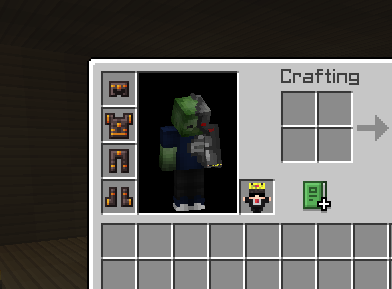
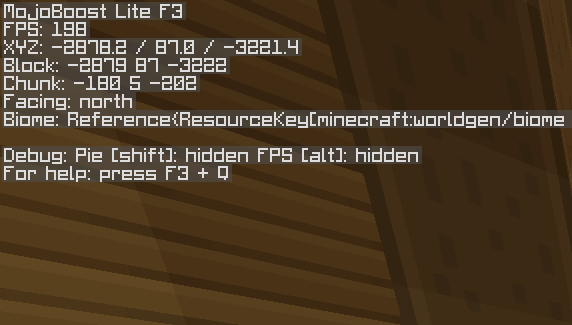
About this Mod
This mod is the result of careful optimization work focused on one thing only: making Minecraft run on low-end mobile devices that are barely holding together.
It is designed to strip away everything that is not strictly necessary for gameplay, improving frame rates and reducing lag spikes on weak hardware.
Unlike general-purpose performance mods, this one takes a much more aggressive approach, prioritizing raw performance over visual completeness.
📉 What this mod changes
This mod disables or removes a wide range of visual and rendering systems, including:
- HUD elements
- Particles
- Animations
- Rendering layers
- Player and entity rendering
- Decorative and environmental visuals
- Additional graphical effects and updates
The result is a significantly simplified rendering pipeline intended to reduce load on the device.
📱 Intended use case
This mod is strictly designed for low-performance Android devices running Minecraft 1.20 on Fabric.
It is especially useful if your device struggles to maintain stable performance, particularly in the range of ~10–15 FPS.
If your game already runs smoothly, this mod will likely be unnecessary and will noticeably reduce visual quality for no meaningful benefit.
⚙️ Requirements
- Minecraft 1.20
- Fabric Loader
- No support for other mod loaders or versions
Do not expect updates beyond this version.
📥 Installation Guide
Install Fabric Loader for Minecraft 1.20, then place the mod file into your mods folder like any standard Fabric mod.
If your launcher supports automatic mod loading, you can use that instead.
Once installed, launch the game and verify that performance changes are active in-game. Visual elements should be significantly reduced.
📊 Performance expectations
This mod is intended for:
- Very low-end phones
- Devices struggling with stable frame rates
- Situations where Minecraft is barely playable
It is not a general optimization mod for mid-range or high-end systems.
🐛 Issues & reporting
If you encounter crashes, missing visuals beyond intended effects, or instability, include:
- Device model
- Minecraft logs
- List of installed mods
- Steps to reproduce the issue
Keep in mind that performance and stability will vary heavily depending on hardware and system configuration.
🧠 Important note
This mod achieves performance gains by removing or disabling visual systems rather than optimizing them. That means better FPS comes at the cost of visual fidelity, clarity, and overall presentation.
It is a trade-off tool, not a universal upgrade.
Available Versions
How to Install MojoBoostFPS on Your Server
Order Server
Order a Minecraft Java server with at least 3 GB RAM (4 GB recommended).
Set fabric Loader
In the panel under "Egg", select the fabric loader and matching Minecraft version (1.20).
Install Mod
Open the mod browser in the dashboard and search for "MojoBoostFPS". Click "Install" – done! Alternatively, upload the .jar via SFTP to the /mods folder.
Compatibility
Mod Loaders
Minecraft Versions
1.20
Server-side
✗ UnsupportedRecommended RAM
4 GB(min. 3 GB)Frequently Asked Questions
MojoBoostFPS server crashes on startup – what to do?
Most common cause: wrong fabric version or insufficient RAM. Check the server log (latest.log) for "OutOfMemoryError" or "Mixin" errors. With Mado Hosting: ensure at least 3 GB RAM is allocated and the loader matches the mod version (1.20). You can switch loaders with one click in the panel.
Is MojoBoostFPS compatible with fabric?
MojoBoostFPS officially supports fabric for Minecraft 1.20. The Mado dashboard automatically detects incompatible loader combinations.
Server lagging with MojoBoostFPS – how to optimize performance?
Recommended RAM: 4 GB (per 8 players). Use /spark profiler to check if MojoBoostFPS consumes the most tick time. Common fixes: reduce server view-distance to 8-10, install "performant" or "starlight" as supplementary mods on Forge. With Mado Hosting, your server runs on NVMe SSDs with dedicated CPU cores for minimal latency.
Similar Mods


Rent Modded Server
Install MojoBoostFPS with just one click on your server.