
Screenshots
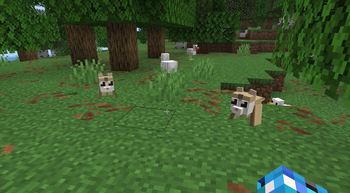
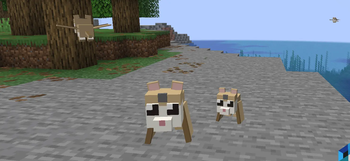
About this Mod
Adds Flying Lemurs to MC!
Tame them, equip armor with colored gems, and explore with your loyal gliding companion.
How to Use Momo's Mod
Finding Lemurs
Flying Lemurs spawn naturally in jungles, mountains, and occasionally across the Overworld

Use a Spawn Egg (Creative tab) to spawn one manually
Taming
Feed a wild Flying Lemur its favorite food to tame it

Once tamed, it will follow you and roam nearby when you're standing still
Armor & Gems
Craft lemur armor using phantom membrane, feathers, and the corresponding material (leather, iron, gold, diamond)

Equip armor by right-clicking the lemur with the armor item

A colored gem appears on the lemur's forehead matching the armor type

Sneak + left-click an armored lemur to remove its armor

Armor tiers: Leather → Iron → Gold → Diamond → Netherite (via smithing table)

Netherite armor gives the strongest regeneration
Regeneration
Armored lemurs passively regenerate health over time

Higher-tier armor = faster regeneration (Netherite is fastest)
Commands
/momo here
— Teleports all your tamed lemurs in the current dimension to your location
Flying
Lemurs glide through the air with their wing membranes

Tamed lemurs will fly to keep up with you
Available Versions
How to Install Momo's Mod on Your Server
Order Server
Order a Minecraft Java server with at least 3 GB RAM (4 GB recommended).
Set fabric Loader
In the panel under "Egg", select the fabric loader and matching Minecraft version (26.2).
Install Mod
Open the mod browser in the dashboard and search for "Momo's Mod". Click "Install" – done! Alternatively, upload the .jar via SFTP to the /mods folder.
Compatibility
Mod Loaders
Minecraft Versions
26.2
Server-side
✓ RequiredRecommended RAM
4 GB(min. 3 GB)Frequently Asked Questions
Momo's Mod server crashes on startup – what to do?
Most common cause: wrong fabric version or insufficient RAM. Check the server log (latest.log) for "OutOfMemoryError" or "Mixin" errors. With Mado Hosting: ensure at least 3 GB RAM is allocated and the loader matches the mod version (26.2). You can switch loaders with one click in the panel.
Is Momo's Mod compatible with fabric?
Momo's Mod officially supports fabric for Minecraft 26.2. The Mado dashboard automatically detects incompatible loader combinations.
Server lagging with Momo's Mod – how to optimize performance?
Recommended RAM: 4 GB (per 8 players). Use /spark profiler to check if Momo's Mod consumes the most tick time. Common fixes: reduce server view-distance to 8-10, install "performant" or "starlight" as supplementary mods on Forge. With Mado Hosting, your server runs on NVMe SSDs with dedicated CPU cores for minimal latency.
Similar Mods
![[EMF] Entity Model Features](https://cdn.modrinth.com/data/4I1XuqiY/6e5bbd0d06b1741bfdab6c0cfab6de8fdaf0064c_96.webp)


Rent Modded Server
Install Momo's Mod with just one click on your server.