
Monster Spawner Upgrades
With this Datapack, you can craft different upgrades to apply to monster spawners.
Screenshots


About this Mod
To access the texture pack, click on versions and click on the newest one. There should be a list of all relevant files.
Using Upgrades
If an upgrade is used (right-click), it will check for a spawner 2 blocks in front of the players looking direction. If there is a spawner, it will try to apply the upgrade. An upgrade can be applied if the spawner was not completely upgraded by the upgrade. Some upgrades can be applied multiple times. If the spawner check failed, the player nearest to the location, which was checked, will get the upgrade item back.
This mod is best paired with other mods that make spawn eggs obtainable or make spawners minable. This mod definitely works with the spawners keeping the upgrades: https://modrinth.com/datapack/mineable-spawner
Upgrade List
Nearby Entities Upgrade
(From 6 Base to 10 to 16)


Player Range Upgrade
(From 16 Base to 48)

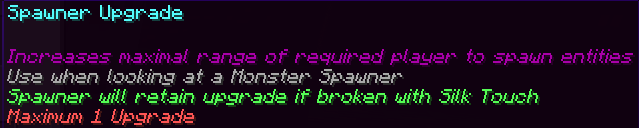
Maximal Possible Entity Spawns Upgrade
(From 4 Base to 5 to 6 to 8)


Maximal Spawning Range Upgrade
If a Maximal Spawning Range Downgrade is applied, it will be set to the base. The upgrade can then be applied again. (From 4 Base to 7)


Maximal Spawning Range Downgrade
If a Maximal Spawning Range Upgrade is applied, it will be set to the base. The upgrade can then be applied again. (From 4 Base to 2)


Maximal Spawning Time Upgrade
The Spawner randomizes spawning time from Minimal Spawning Time to Maximal Spawning Time (From 800 Base to 750 to 700 to 650 to 600)


Minimal Spawning Time Upgrade
The Spawner randomizes spawning time from Minimal Spawning Time to Maximal Spawning Time (From 200 Base to 100)


Remove Sky Light Condition Upgrade
I didn't find a good way to check if the upgrade was applied already, so it can be use infinitely but won't have an effect.
Overwrites the custom spawn rules for the light-level of the sky with a minimum of 0 and a maximum of 15.


Controllable Spawner Upgrade
Overwrites the custom spawn rules for the block light level with a minimum of 0 and a maximum of 5. Air blocks are also blocks.

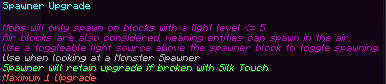
Experience Value Upgrade
Adds a small experience orb as a passenger to spawned entities


Spawner Reset
Breaks target spawner dropping xp and placing a blank spawner at the location
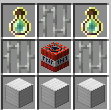

Bedrock Compatability
If you want to use this datapack on Geyser servers, extract the texture pack zip file and put the "SPWR_mappings.json" inside of Geyser's custom mappings folder and the "SPWR Bedrock.mcpack" inside of Geyser's pack folder. Both of the folders can take multiple files; no merging is needed.
Currently there is a bug on GeyserMC preventing players from using any items when looking at a Spawner (https://github.com/GeyserMC/Geyser/issues/5225).
I found a workaround to this by clicking on the bottom of a block above the spawner. Look at the gallery for a GIF showing it.
Available Versions
How to Install Monster Spawner Upgrades on Your Server
Order Server
Order a Minecraft Java server with at least 3 GB RAM (4 GB recommended).
Set datapack Loader
In the panel under "Egg", select the datapack loader and matching Minecraft version (1.21.4).
Install Mod
Open the mod browser in the dashboard and search for "Monster Spawner Upgrades". Click "Install" – done! Alternatively, upload the .jar via SFTP to the /mods folder.
Compatibility
Mod Loaders
Minecraft Versions
1.21.4
Server-side
✓ RequiredRecommended RAM
4 GB(min. 3 GB)Frequently Asked Questions
Monster Spawner Upgrades server crashes on startup – what to do?
Most common cause: wrong datapack version or insufficient RAM. Check the server log (latest.log) for "OutOfMemoryError" or "Mixin" errors. With Mado Hosting: ensure at least 3 GB RAM is allocated and the loader matches the mod version (1.21.4). You can switch loaders with one click in the panel.
Is Monster Spawner Upgrades compatible with datapack and fabric and forge and neoforge and quilt?
Monster Spawner Upgrades officially supports datapack, fabric, forge, neoforge, quilt for Minecraft 1.21.4. Note: Forge and Fabric mods are NOT cross-compatible – pick one loader and stick with it. The Mado dashboard automatically detects incompatible loader combinations.
Server lagging with Monster Spawner Upgrades – how to optimize performance?
Recommended RAM: 4 GB (per 8 players). Use /spark profiler to check if Monster Spawner Upgrades consumes the most tick time. Common fixes: reduce server view-distance to 8-10, install "performant" or "starlight" as supplementary mods on Forge. With Mado Hosting, your server runs on NVMe SSDs with dedicated CPU cores for minimal latency.
Similar Mods
![[EMF] Entity Model Features](https://cdn.modrinth.com/data/4I1XuqiY/6e5bbd0d06b1741bfdab6c0cfab6de8fdaf0064c_96.webp)


Rent Modded Server
Install Monster Spawner Upgrades with just one click on your server.