
Moobloom (With Data-Driven Variants)
a mod that adds mooblooms to the game
Screenshots
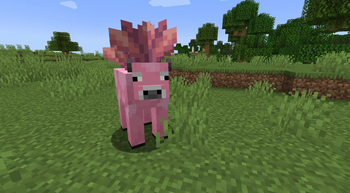
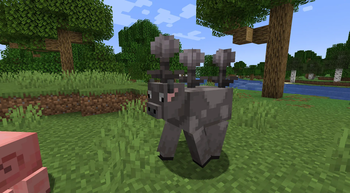
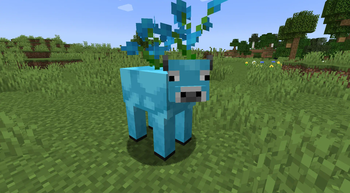
About this Mod
Welcome to Mooblooms mod for NeoForge & Forge,
This mod adds 16 variants of Moobloom to the game but as of V2 for 1,21.4 you can add your own variants with datapacks and resource packs! (Example Pack Download)
The Variants we add within the base mod are Allium, Azure Bluet, Blue Orchid, Closed Eyeblossom, Cornflower, dandelion, Lily of the Valley, Open Eyeblossom, Orange Tulip, Oxeye Daisy, Pink Tulip, Poppy, Red Tulip, Torchflower, White Tulip, Wither Rose, Cactus Flower (1.21.5)
The Mooblooms can spawn within Flower Forests, Meadows or Sunflower Plains but you can adjust this within the data driven variants datapack if you want to add more biomes or removes possible biomes
Whats possible with custom variants!
With adding your own variants there are plenty of options you can adjust,
The first few being the biome the mob appears in, the loot table the mob drops when it has been sheared, the block that renders on the mobs back and the texture of the custom variant (we provide about 16 free textures for you to use (one for each mc colour))
Next we have added some new options like can you click bonemeal on this variant to produce more of the flowers on its back, also the cooldown between clicking bonemeal on the variant and finally can this variant place its flower type random within the world
All these options can be adjust per variant and you can also adjust these values within the variants we have made just by renaming the json file as the flower type you want to adjust
All Custom Options: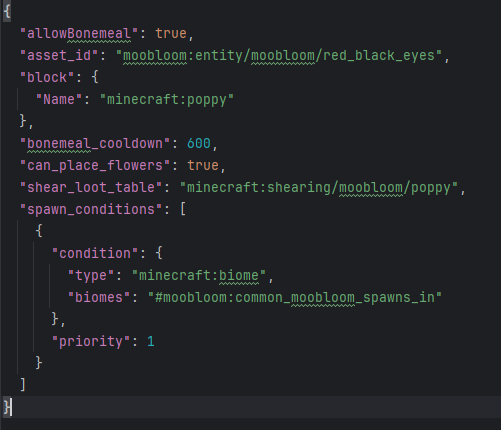
Available Versions
How to Install Moobloom (With Data-Driven Variants) on Your Server
Order Server
Order a Minecraft Java server with at least 4 GB RAM (6 GB recommended).
Set forge Loader
In the panel under "Egg", select the forge loader and matching Minecraft version (26.1.2).
Install Mod
Open the mod browser in the dashboard and search for "Moobloom (With Data-Driven Variants)". Click "Install" – done! Alternatively, upload the .jar via SFTP to the /mods folder.
Compatibility
Mod Loaders
Minecraft Versions
26.1.2, 26.1.1, 26.1 (+7 more)
Server-side
✓ RequiredRecommended RAM
6 GB(min. 4 GB)Frequently Asked Questions
Moobloom (With Data-Driven Variants) server crashes on startup – what to do?
Most common cause: wrong forge version or insufficient RAM. Check the server log (latest.log) for "OutOfMemoryError" or "Mixin" errors. With Mado Hosting: ensure at least 4 GB RAM is allocated and the loader matches the mod version (26.1.2). You can switch loaders with one click in the panel.
Is Moobloom (With Data-Driven Variants) compatible with forge and neoforge?
Moobloom (With Data-Driven Variants) officially supports forge, neoforge for Minecraft 26.1.2, 26.1.1, 26.1. The Mado dashboard automatically detects incompatible loader combinations.
Server lagging with Moobloom (With Data-Driven Variants) – how to optimize performance?
Recommended RAM: 6 GB (per 5 players). Use /spark profiler to check if Moobloom (With Data-Driven Variants) consumes the most tick time. Common fixes: reduce server view-distance to 8-10, install "performant" or "starlight" as supplementary mods on Forge. With Mado Hosting, your server runs on NVMe SSDs with dedicated CPU cores for minimal latency.
Similar Mods
![[EMF] Entity Model Features](https://cdn.modrinth.com/data/4I1XuqiY/6e5bbd0d06b1741bfdab6c0cfab6de8fdaf0064c_96.webp)


Rent Modded Server
Install Moobloom (With Data-Driven Variants) with just one click on your server.