
More Canvases
(Obsolete since MC 1.21) Lets you add custom painting variants using a configuration file and a resource pack.
Screenshots
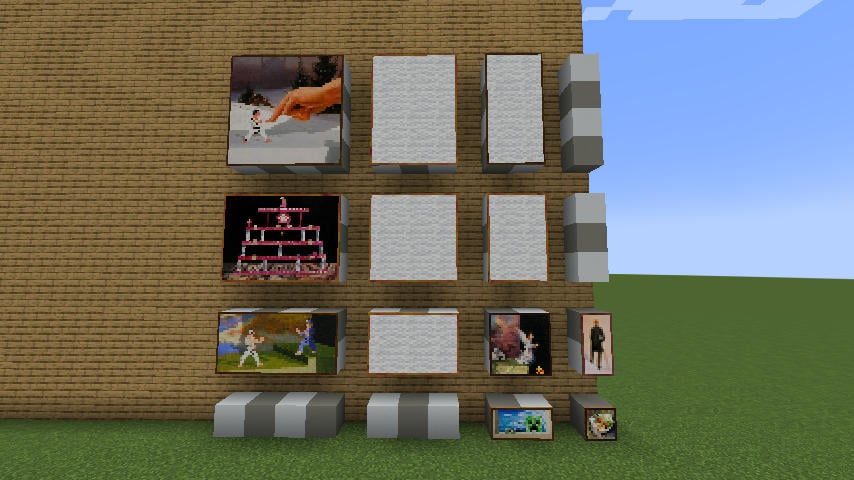
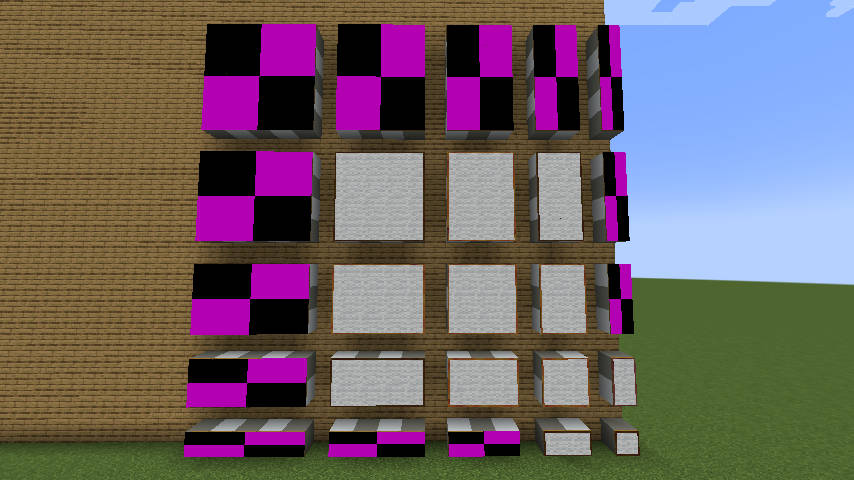
About this Mod
Note of archival: With MC 1.21's data-driven painting, this mod has become redundant, and would be difficult to port anyways. Instead, if your familiar with CLI, here is a small scripts that can generate a datapack from an unzipped texture pack.
The mod was only confirmed to work down to MC 1.19.4, but is expected to work with some older versions. Although no support will be provided for those.
More Canvases
Overview
Lets you register new painting variants via a configuration file, in compliance with the vanilla variant system.
This mod only handles the registration part of the paintings and their addition to the placeable tag. All other aspects (textures, names and authors) must be provided via a resource pack, using the same format as for vanilla paintings.
This should work in multiplayer, so long as everyone uses the same set of paintings as the server.
I recommend also installing No Kebab. If you accidentally remove a variant from the config, No-Kebab will prevent it from being removed from the world.
Configuration files
Painting sets
In order to easily manage multiple painting sets from different sources, this mod can accomodate for any number of configuration files, each containing multiple paintings.
The files are located in .minecraft/config/more-canvases/*.json, and may use any name you want; the filename has no bearing on the functionality.
Each key in the root object is the ID of a painting. It should contain both the namespace and the path, separated by a semicolon.
Each value has the following properties:
size: An array of two integers, the dimensions of the painting measured in blocks. Width first, then height.placeable(Optional; defaults totrue) : Whether this painting should be included in the "placeable" tag. Paintings that are excluded can only be obtained through commands.
For example, here's a config file that would reproduce the behaviour of v1.0 of the mod:
{
	"mocan:blank2x3": { "size":[2,3] },
	"mocan:blank2x4": { "size":[2,4] },
	"mocan:blank3x2": { "size":[3,2] },
	"mocan:blank3x3": { "size":[3,3] },
	"mocan:blank3x4": { "size":[3,4] },
	"mocan:blank1x3": { "size":[1,3], "placeable":false },
	"mocan:blank1x4": { "size":[1,4], "placeable":false },
	"mocan:blank3x1": { "size":[3,1], "placeable":false },
	"mocan:blank4x1": { "size":[4,1], "placeable":false }
}
(The painting's ID does not need to contain its size; this is just the naming convention I was using back then.)
If you're familar with CLI, here is a tiny script capable of generating a config file from an unzipped texture pack.
Error handling
By default, any error in the painting sets will cause the game to crash. Minecraft removes missing paintings from the world with no warning, so this is to prevent any accidental loss.
If you know what you're doing, those restrictions can be laxed in a separate configuration file: .minecraft/config/more-canvases.properties.
All the properties are true by default
failHard.onPaintingscrashes if a painting couldn't be created, either because it has an invalid definition, or because a configuration file could not be read.failHard.onDuplicatacrashes if multiple definitions exist for the same id. This only applies to the paintings defined within the scope of More-Canvases, or vanilla paintings. Redefining a painting from another mod may still lead to a crash even with this option set to false, depending on the mod-loading order.failHard.onPlaceablecrashes if the mod fails to populate the placeable tag with the generated paintings.
Related mods
 No Kebab
Prevents uninstalled custom paintings from being removed from the world.
 Invariable Paintings
Turns paintings into collectibles.
Extra credits
Client Paintings
V1 was designed as a companion mod for Client-Paintings. V2 can still coexist with it, and can still be used to make more painting sizes available to it. However v2 makes Client-Paintings redundant, unless you really like the principle behind its ETF-like variant system.
The readme for v1 can still be found on the corresponding tag of the repository.
Dataified paintings
For most means and purpose, Mo-Can achieves the same results as my other mod Dataified Paintings, with the exception of being config-driven instead of datapack-driven. Mo-Can is infinitely easier to maintain and more stable, whereas Dataified is still experimental and not fully functional.
Available Versions
How to Install More Canvases on Your Server
Order Server
Order a Minecraft Java server with at least 3 GB RAM (4 GB recommended).
Set fabric Loader
In the panel under "Egg", select the fabric loader and matching Minecraft version (1.20.6).
Install Mod
Open the mod browser in the dashboard and search for "More Canvases". Click "Install" – done! Alternatively, upload the .jar via SFTP to the /mods folder.
Compatibility
Mod Loaders
Minecraft Versions
1.20.6, 1.20.5, 1.20.4 (+5 more)
Server-side
✓ RequiredRecommended RAM
4 GB(min. 3 GB)Frequently Asked Questions
More Canvases server crashes on startup – what to do?
Most common cause: wrong fabric version or insufficient RAM. Check the server log (latest.log) for "OutOfMemoryError" or "Mixin" errors. With Mado Hosting: ensure at least 3 GB RAM is allocated and the loader matches the mod version (1.20.6). You can switch loaders with one click in the panel.
Is More Canvases compatible with fabric?
More Canvases officially supports fabric for Minecraft 1.20.6, 1.20.5, 1.20.4. The Mado dashboard automatically detects incompatible loader combinations.
Server lagging with More Canvases – how to optimize performance?
Recommended RAM: 4 GB (per 8 players). Use /spark profiler to check if More Canvases consumes the most tick time. Common fixes: reduce server view-distance to 8-10, install "performant" or "starlight" as supplementary mods on Forge. With Mado Hosting, your server runs on NVMe SSDs with dedicated CPU cores for minimal latency.
Similar Mods

![[ETF] Entity Texture Features](https://cdn.modrinth.com/data/BVzZfTc1/af683d206d50b05258d865b0d6e4aa2f2cee12f2_96.webp)
![[EMF] Entity Model Features](https://cdn.modrinth.com/data/4I1XuqiY/6e5bbd0d06b1741bfdab6c0cfab6de8fdaf0064c_96.webp)



Rent Modded Server
Install More Canvases with just one click on your server.