More Profiling
Profile more events with JFR
About this Mod
Feel free to open ticket on GitHub for new events
Recommended to use with
- https://modrinth.com/mod/worldgen-profiling that added events for feature and surface
- https://modrinth.com/mod/packs-entries-blocker to disable unused pack entries
- https://modrinth.com/mod/registry-blocker to disable the registries' entries like entities that are lagging.
Feature
Option for profiling launch with JFR profiler bundled with Minecraft and Java. Need to enable in config file. Disabled by default.
    [09:41:51] [main/INFO] (FabricLoader/MixinExtras|Service) Initializing MixinExtras via com.llamalad7.mixinextras.service.MixinExtrasServiceImpl(version=0.3.5).
    [09:41:52] [main/INFO] (Minecraft) Started flight recorder profiling id(1):name(client-1.20.1-2024-04-22-094152) - will dump to debug\client-2024-04-22-094152.jfr on exit or stop command
    [09:41:58] [main/INFO] (Minecraft) Vanilla bootstrap took 4501 milliseconds
    [09:42:09] [Render thread/INFO] (Minecraft) Total blocking time: 775 ms
    [09:42:11] [Render thread/WARN] (ModernFix) Game took 24.617 seconds to start
    2024-04-22 09:42:11,665 Render thread WARN Error parsing URI D:\Projects\Minecraft\MoreProfiling\mod\.gradle\loom-cache\log4j.xml
    [09:42:11] [Render thread/INFO] (Minecraft) Dumped flight recorder profiling to debug\client-2024-04-22-094152.jfr
    [09:42:11] [Render thread/INFO] (Minecraft) Dumped recording summary to debug\jfr-report-client-2024-04-22-094152.json
    [09:42:11] [Render thread/INFO] (MoreProfiling) Launch profiling finished. Exported to debug\client-2024-04-22-094152.jfr
Option for enable debug reloader for profiling data packs/resource packs' loading. **Not JFR**.
[09:42:09] [Render thread/INFO] (Minecraft) LanguageManager [net.minecraft.client.resource.language.LanguageManager] took approximately 65 ms (0 ms preparing, 65 ms applying)
[09:42:09] [Render thread/INFO] (Minecraft) TextureManager [net.minecraft.client.texture.TextureManager] took approximately 21992 ms (21992 ms preparing, 0 ms applying)
[09:42:09] [Render thread/INFO] (Minecraft) SoundManager [net.minecraft.client.sound.SoundManager] took approximately 3172 ms (3124 ms preparing, 48 ms applying)
[09:42:09] [Render thread/INFO] (Minecraft) SplashTextResourceSupplier [net.minecraft.client.resource.SplashTextResourceSupplier] took approximately 2 ms (2 ms preparing, 0 ms applying)
[09:42:09] [Render thread/INFO] (Minecraft) FontManager [net.minecraft.client.font.FontManager] took approximately 22460 ms (22299 ms preparing, 161 ms applying)
[09:42:09] [Render thread/INFO] (Minecraft) GrassColormapResourceSupplier [net.minecraft.client.resource.GrassColormapResourceSupplier] took approximately 26 ms (24 ms preparing, 2 ms applying)
[09:42:09] [Render thread/INFO] (Minecraft) FoliageColormapResourceSupplier [net.minecraft.client.resource.FoliageColormapResourceSupplier] took approximately 24 ms (23 ms preparing, 1 ms applying)
[09:42:09] [Render thread/INFO] (Minecraft) BakedModelManager [net.minecraft.client.render.model.BakedModelManager] took approximately 25132 ms (25108 ms preparing, 24 ms applying)
[09:42:09] [Render thread/INFO] (Minecraft) EntityModelLoader [net.minecraft.client.render.entity.model.EntityModelLoader] took approximately 140 ms (0 ms preparing, 140 ms applying)
[09:42:09] [Render thread/INFO] (Minecraft) BlockEntityRenderDispatcher [net.minecraft.client.render.block.entity.BlockEntityRenderDispatcher] took approximately 32 ms (0 ms preparing, 32 ms applying)
[09:42:09] [Render thread/INFO] (Minecraft) BuiltinModelItemRenderer [net.minecraft.client.render.item.BuiltinModelItemRenderer] took approximately 0 ms (0 ms preparing, 0 ms applying)
[09:42:09] [Render thread/INFO] (Minecraft) ItemRenderer [net.minecraft.client.render.item.ItemRenderer] took approximately 6 ms (0 ms preparing, 6 ms applying)
[09:42:09] [Render thread/INFO] (Minecraft) BlockRenderManager [net.minecraft.client.render.block.BlockRenderManager] took approximately 3 ms (0 ms preparing, 3 ms applying)
[09:42:09] [Render thread/INFO] (Minecraft) EntityRenderDispatcher [net.minecraft.client.render.entity.EntityRenderDispatcher] took approximately 191 ms (0 ms preparing, 191 ms applying)
[09:42:09] [Render thread/INFO] (Minecraft) Shader Loader [net.minecraft.client.render.GameRenderer$1] took approximately 200 ms (116 ms preparing, 84 ms applying)
[09:42:09] [Render thread/INFO] (Minecraft) WorldRenderer [net.minecraft.client.render.WorldRenderer] took approximately 16 ms (0 ms preparing, 16 ms applying)
[09:42:09] [Render thread/INFO] (Minecraft) SearchManager [net.minecraft.client.search.SearchManager] took approximately 0 ms (0 ms preparing, 0 ms applying)
[09:42:09] [Render thread/INFO] (Minecraft) ParticleManager [net.minecraft.client.particle.ParticleManager] took approximately 302 ms (301 ms preparing, 1 ms applying)
[09:42:09] [Render thread/INFO] (Minecraft) PaintingManager [net.minecraft.client.texture.PaintingManager] took approximately 179 ms (179 ms preparing, 0 ms applying)
[09:42:09] [Render thread/INFO] (Minecraft) StatusEffectSpriteManager [net.minecraft.client.texture.StatusEffectSpriteManager] took approximately 75 ms (75 ms preparing, 0 ms applying)
[09:42:09] [Render thread/INFO] (Minecraft) VideoWarningManager [net.minecraft.client.resource.VideoWarningManager] took approximately 5 ms (4 ms preparing, 1 ms applying)
[09:42:09] [Render thread/INFO] (Minecraft) PeriodicNotificationManager [net.minecraft.client.resource.PeriodicNotificationManager] took approximately 1 ms (1 ms preparing, 0 ms applying)
[09:55:32] [Render thread/INFO] (Minecraft) TagManagerLoader [net.minecraft.registry.tag.TagManagerLoader] took approximately 519 ms (519 ms preparing, 0 ms applying)
[09:55:32] [Render thread/INFO] (Minecraft) LootManager [net.minecraft.loot.LootManager] took approximately 340 ms (251 ms preparing, 89 ms applying)
[09:55:32] [Render thread/INFO] (Minecraft) RecipeManager [net.minecraft.recipe.RecipeManager] took approximately 110 ms (83 ms preparing, 27 ms applying)
[09:55:32] [Render thread/INFO] (Minecraft) FunctionLoader [net.minecraft.server.function.FunctionLoader] took approximately 18 ms (18 ms preparing, 0 ms applying)
[09:55:32] [Render thread/INFO] (Minecraft) ServerAdvancementLoader [net.minecraft.server.ServerAdvancementLoader] took approximately 198 ms (87 ms preparing, 111 ms applying)
Option for dumping resource reload profiling. Need to enable debug reloader through the above option.
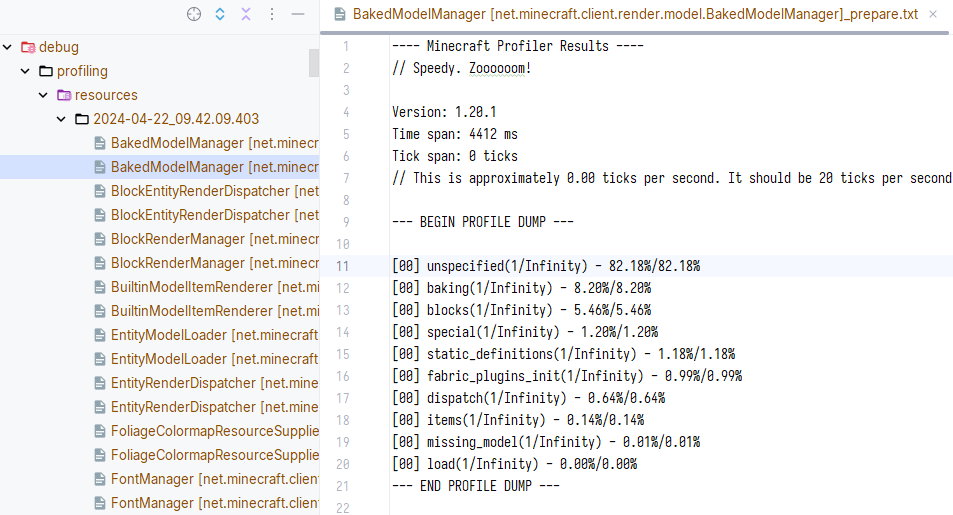
Option for profiling world loading.
[09:55:34] [Server thread/INFO] (Minecraft) Starting integrated minecraft server version 1.20.1
[09:55:34] [Server thread/INFO] (Minecraft) Generating keypair
[09:55:34] [Server thread/INFO] (Minecraft) Started flight recorder profiling id(2):name(client-1.20.1-2024-04-22-095534) - will dump to debug\client-2024-04-22-095534.jfr on exit or stop command
[09:55:37] [Server thread/INFO] (Minecraft) Preparing start region for dimension minecraft:overworld
[09:55:37] [Render thread/INFO] (Minecraft) Time elapsed: 114 ms
[09:55:37] [Server thread/INFO] (Minecraft) Dumped flight recorder profiling to debug\client-2024-04-22-095534.jfr
[09:55:37] [Server thread/INFO] (Minecraft) Dumped recording summary to debug\jfr-report-client-2024-04-22-095534.json
[09:55:37] [Server thread/INFO] (MoreProfiling) World loading profiling finished. Exported to debug\client-2024-04-22-095534.jfr
[09:55:37] [Server thread/INFO] (Minecraft) Changing view distance to 12, from 10
[09:55:37] [Server thread/INFO] (Minecraft) Changing simulation distance to 12, from 0
[09:55:39] [Server thread/INFO] (Minecraft) Player378[local:E:8feacf15] logged in with entity id 1 at (-165.5, 76.0, -50.5)
- Option for suppress profiler logging profiling info json.
Option for redirecting Minecraft profiler to JFR event.
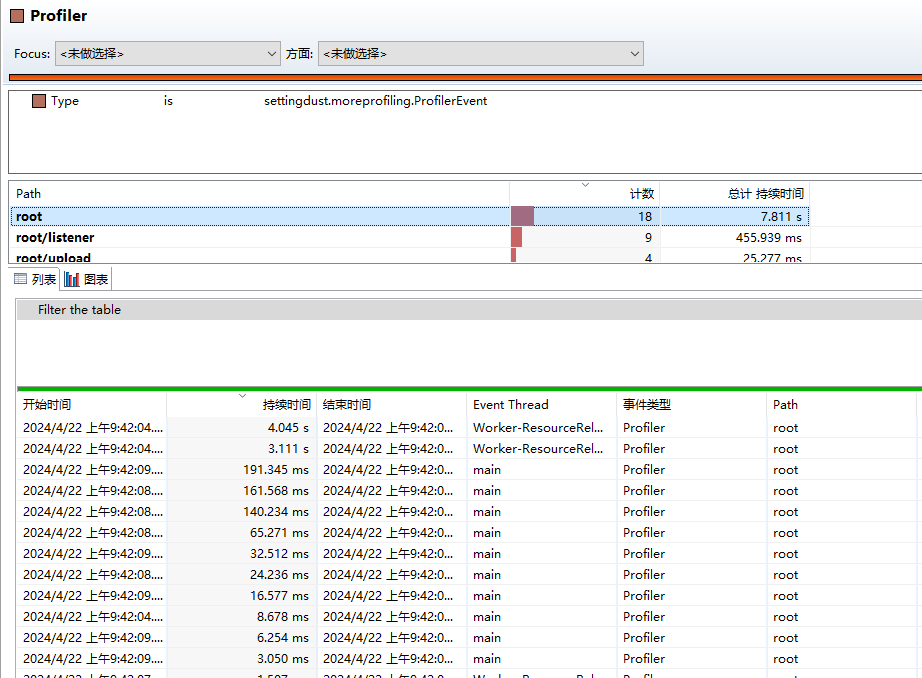
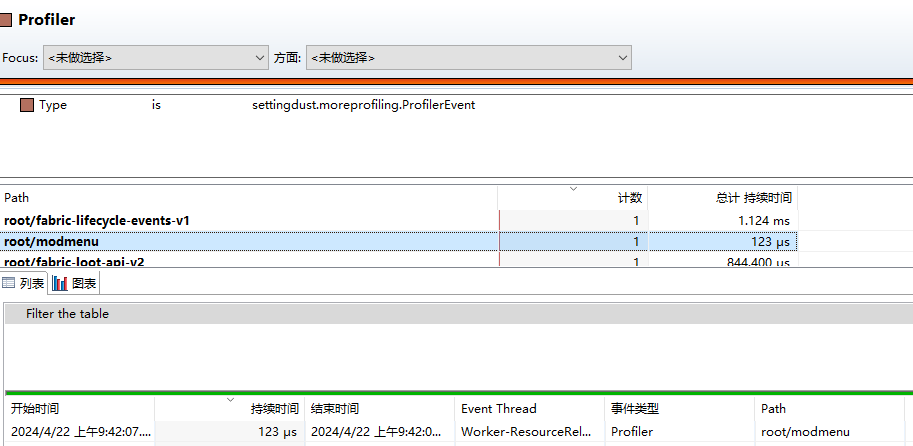
- Option for profiling when resource reloading
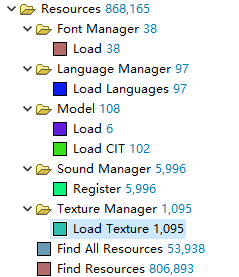
Option adding resource reload profiling events
CIT Resewn events supported
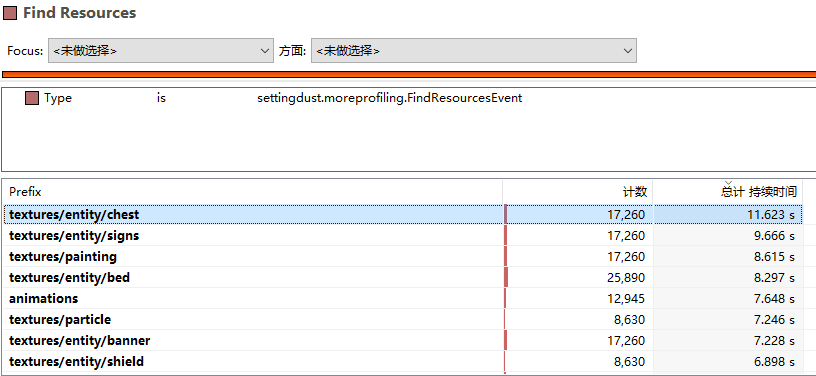
Available Versions
How to Install More Profiling on Your Server
Order Server
Order a Minecraft Java server with at least 3 GB RAM (4 GB recommended).
Set fabric Loader
In the panel under "Egg", select the fabric loader and matching Minecraft version (1.21.3).
Install Mod
Open the mod browser in the dashboard and search for "More Profiling". Click "Install" – done! Alternatively, upload the .jar via SFTP to the /mods folder.
Compatibility
Mod Loaders
Minecraft Versions
1.21.3, 1.21.2, 1.21.1 (+8 more)
Server-side
~ OptionalRecommended RAM
4 GB(min. 3 GB)Frequently Asked Questions
More Profiling server crashes on startup – what to do?
Most common cause: wrong fabric version or insufficient RAM. Check the server log (latest.log) for "OutOfMemoryError" or "Mixin" errors. With Mado Hosting: ensure at least 3 GB RAM is allocated and the loader matches the mod version (1.21.3). You can switch loaders with one click in the panel.
Is More Profiling compatible with fabric and forge and quilt?
More Profiling officially supports fabric, forge, quilt for Minecraft 1.21.3, 1.21.2, 1.21.1. Note: Forge and Fabric mods are NOT cross-compatible – pick one loader and stick with it. The Mado dashboard automatically detects incompatible loader combinations.
Server lagging with More Profiling – how to optimize performance?
Recommended RAM: 4 GB (per 8 players). Use /spark profiler to check if More Profiling consumes the most tick time. Common fixes: reduce server view-distance to 8-10, install "performant" or "starlight" as supplementary mods on Forge. With Mado Hosting, your server runs on NVMe SSDs with dedicated CPU cores for minimal latency.
Similar Mods


Rent Modded Server
Install More Profiling with just one click on your server.