
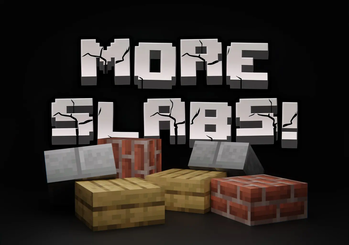
More Slabs!
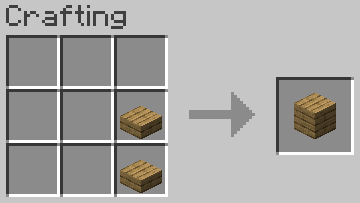
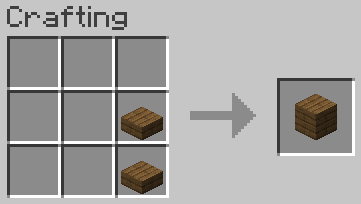
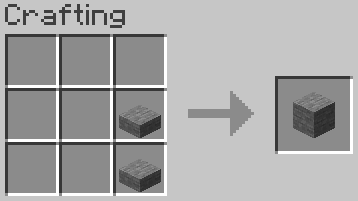
🌟 A clever solution for allowing you to recraft slabs back into full blocks.
Screenshots
About this Mod
🌟 More Slabs - Recraft the Full Blocks! 🌟
Do you ever find yourself frustrated by the resource drain when crafting full blocks into slabs, only to realize you need those blocks in their original form later? Fear not! "More Slabs" has come to your rescue! 🚀 This Minecraft datapack presents an ingenious solution, enabling you to recraft slabs back into full blocks effortlessly. With "More Slabs," you have the power to convert any slab back into a full block, granting you unparalleled resource efficiency. Say farewell to the agony of wasted building blocks! 🏗️
🛠️ Features:
- Reverse Crafting: Effortlessly convert slabs back into full blocks.
- Resource Efficiency: Maximize your materials and keep your inventory organized.
- User-Friendly: Craft with convenience at any crafting table.
- Block Compatibility: Works seamlessly with all available slab types.
🏡 Build with Confidence:
"More Slabs" is the ultimate datapack for builders and resource-conscious players. Never again will you let your resources go to waste! Craft your way to perfection with "More Slabs" by your side. 💪
💚 Leave Your Feedback:
If you find this datapack valuable, please consider leaving a review and rating. Your feedback is highly appreciated. 🙏
Note: This datapack is designed for Minecraft versions 1.20.*.
Available Versions
How to Install More Slabs! on Your Server
Order Server
Order a Minecraft Java server with at least 3 GB RAM (4 GB recommended).
Set datapack Loader
In the panel under "Egg", select the datapack loader and matching Minecraft version (1.20.4).
Install Mod
Open the mod browser in the dashboard and search for "More Slabs!". Click "Install" – done! Alternatively, upload the .jar via SFTP to the /mods folder.
Compatibility
Mod Loaders
Minecraft Versions
1.20.4, 1.20.3, 1.20.2 (+2 more)
Server-side
✓ RequiredRecommended RAM
4 GB(min. 3 GB)Frequently Asked Questions
More Slabs! server crashes on startup – what to do?
Most common cause: wrong datapack version or insufficient RAM. Check the server log (latest.log) for "OutOfMemoryError" or "Mixin" errors. With Mado Hosting: ensure at least 3 GB RAM is allocated and the loader matches the mod version (1.20.4). You can switch loaders with one click in the panel.
Is More Slabs! compatible with datapack and fabric and forge and quilt?
More Slabs! officially supports datapack, fabric, forge, quilt for Minecraft 1.20.4, 1.20.3, 1.20.2. Note: Forge and Fabric mods are NOT cross-compatible – pick one loader and stick with it. The Mado dashboard automatically detects incompatible loader combinations.
Server lagging with More Slabs! – how to optimize performance?
Recommended RAM: 4 GB (per 8 players). Use /spark profiler to check if More Slabs! consumes the most tick time. Common fixes: reduce server view-distance to 8-10, install "performant" or "starlight" as supplementary mods on Forge. With Mado Hosting, your server runs on NVMe SSDs with dedicated CPU cores for minimal latency.
Similar Mods




Rent Modded Server
Install More Slabs! with just one click on your server.