
Morphic
Set up your morphology through a quick setup (size, weight, strength, speed, stamina) and play with your uniq profile.
Screenshots
About this Mod
Play as a dwarf! (or an elf...)
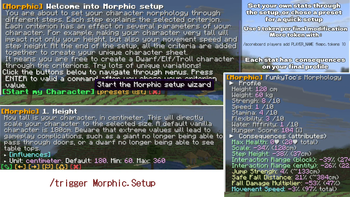
Morphic allow players to set up their morphology through a quick setup. Chose your size, weight, strength, speed, stamina, flexibility and water affinity to get your final profile.
It looks mostly cosmetic BUT the changes, even being reasonnable, can change a lot of your gameplay. A single centimeter can makes you unable to pass through doors, or able to sneak into a one-block tunnel.
Playable Classes
- Primary: vanilla, man, woman, teenager, child
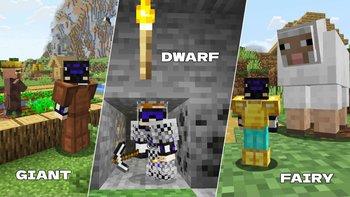
- Shapes: olympic, strongman, ironman, giant, obese
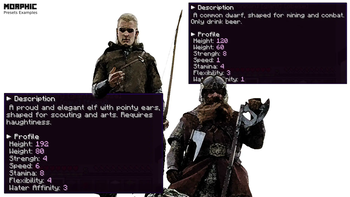
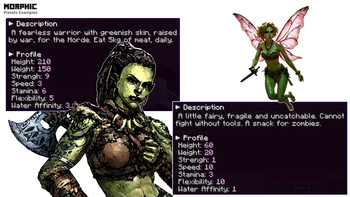
- Fantasy: dwarf, elf, orc, vampire, navi, fairy, astartes
Features
- Morphology is set to vanilla by default (no modification)
- Every player get 1 token on their first connection (require admin to get more)
- Every stat modify your attributes
- Every stat has a drawback (ex: strong profiles lead to more hunger, weak profiles lead to low damage output)
- The datapack has been made to match discrete changes. In the opposite, extreme profiles may struggle to survive.
Procedure
- Start the setup using (require 1 token) (public command)
/trigger Morphic.Setup
- info if you don't have any token (and are admin), get more with: (replace with your name in the command)
/scoreboard players add PLAYER_NAME fkmpc.tokens 5 - click on [start your character] or click the [presets list] button
- follow the steps and use the buttons at the end of the dialogs to navigate
- to set a stat, click the [pen] to get the command in the chat, then change the value at the end and valid the command
- your stats are modified at each steps
- when your are OK, click on the [green check_box] on the last step to permanently validate your profile (otherwise, you will lost the morphology on death)
(watch the video for a live example)
Ideas...
- role playing, adding a bit of personality in your avatar
- completing a parkour map with a dwarf body
- kill the enderdragon as an obese character (hardcore)
- eating the whole planet as an orc
- ...
Datapack's Options
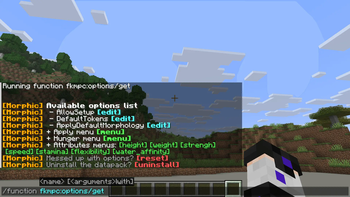
In game, use: /function fkmpc:options/get
Patreon Supporters
- 26.1 (09/04/2026): Setsu-P, varinyc, nfnpgllxhn
- 1.21.11 (26/01/2026): Azerxim, Setsu-P, varinyc, nfnpgllxhn
- 1.21.9 (08/10/2025): CYKLOPPS, Azerxim, varinyc, Setsu-P, Wani P, Lionel Felke
- 1.21.5 (2025-07-20): CYKLOPPS, Azerxim, Setsu-P, varinyc, Wani P
- 1.21.4 (2025-02-08): Screaming Man, ZMH, CYKLOPPS, Darklad32, Aidan McCreary, Azerxim, Setsu-P, varinyc, Maximilian Adler, Jamie B, Xeraxor, danihax
- Dev 1.21.4 (2024-12-15): Screaming Man, ZMH, CYKLOPPS, Darklad32, Delivator, Azerxim, Aidan McCreary, varinyc, Setsu-P, Gaming Grotto, Maximilian Adler, Jamie B, Jinx PSMP
- Dev 1.21.2 (2024-11-07): Screaming Man, ZMH, Darklad32, CYKLOPPS, Azerxim, Aidan McCreary, varinyc, Setsu-P, Maximilian Adler, ODS, Jamie B
- Dev 1.21 (2024-10-11): Screaming Man, 아아앨, ZMH, Darklad32, CYKLOPPS, Azerxim, Aidan McCreary, varinyc, Setsu-P, Gaming Grotto, Maximilian Adler
- Dev init (2024-09-28): Screaming Man, 아아앨, ZMH, Darklad32, CYKLOPPS, Azerxim, Aidan McCreary, varinyc, Setsu-P, Gaming Grotto, Maximilian Adler
Patreon Version
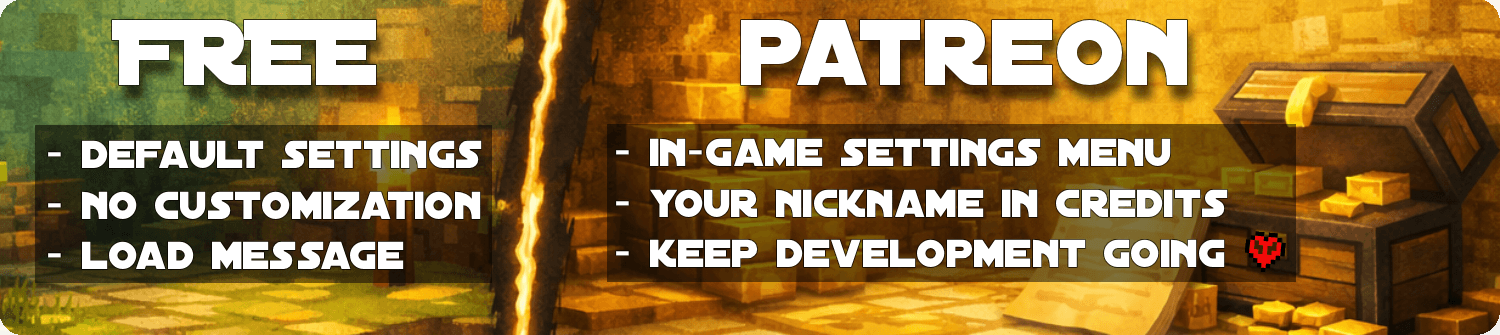
The free versions are designed to be fun and fully playable. The Patreon version is for players and server owners who want more control, comfort, and flexibility through an in-game settings menu to tweak the parameters live, without file editing.Becoming a Gold Patreon also means:
- Getting access to every Patreon versions of every projects.
- Getting your name listed in each project and on this page (see above).
- Supporting long-term development, updates, and new features 💛
Mod Version
Mod packaging is designed to be more convenient for your installations. Executed on the server side, it does not need to be installed on the client side. Keep in mind that inside the mod is simply a datapack. In addition, interactions between too many mods can degrade the functioning of one or more mods.Issue / Bug
Visitors
Available Versions
How to Install Morphic on Your Server
Order Server
Order a Minecraft Java server with at least 3 GB RAM (4 GB recommended).
Set datapack Loader
In the panel under "Egg", select the datapack loader and matching Minecraft version (26.1.2).
Install Mod
Open the mod browser in the dashboard and search for "Morphic". Click "Install" – done! Alternatively, upload the .jar via SFTP to the /mods folder.
Compatibility
Mod Loaders
Minecraft Versions
26.1.2, 26.1.1, 26.1 (+7 more)
Server-side
✓ RequiredRecommended RAM
4 GB(min. 3 GB)Frequently Asked Questions
Morphic server crashes on startup – what to do?
Most common cause: wrong datapack version or insufficient RAM. Check the server log (latest.log) for "OutOfMemoryError" or "Mixin" errors. With Mado Hosting: ensure at least 3 GB RAM is allocated and the loader matches the mod version (26.1.2). You can switch loaders with one click in the panel.
Is Morphic compatible with datapack and fabric and forge and neoforge and quilt?
Morphic officially supports datapack, fabric, forge, neoforge, quilt for Minecraft 26.1.2, 26.1.1, 26.1. Note: Forge and Fabric mods are NOT cross-compatible – pick one loader and stick with it. The Mado dashboard automatically detects incompatible loader combinations.
Server lagging with Morphic – how to optimize performance?
Recommended RAM: 4 GB (per 8 players). Use /spark profiler to check if Morphic consumes the most tick time. Common fixes: reduce server view-distance to 8-10, install "performant" or "starlight" as supplementary mods on Forge. With Mado Hosting, your server runs on NVMe SSDs with dedicated CPU cores for minimal latency.
Similar Mods




Rent Modded Server
Install Morphic with just one click on your server.
Details
- License
- Creative Commons Attribution Non Commercial No Derivatives 4.0 International
- Server-side
- Required