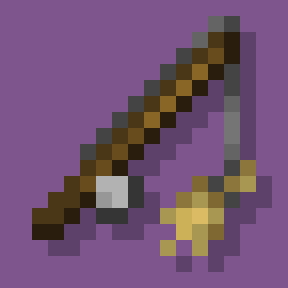
Mount & Ride
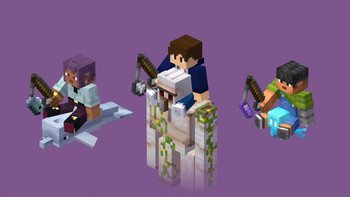
Mount and ride more mobs in survival.
Screenshots
About this Mod



⚠️ Resource Pack Required
Have you always wanted to ride other mobs?
Well, with this data pack you can do it!
Features
- Fast riding system.
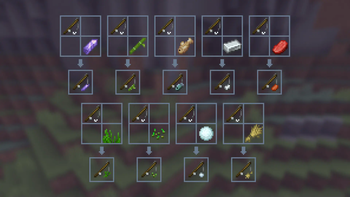
- Added 9 riding sticks:
 Amethyst Shard on a Stick.
 Bamboo on a Stick.
 Fish on a Stick.
 Iron on a Stick.
 Meat on a Stick.
 Seagrass on a Stick.
 Seeds on a Stick.
 Snowball on a Stick.
 Wheat on a Stick.
- 3 new advancements:
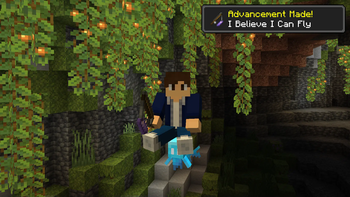
- "I Believe I Can Fly", obtained by riding a Allay.
- "Tank Time!", obtained by riding a Iron Golem.
- "Better Than a Knight", obtained by mounting every rideable mob.
- Support for 4 languages:
- English
- Español
- Français
- Português
How to Install
Data Pack:
- Click the "DP & RP" featured version.
- Scroll down and Download the Primary file.
- If you want to create a World, go to Singleplayer > Create New World > Data Packs > Open Pack Folder.
- If you want to put it in an already existing world, go to Singleplayer > Select World > Edit > Open World Folder > datapacks.
- Copy/Cut and Paste the file downloaded there.
- Open/Create your world (if necessary, run "/reload" in the chat).
Required Resource Pack:
- Click the "DP & RP" featured version.
- Scroll down and Download the Required Resource Pack.
- Open Minecraft and go to Options > Resource Packs > Open Pack Folder.
- Copy/Cut and Paste the file downloaded there.
- Active the Resource Pack.
Mod (DP & RP Packaged):
- Download the "Mod" featured version.
- Make sure that you installed Forge, Fabric or Quilt for 1.20+
- Press Win + R and search for "%AppData%".
- Go to .minecraft > mods.
- Copy/Cut and Paste the file downloaded there.
- Run the Mod-Loader that you use.
Tutorial
Mounting
You can mount a mob by dropping a saddle on it. However, you cannot mount hostile or weak mobs on survival mode (such as silverfishes and frogs).
Riding
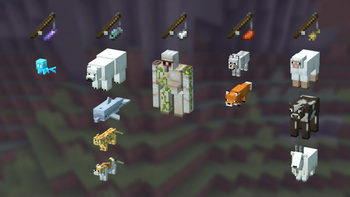
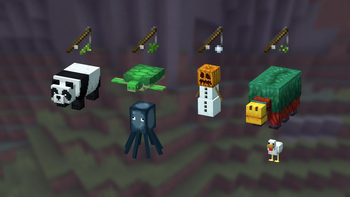
To ride a mob, you need a riding stick first. There are 9 different sticks that you can use:
- Amethyst Shard on a Stick. (Allay)
- Bamboo on a Stick. (Panda)
- Fish on a Stick. (Polar Bear, Dolphin, Cat, and Ocelot)
- Iron on a Stick. (Iron Golem)
- Meat on a Stick. (Wolf, and Fox)
- Seagrass on a Stick. (Turtle, Squid, and Glow Squid)
- Seeds on a Stick. (Sniffer, and Chicken)
- Snowball on a Stick. (Snow Golem)
- Wheat on a Stick. (Goat, Sheep, Cow, and Mooshrom)
The mobs also have different speeds depending on their size. It can be increased by right-clicking with the stick.
| Type | Normal Speed (m/s) |
Maximum Speed (m/s) |
|---|---|---|
| Small (like Wolfs) | 6 | 8.5 |
| Medium (like Goats) | 7 | 9.5 |
| Big (like Pandas) | 5.5 | 8 |
Crafting
To craft a riding stick, you just need to put a Fishing Rod and the item (Amethyst Shard, Bamboo, Fish...) on a Crafting Table.
Note: It will appear a Knowledge Book has the recipe result, but, once you click it, you get the correct stick.

Advancements
This data pack also adds 3 advancements:
- "I Believe I Can Fly", that can be obtained by riding an Allay with a Amethyst Shard on a Stick.
- "Tank Time!", that can be obtained by riding an Iron Golem with a Iron Ingot on a Stick.
- "Better Than a Knight", that can be obtained by mounting every rideable mob
FAQ
Can I make a post/video about it on social medias?
Yes, if you give me the credits including a direct link to this page. Please do not distribute modified versions.
Why aren't the custom items appearing in the creative menu?
Unfortunately, data packs cannot add modified items to the creative menu. However, you can always get them by using the command "/function tooltrims:custom_items".
Enjoy! :)
Available Versions
How to Install Mount & Ride on Your Server
Order Server
Order a Minecraft Java server with at least 3 GB RAM (4 GB recommended).
Set datapack Loader
In the panel under "Egg", select the datapack loader and matching Minecraft version (1.20.2).
Install Mod
Open the mod browser in the dashboard and search for "Mount & Ride". Click "Install" – done! Alternatively, upload the .jar via SFTP to the /mods folder.
Compatibility
Mod Loaders
Minecraft Versions
1.20.2, 1.20.1, 1.20
Server-side
✓ RequiredRecommended RAM
4 GB(min. 3 GB)Frequently Asked Questions
Mount & Ride server crashes on startup – what to do?
Most common cause: wrong datapack version or insufficient RAM. Check the server log (latest.log) for "OutOfMemoryError" or "Mixin" errors. With Mado Hosting: ensure at least 3 GB RAM is allocated and the loader matches the mod version (1.20.2). You can switch loaders with one click in the panel.
Is Mount & Ride compatible with datapack and fabric and forge and quilt?
Mount & Ride officially supports datapack, fabric, forge, quilt for Minecraft 1.20.2, 1.20.1, 1.20. Note: Forge and Fabric mods are NOT cross-compatible – pick one loader and stick with it. The Mado dashboard automatically detects incompatible loader combinations.
Server lagging with Mount & Ride – how to optimize performance?
Recommended RAM: 4 GB (per 8 players). Use /spark profiler to check if Mount & Ride consumes the most tick time. Common fixes: reduce server view-distance to 8-10, install "performant" or "starlight" as supplementary mods on Forge. With Mado Hosting, your server runs on NVMe SSDs with dedicated CPU cores for minimal latency.
Similar Mods




Rent Modded Server
Install Mount & Ride with just one click on your server.