
Move Actionbar
Remake of the Moveable Actionbar Mod By Burrnr but updated for 1.21.6+ and a few more features added.
Screenshots
About this Mod
Move Action Bar
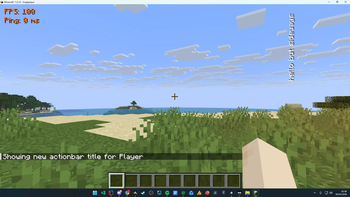
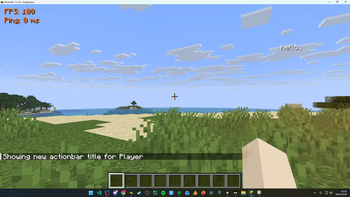
Take control of your HUD. Move Action Bar lets you reposition and rotate Minecraft's action bar (the text that appears above your hotbar) anywhere on your screen.
This mod is a modern recreation of similar action bar positioning concepts, rebuilt and updated for newer Minecraft and Fabric versions with improved features and compatibility.
Features
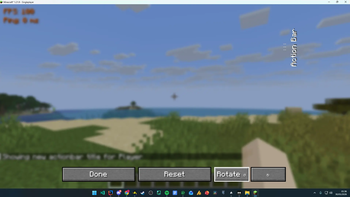
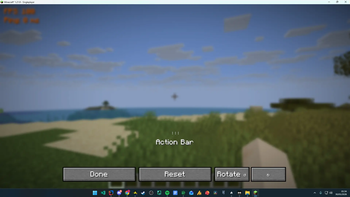
- Drag & drop positioning - Open the config screen and simply drag the action bar to your preferred spot.
- Free rotation - Rotate the action bar in 15° increments to any angle you like.
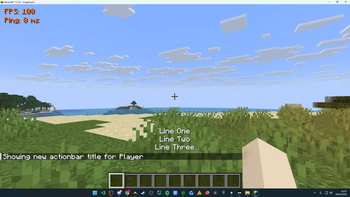
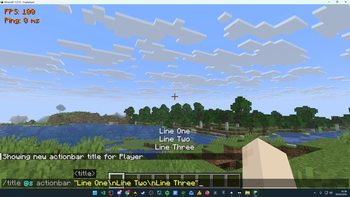
- Multiline support - Action bar messages containing line breaks are rendered cleanly across multiple centered lines (e.g.
/title @s actionbar "Test1\nTest2\nTest3"). - Persistent config - Your position and rotation are saved automatically and restored every time you launch the game.
- Quick access - Open the configuration screen instantly with a keybind (default: Num Lock, fully rebindable).
- One-click reset - Snap everything back to default whenever you want.
How to Use
- Press Num Lock (or your chosen keybind) to open the config screen.
- Drag the "Action Bar" label to reposition it.
- Use the rotate buttons to adjust the angle.
- Hit Done - your settings save automatically.
Compatibility
Client-side only - works on any server, no installation required on the server side. Built for Fabric.
A lightweight, no-fuss mod for players who want their action bar exactly where they want it.
Available Versions
How to Install Move Actionbar on Your Server
Order Server
Order a Minecraft Java server with at least 3 GB RAM (4 GB recommended).
Set fabric Loader
In the panel under "Egg", select the fabric loader and matching Minecraft version (1.21.11).
Install Mod
Open the mod browser in the dashboard and search for "Move Actionbar". Click "Install" – done! Alternatively, upload the .jar via SFTP to the /mods folder.
Compatibility
Mod Loaders
Minecraft Versions
1.21.11, 1.21.10, 1.21.9
Server-side
✗ UnsupportedRecommended RAM
4 GB(min. 3 GB)Frequently Asked Questions
Move Actionbar server crashes on startup – what to do?
Most common cause: wrong fabric version or insufficient RAM. Check the server log (latest.log) for "OutOfMemoryError" or "Mixin" errors. With Mado Hosting: ensure at least 3 GB RAM is allocated and the loader matches the mod version (1.21.11). You can switch loaders with one click in the panel.
Is Move Actionbar compatible with fabric?
Move Actionbar officially supports fabric for Minecraft 1.21.11, 1.21.10, 1.21.9. The Mado dashboard automatically detects incompatible loader combinations.
Server lagging with Move Actionbar – how to optimize performance?
Recommended RAM: 4 GB (per 8 players). Use /spark profiler to check if Move Actionbar consumes the most tick time. Common fixes: reduce server view-distance to 8-10, install "performant" or "starlight" as supplementary mods on Forge. With Mado Hosting, your server runs on NVMe SSDs with dedicated CPU cores for minimal latency.
Similar Mods




![[ETF] Entity Texture Features](https://cdn.modrinth.com/data/BVzZfTc1/af683d206d50b05258d865b0d6e4aa2f2cee12f2_96.webp)
![[EMF] Entity Model Features](https://cdn.modrinth.com/data/4I1XuqiY/6e5bbd0d06b1741bfdab6c0cfab6de8fdaf0064c_96.webp)
Rent Modded Server
Install Move Actionbar with just one click on your server.