
Multiplayer Spawners
Never miss out on dungeon experience again! Each player gets their own spawner experience - disable spawners for yourself while keeping them active for friends who haven't explored yet
Screenshots
About this Mod

🏰 Fair Dungeon Adventures for Everyone! 🏰
ㅤ
The Problem This Mod Solves
We've all been there - you're exploring with friends, someone finds an awesome dungeon, and by the time you get there, all the spawners are broken and the challenge is gone. What should have been an exciting mob-filled adventure becomes a boring empty hallway. MultiplayerSpawners fixes this frustrating multiplayer experience by making spawners personal rather than shared resources.

✨ Core Features
Personal Spawner System
- Individual Challenge: Each player gets their own full dungeon experience with active spawners
- Preserve the Adventure: Late arrivals to dungeons face the same exciting mob encounters
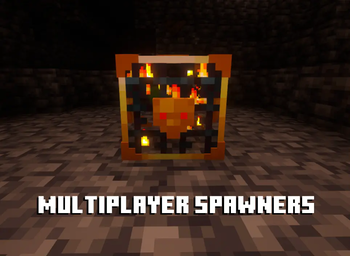
- Visual Feedback: Clear textures show which spawners you've already conquered
- Smart Persistence: Spawner states save with the world and sync across clients
How It Works
- First Interaction: When you "break" a spawner, you get all the normal XP and drops, but the spawner remains in the world
- Personal Disabling: The spawner becomes disabled only for you - no more creatures spawn when you're nearby
- Others Face the Challenge: Your friends see the spawner as fully active and must overcome the same mob encounters
- Visual Clarity: Enabled spawners show a unique texture so you know which dungeons you've already conquered

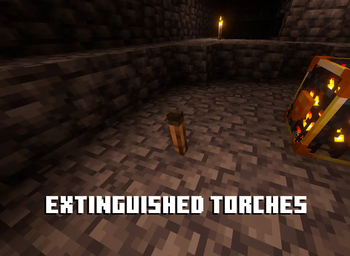
🕯️ Torch Extinguishing System - Keep Spawners Functional
Smart Spawner Protection
MultiplayerSpawners includes a crucial feature to prevent torch spam from disabling spawner functionality!
- Smart Detection: Spawners detect torches placed within 7 blocks that would interfere with mob spawning
- Configurable Timer: Torches get extinguished after a customizable delay (default: 10 seconds)
- Unlit Torches: Extinguished torches become "Unlit Torch" blocks that drop normal torches when broken
- Fully Optional: Can be completely disabled or have the timer adjusted via config/commands
Why This Matters
- Functional Spawners: Prevents players from lighting up areas so much that spawners can't work properly
- Natural Mob Spawning: Maintains proper light levels for both spawner-based and natural mob generation
- Balanced Lighting: Encourages strategic torch placement rather than mindless spam
- Preserves Intended Difficulty: Keeps spawners operating as designed without being completely negated by excessive lighting

The system ensures that spawners can continue doing their job - spawning mobs - rather than being rendered useless by torch placement that brings light levels too high for mob spawning.
⚙️ Usage & Commands
Basic Usage
- Simply explore dungeons normally - hit spawners with any tool to claim your XP and disable them for yourself
- Spawners you've conquered show a different texture and won't spawn mobs for you anymore
- Other players see them as normal spawners and must face the full challenge
Commands (Operator only)
/multiplayerspawners allow_break <x> <y> <z>  - Permanently break a disabled spawner
/multiplayerspawners torch delay <seconds>     - Set torch extinguish delay (0 = disabled)
/multiplayerspawners torch info               - Show current torch system settings
🔧 Technical Details
Compatibility
- Multiloader: Works on both Fabric and Forge
- Minecraft Version: 1.20.1
- Server-Client: Full multiplayer support with optimized networking
- Performance: Efficient caching and smart tick optimization
Data Storage
- Spawner states are stored directly in the spawner's NBT data
- Survives world saves/loads and chunk unloading
- No external files or databases required
🔮 The Result
Transform your multiplayer Minecraft experience from rushed dungeon clearing into individual conquests where everyone faces the full challenge. Every player gets their moment of triumph against active spawners, every dungeon maintains its intended difficulty, and every mob encounter remains as thrilling as intended.
Download now and give every player the dungeon challenge they deserve!
Compatible with most other mods - if you find any conflicts, please report them!
❤ Discord ➜ https://discord.gg/EeQgres2Fz
Available Versions
How to Install Multiplayer Spawners on Your Server
Order Server
Order a Minecraft Java server with at least 3 GB RAM (4 GB recommended).
Set fabric Loader
In the panel under "Egg", select the fabric loader and matching Minecraft version (1.21.1).
Install Mod
Open the mod browser in the dashboard and search for "Multiplayer Spawners". Click "Install" – done! Alternatively, upload the .jar via SFTP to the /mods folder.
Compatibility
Mod Loaders
Minecraft Versions
1.21.1, 1.20.1
Server-side
✓ RequiredRecommended RAM
4 GB(min. 3 GB)Frequently Asked Questions
Multiplayer Spawners server crashes on startup – what to do?
Most common cause: wrong fabric version or insufficient RAM. Check the server log (latest.log) for "OutOfMemoryError" or "Mixin" errors. With Mado Hosting: ensure at least 3 GB RAM is allocated and the loader matches the mod version (1.21.1). You can switch loaders with one click in the panel.
Is Multiplayer Spawners compatible with fabric and forge and neoforge?
Multiplayer Spawners officially supports fabric, forge, neoforge for Minecraft 1.21.1, 1.20.1. Note: Forge and Fabric mods are NOT cross-compatible – pick one loader and stick with it. The Mado dashboard automatically detects incompatible loader combinations.
Server lagging with Multiplayer Spawners – how to optimize performance?
Recommended RAM: 4 GB (per 8 players). Use /spark profiler to check if Multiplayer Spawners consumes the most tick time. Common fixes: reduce server view-distance to 8-10, install "performant" or "starlight" as supplementary mods on Forge. With Mado Hosting, your server runs on NVMe SSDs with dedicated CPU cores for minimal latency.
Similar Mods




![[ETF] Entity Texture Features](https://cdn.modrinth.com/data/BVzZfTc1/af683d206d50b05258d865b0d6e4aa2f2cee12f2_96.webp)
![[EMF] Entity Model Features](https://cdn.modrinth.com/data/4I1XuqiY/6e5bbd0d06b1741bfdab6c0cfab6de8fdaf0064c_96.webp)
Rent Modded Server
Install Multiplayer Spawners with just one click on your server.