
MultiRecipe
No more recipe problems and conflicts when using mods!
Screenshots
About this Mod
!
No more recipe problems and conflicts when using mods!
We know that there are other mods that manage to solve recipe problems in one way or another, but it is also true that most of them do not usually receive prompt updates from day one. Our goal is that as soon as a new version is released, recipe conflicts disappear!
And most importantly, it doesn't require any other mod to work!
Do you need a server to play with your friends?
For exceptional server hosting services, look no further than ****. Of course, you can install all the mods or modpacks you want, and their support team is always available to help you.
!
If there is one good thing about the Minecraft mod community, it is the number of projects that have been launched, which has led to thousands and thousands of new items that can be added. This has its good side and its bad side, since many times, there are duplicate recipes for the same object, and this is exactly what we intend to avoid with this mod.
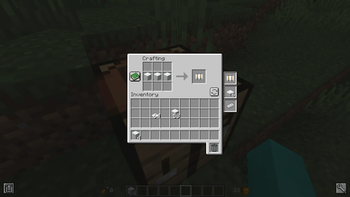
For example, if with 3 blocks of wool horizontally you make a sleeping bag and a hammock, without this mod you could only make one of the two elements, leaving the other completely forgotten. Now you can do both without any problem!
!
Is it compatible with other mods?
That's what it's all about hehehe, it's perfectly compatible with any other mod, and it will resolve all the recipe conflicts you may have in your game. You will never miss making an item due to incompatibility again!
Does it work on servers?
Sure! Remember that the best way to play with mods and friends is with BisectHosting, and by .
Can this mod be used in modpacks?
Of course! As long as it is published only on Modrinth or CurseForge. Uploading it to any other platform would be violating our rights and is not allowed at all.
However, we are really grateful if you consider adding it to your Modrinth or CurseForge modpack. If you need any small changes or have any questions, contact us!
](https://discord.gg/X8VY5WMbe4)
.
Available Versions
How to Install MultiRecipe on Your Server
Order Server
Order a Minecraft Java server with at least 3 GB RAM (4 GB recommended).
Set fabric Loader
In the panel under "Egg", select the fabric loader and matching Minecraft version (26.1.2).
Install Mod
Open the mod browser in the dashboard and search for "MultiRecipe". Click "Install" – done! Alternatively, upload the .jar via SFTP to the /mods folder.
Compatibility
Mod Loaders
Minecraft Versions
26.1.2, 1.20.4, 1.20.2
Server-side
✓ RequiredRecommended RAM
4 GB(min. 3 GB)Frequently Asked Questions
MultiRecipe server crashes on startup – what to do?
Most common cause: wrong fabric version or insufficient RAM. Check the server log (latest.log) for "OutOfMemoryError" or "Mixin" errors. With Mado Hosting: ensure at least 3 GB RAM is allocated and the loader matches the mod version (26.1.2). You can switch loaders with one click in the panel.
Is MultiRecipe compatible with fabric and forge and neoforge?
MultiRecipe officially supports fabric, forge, neoforge for Minecraft 26.1.2, 1.20.4, 1.20.2. Note: Forge and Fabric mods are NOT cross-compatible – pick one loader and stick with it. The Mado dashboard automatically detects incompatible loader combinations.
Server lagging with MultiRecipe – how to optimize performance?
Recommended RAM: 4 GB (per 8 players). Use /spark profiler to check if MultiRecipe consumes the most tick time. Common fixes: reduce server view-distance to 8-10, install "performant" or "starlight" as supplementary mods on Forge. With Mado Hosting, your server runs on NVMe SSDs with dedicated CPU cores for minimal latency.
Similar Mods




Rent Modded Server
Install MultiRecipe with just one click on your server.