
MultiScoreboard
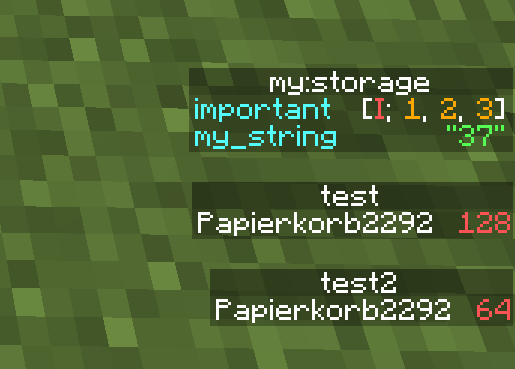
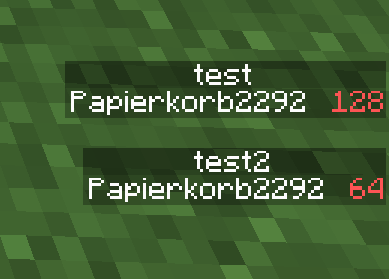
Allows viewing multiple scoreboards and nbt data on the sidebar at the same time
Screenshots
About this Mod
MultiScoreboard Minecraft Mod

This Minecraft Fabric mod allows you to view multiple scoreboards and nbt data on the sidebar at the same time!
Usage
For the mod to work, it must be installed on both the client and the server.
Otherwise, scoreboards act like in vanilla.
Scoreboards
To view multiple objectives at once, simply call/scoreboard objectives setdisplay sidebar <objective> multiple
times with different objectives. Calling the command with the same
scoreboard again will remove the objective from the sidebar again.
/scoreboard objectives setdisplay sidebar still clears the sidebar.
It is also possible to display individual scores to the
sidebar using /scoreboard objectives setdisplay indivSidebar [<objective>] [<target>]:
If both objective and target are specified, the individual score is toggled for the sidebar.
If only objective is specified, all individual scores of that objective are removed from the sidebar.
If neither objective nor target is specified, all individual scores are removed from the sidebar.
Nbt Sidebar
To view nbt data in the sidebar, use the command /data multiscoreboard toggle (block <targetPos>|entity <target>|storage <target>) [<path>] [<name>]
to toggle whether the specified nbt data is displayed in the sidebar.
If <path> is not specified, the root compound is displayed.
If <name> is not specified, a default name is build based on the data object and nbt path.
The command /data multiscoreboard remove <name> removes the nbt sidebar with the specified name.
The command /data multiscoreboard removeAll (block <targetPos>|entity <target>|storage <target>)
removes all nbt sidebars for the specified data object.
Scrolling
Use the Up or Down arrow keys to scroll through the sidebar.
If Ctrl is pressed, the next sidebar entry of the particular direction
will be brought into view.
Available Versions
How to Install MultiScoreboard on Your Server
Order Server
Order a Minecraft Java server with at least 3 GB RAM (4 GB recommended).
Set fabric Loader
In the panel under "Egg", select the fabric loader and matching Minecraft version (26.1.2).
Install Mod
Open the mod browser in the dashboard and search for "MultiScoreboard". Click "Install" – done! Alternatively, upload the .jar via SFTP to the /mods folder.
Compatibility
Mod Loaders
Minecraft Versions
26.1.2, 26.1.1, 26.1 (+15 more)
Server-side
✓ RequiredRecommended RAM
4 GB(min. 3 GB)Frequently Asked Questions
MultiScoreboard server crashes on startup – what to do?
Most common cause: wrong fabric version or insufficient RAM. Check the server log (latest.log) for "OutOfMemoryError" or "Mixin" errors. With Mado Hosting: ensure at least 3 GB RAM is allocated and the loader matches the mod version (26.1.2). You can switch loaders with one click in the panel.
Is MultiScoreboard compatible with fabric?
MultiScoreboard officially supports fabric for Minecraft 26.1.2, 26.1.1, 26.1. The Mado dashboard automatically detects incompatible loader combinations.
Server lagging with MultiScoreboard – how to optimize performance?
Recommended RAM: 4 GB (per 8 players). Use /spark profiler to check if MultiScoreboard consumes the most tick time. Common fixes: reduce server view-distance to 8-10, install "performant" or "starlight" as supplementary mods on Forge. With Mado Hosting, your server runs on NVMe SSDs with dedicated CPU cores for minimal latency.
Similar Mods




![[ETF] Entity Texture Features](https://cdn.modrinth.com/data/BVzZfTc1/af683d206d50b05258d865b0d6e4aa2f2cee12f2_96.webp)
![[EMF] Entity Model Features](https://cdn.modrinth.com/data/4I1XuqiY/6e5bbd0d06b1741bfdab6c0cfab6de8fdaf0064c_96.webp)
Rent Modded Server
Install MultiScoreboard with just one click on your server.