
Music Machine
A Minecraft mod allowing of control over individual tracks and their priorities
Screenshots
About this Mod
Music Machine
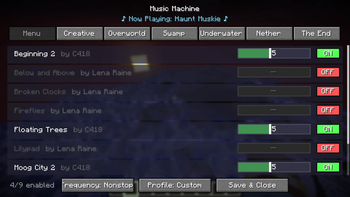
Music Machine is a client-side mod that gives you complete, granular control over Minecraft's dynamic background music.
Tired of hearing the same track play when you're building? Wish the game played music a bit more often? Want to listen exclusively to the classic C418 soundtrack? Music Machine lets you do exactly that through an easy-to-use in-game configuration menu.
🎵 Features
🎛️ Complete Track Control
The mod automatically hooks into the game's music system and provides a categorized list of every single vanilla music track (Menu, Creative, Overworld, Nether, The End, etc.). From the config menu, you can:
- Toggle Tracks: Turn individual songs ON or OFF. Dislike a specific ambient track? Disable it forever.
- Weight Sliders: Adjust the "weight" of each track to increase or decrease its chance of playing. Boost the odds of hearing your favorite songs!
- Resource Pack Support: Playing with custom music from resource packs? Music Machine automatically detects and registers custom tracks from your
sounds.jsonfiles so you can toggle and weigh them just like vanilla tracks!
⏱️ Music Frequency Settings
Take control of how often music actually plays in your world. The config allows you to switch between four distinct modes:
- Never: Completely mutes all background music.
- Sometimes: The standard vanilla pacing with long delays between tracks.
- Often: Shortens the delays so music plays more frequently.
- Nonstop: Music loops continuously with almost zero downtime between tracks.
🎭 Pre-Configured Profiles
Don't want to manually tweak every song? Use the built-in music profiles to instantly change the vibe:
- Default: Plays all tracks exactly as vanilla Minecraft intended.
- Legacy: Automatically restricts all music to only tracks composed by C418.
- Custom: Activates your personalized settings, custom toggles, and track weights.
💿 "Now Playing" Display
When opening the configuration menu, a stylish animated display will show you the exact title and author of the song currently playing in the background.
⚙️ How to Use
- Install the mod on your client.
- Launch the game and load into a world.
- Press
Mon your keyboard (rebindable in the Controls menu) to open the music management screen. - Adjust the settings to your liking—changes apply instantly!
🛠️ Compatibility & Installation
- Supported Loaders: Available for Fabric, Forge, and NeoForge (refer to the downloads section for specific Minecraft versions). Note: Fabric users must install the Fabric API.
- Environment: Client-Side Only. You can install this on your client and safely connect to vanilla servers, realms, or modded servers without the server needing the mod installed.
Available Versions
How to Install Music Machine on Your Server
Order Server
Order a Minecraft Java server with at least 3 GB RAM (4 GB recommended).
Set fabric Loader
In the panel under "Egg", select the fabric loader and matching Minecraft version (1.21.11).
Install Mod
Open the mod browser in the dashboard and search for "Music Machine". Click "Install" – done! Alternatively, upload the .jar via SFTP to the /mods folder.
Compatibility
Mod Loaders
Minecraft Versions
1.21.11, 1.20.6, 1.20.5 (+4 more)
Server-side
✗ UnsupportedRecommended RAM
4 GB(min. 3 GB)Frequently Asked Questions
Music Machine server crashes on startup – what to do?
Most common cause: wrong fabric version or insufficient RAM. Check the server log (latest.log) for "OutOfMemoryError" or "Mixin" errors. With Mado Hosting: ensure at least 3 GB RAM is allocated and the loader matches the mod version (1.21.11). You can switch loaders with one click in the panel.
Is Music Machine compatible with fabric and forge and neoforge?
Music Machine officially supports fabric, forge, neoforge for Minecraft 1.21.11, 1.20.6, 1.20.5. Note: Forge and Fabric mods are NOT cross-compatible – pick one loader and stick with it. The Mado dashboard automatically detects incompatible loader combinations.
Server lagging with Music Machine – how to optimize performance?
Recommended RAM: 4 GB (per 8 players). Use /spark profiler to check if Music Machine consumes the most tick time. Common fixes: reduce server view-distance to 8-10, install "performant" or "starlight" as supplementary mods on Forge. With Mado Hosting, your server runs on NVMe SSDs with dedicated CPU cores for minimal latency.
Similar Mods




Rent Modded Server
Install Music Machine with just one click on your server.