
Music Box
Play Youtube songs inside Minecraft! Server compatible!
Screenshots
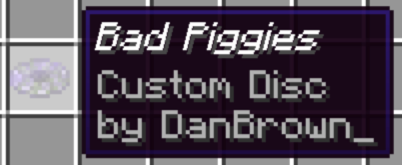

About this Mod
Warning!
Music Box won't be updated for 1.21+ versions in favor of VinURL, if you want a similar experience I really recommend this one.
About the Mod
Music Box is a Minecraft mod that adds a custom music disc item, allowing you to play any YouTube music in the JukeBox! It is server compatible, so you can play music with your friends, add ambient music, create a radio station, and much more!
It is a fork of the Fabric mod URL Music Discs and VinURL, ported to Forge with some improvements and new features.
Dependencies
- DeltaBox Lib
- Architectury
- If you are using Forge, Kotlin For Forge
- If you are using Fabric, Fabric Language Kotlin
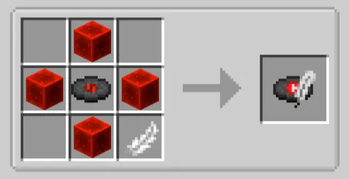
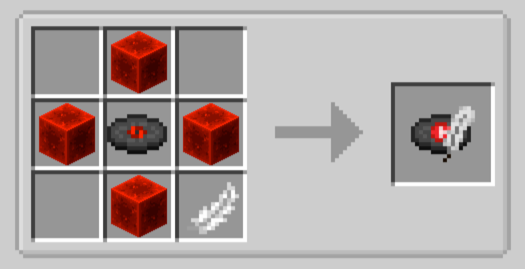
Recipe
Features
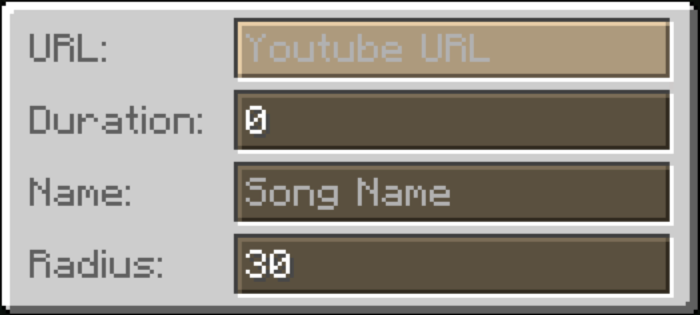
- Right click with a custom music disc to open the configuration screen.
- Paste a YouTube link to play the music.
- Set up the Duration, in seconds (optional) to make it redstone compatible.
- Set a Name for the music disc.
- You can also set a Radius, by default it is 30 blocks. (Maximum 999 blocks)
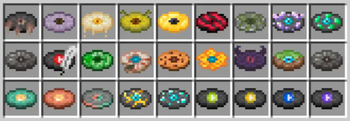
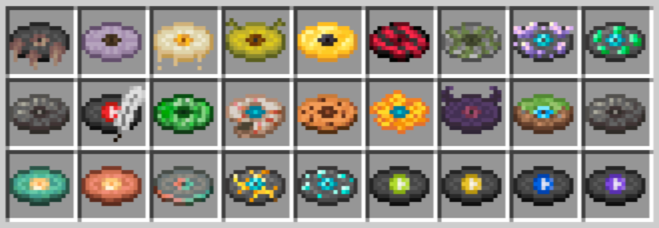
After a disc is saved it can get a random texture out of 40 different variants!
And more to be added in the future!
Saving the disc by pressing esc will maintain it editable, but if you save it with enter it will be locked and signed by you, and can't be edited anymore.
If you have a locked disc you want to recycle, you can always use it to craft a fresh new one!
Secret Features
Click to reveal
You can change the song **Pitch** by ading `&pitch=1.5` at the end of the URL. The pitch value can be any number between 0.5 (scary low) and 2.0 (chipmunk high). The default pitch is 1.0.
It will only be changed back to the default pitch if you change the pitch to 1.0, as removing the pitch parameter will not change it back to the default pitch.
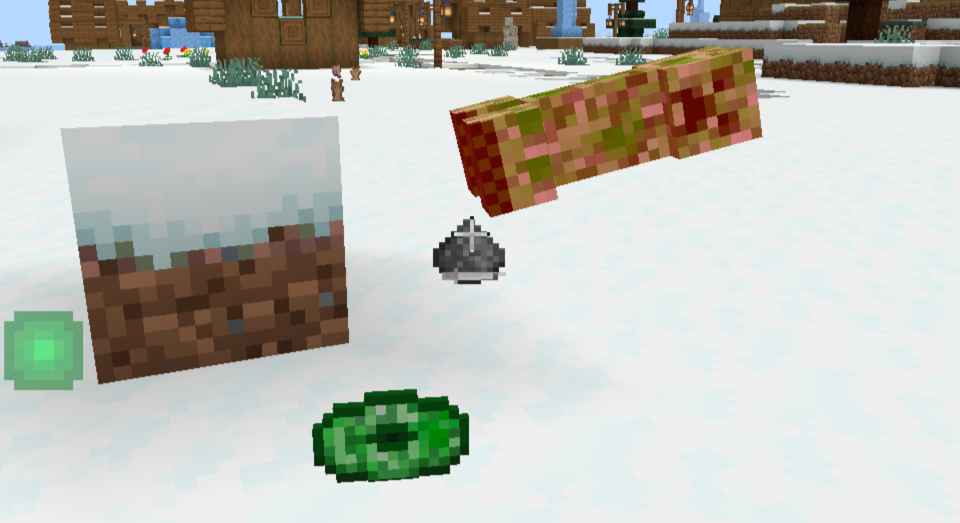
Music Box also adds secret music discs that can be obtained in random loot chests, or dropped by mobs. These discs are not craftable, and can only be obtained by luck.
Future
The mod is still in development, as of now it only works with YouTube links, but I am planning to add support for other platforms like Discord, SoundCloud, and more. If you have any suggestions, or found bugs, please let me know.
New disc variants textures are always welcome if you have new ideas!
Credits
DannBrown - Forge Port and Improvements
Hoofer - URL Music Discs Creator
Plompii - VinURL Creator
Tejty - Some disc textures
Available Versions
How to Install Music Box on Your Server
Order Server
Order a Minecraft Java server with at least 3 GB RAM (4 GB recommended).
Set fabric Loader
In the panel under "Egg", select the fabric loader and matching Minecraft version (1.20.1).
Install Mod
Open the mod browser in the dashboard and search for "Music Box". Click "Install" – done! Alternatively, upload the .jar via SFTP to the /mods folder.
Compatibility
Mod Loaders
Minecraft Versions
1.20.1
Server-side
✓ RequiredRecommended RAM
4 GB(min. 3 GB)Frequently Asked Questions
Music Box server crashes on startup – what to do?
Most common cause: wrong fabric version or insufficient RAM. Check the server log (latest.log) for "OutOfMemoryError" or "Mixin" errors. With Mado Hosting: ensure at least 3 GB RAM is allocated and the loader matches the mod version (1.20.1). You can switch loaders with one click in the panel.
Is Music Box compatible with fabric and forge?
Music Box officially supports fabric, forge for Minecraft 1.20.1. Note: Forge and Fabric mods are NOT cross-compatible – pick one loader and stick with it. The Mado dashboard automatically detects incompatible loader combinations.
Server lagging with Music Box – how to optimize performance?
Recommended RAM: 4 GB (per 8 players). Use /spark profiler to check if Music Box consumes the most tick time. Common fixes: reduce server view-distance to 8-10, install "performant" or "starlight" as supplementary mods on Forge. With Mado Hosting, your server runs on NVMe SSDs with dedicated CPU cores for minimal latency.
Similar Mods




Rent Modded Server
Install Music Box with just one click on your server.