
Name History
Simple Name History Mod. With my own hosted API, and a custom hostable API.
Screenshots
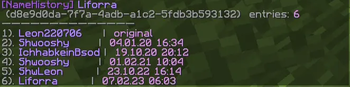
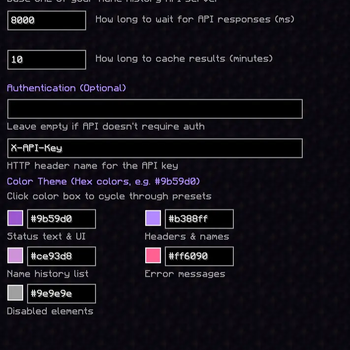
About this Mod

💜 Name History
A beautiful, modern Minecraft mod for viewing player username history





✨ Features
🎨 Beautiful UI
- Modern purple color scheme that's easy on the eyes
- Fully customizable colors - change every aspect of the theme to match your style
- Real-time color preview in the config screen with grid layout
🔍 Powerful Lookup
- Chat Commands - Quick lookups via
/namehistory <username|uuid> - Player Auto-Complete - Tab completion for online player names
- Cached Results - Fast repeated queries with configurable cache duration
- Smart Detection - Automatically detects whether you're searching by username or UUID
⚙️ Highly Configurable
- ModMenu Integration - Easy configuration through ModMenu
- API Endpoint - Connect to any compatible name history API
- Optional Authentication - API key support for private servers
- Customizable Timeouts - Adjust request timeout and cache duration
- Grid Layout - Organized 2-column color configuration
🚀 Getting Started
Installation
- Install Fabric Loader
- Download and install Fabric API
- Download and install Fabric Language Kotlin
- Download the latest release of Name History
- Place the
.jarfile in your.minecraft/modsfolder - Launch Minecraft!
Usage
Commands:
/namehistory <username|uuid>  # Look up a player's name history (with tab completion)
/namehistory update <query>   # Force update cached data
/namehistory delete <query>   # Remove cached entry
Examples:
/namehistory Notch
/namehistory 069a79f4-44e9-4726-a5be-fca90e38aaf5
/namehistory update jeb_
Tip: Press Tab after /namehistory to auto-complete from online player names!
⚙️ Configuration
The mod creates a config file at config/namehistory-client.json on first launch.
Default Configuration
{
  "baseUrl": "https://liforra.de/api/namehistory",
  "requestTimeoutMs": 8000,
  "cacheTtlMinutes": 10,
  "apiKey": "",
  "apiKeyHeader": "X-API-Key",
  "primaryColor": "#9b59d0",
  "secondaryColor": "#b388ff",
  "specialColor": "#ce93d8",
  "errorColor": "#ff6090",
  "disabledColor": "#9e9e9e"
}
Configuration Options
| Option | Description | Default |
|---|---|---|
baseUrl |
API endpoint URL | https://liforra.de/api/namehistory |
requestTimeoutMs |
Request timeout in milliseconds | 8000 |
cacheTtlMinutes |
Cache duration in minutes | 10 |
apiKey |
API key (leave empty if not needed) | "" |
apiKeyHeader |
HTTP header name for API key | X-API-Key |
primaryColor |
Main UI text color | #9b59d0 |
secondaryColor |
Headers & player names color | #b388ff |
specialColor |
Name history entries color | #ce93d8 |
errorColor |
Error messages color | #ff6090 |
disabledColor |
Disabled elements color | #9e9e9e |
Using ModMenu
If you have ModMenu installed:
- Click "Mods" from the main menu
- Find "Name History" in the list
- Click the config button
- Customize colors by clicking the color preview boxes!
🔧 Building from Source
Prerequisites
- Java 21 or higher
- Git
Build Steps
git clone https://github.com/liforra/namehistory-minecraft.git
cd namehistory-minecraft
./gradlew build
The compiled mod will be in build/libs/name-history-0.1.0.jar.
🌐 API Compatibility
This mod works with any API that implements the following endpoints:
| Method | Endpoint | Description |
|---|---|---|
GET |
/api/namehistory?username=<username> |
Get history by username |
GET |
/api/namehistory/uuid/<uuid> |
Get history by UUID |
POST |
/api/namehistory/update |
Force update player data |
DELETE |
/api/namehistory?username=<username> |
Delete cached entry |
📄 Full API Documentation
- OpenAPI Specification:
openapi.yaml - Detailed Documentation: API.md
Response Format
{
  "uuid": "069a79f4-44e9-4726-a5be-fca90e38aaf5",
  "query": "Notch",
  "history": [
    { "id": 1, "name": "Notch", "changedAt": null, "censored": false }
  ]
}
💡 Tip: Use the OpenAPI spec to generate client libraries or server stubs.
📸 Screenshots
Chat Command Output

Configuration Screen

🎨 Artwork and Attribution
- The purple icon used in this project is a modified derivative of
icon.png
from the project “fabric-name-history-lookup” by Woolyenough
(Copyright © 2022 Woolyenough), licensed under the MIT License. - Original repository: https://github.com/Woolyenough/fabric-name-history-lookup
- Changes: recoloring to purple, removal of the stem, centering of the glyph,
and minor pixel adjustments for the theme.
This project includes the MIT license text and copyright notice for that
asset in ICON_NOTICE.txt.
No endorsement by the original author is implied.
📝 License
This project is licensed under the GNU Affero General Public License v3.0 (AGPL-3.0).
See LICENSE for details.
Third‑party components:
- Icon derivative: MIT-licensed work by Woolyenough (see
ICON_NOTICE.txt).
🤝 Contributing
Contributions are welcome! Feel free to:
- Report bugs
- Suggest new features
- Submit pull requests
- Improve documentation
💖 Credits
- Built with Fabric
- Written in Kotlin
- Inspired by the need for a beautiful, modern name history viewer
Made with 💜 by liforra
Available Versions
How to Install Name History on Your Server
Order Server
Order a Minecraft Java server with at least 3 GB RAM (4 GB recommended).
Set fabric Loader
In the panel under "Egg", select the fabric loader and matching Minecraft version (1.21.10).
Install Mod
Open the mod browser in the dashboard and search for "Name History". Click "Install" – done! Alternatively, upload the .jar via SFTP to the /mods folder.
Compatibility
Mod Loaders
Minecraft Versions
1.21.10, 1.21.9, 1.21.8 (+7 more)
Server-side
✗ UnsupportedRecommended RAM
4 GB(min. 3 GB)Frequently Asked Questions
Name History server crashes on startup – what to do?
Most common cause: wrong fabric version or insufficient RAM. Check the server log (latest.log) for "OutOfMemoryError" or "Mixin" errors. With Mado Hosting: ensure at least 3 GB RAM is allocated and the loader matches the mod version (1.21.10). You can switch loaders with one click in the panel.
Is Name History compatible with fabric?
Name History officially supports fabric for Minecraft 1.21.10, 1.21.9, 1.21.8. The Mado dashboard automatically detects incompatible loader combinations.
Server lagging with Name History – how to optimize performance?
Recommended RAM: 4 GB (per 8 players). Use /spark profiler to check if Name History consumes the most tick time. Common fixes: reduce server view-distance to 8-10, install "performant" or "starlight" as supplementary mods on Forge. With Mado Hosting, your server runs on NVMe SSDs with dedicated CPU cores for minimal latency.
Similar Mods




![[ETF] Entity Texture Features](https://cdn.modrinth.com/data/BVzZfTc1/af683d206d50b05258d865b0d6e4aa2f2cee12f2_96.webp)
![[EMF] Entity Model Features](https://cdn.modrinth.com/data/4I1XuqiY/6e5bbd0d06b1741bfdab6c0cfab6de8fdaf0064c_96.webp)
Rent Modded Server
Install Name History with just one click on your server.