
NBS Extensions
A mod for importing Nbs files into Diamondfire.
Screenshots
About this Mod

Notice:
This is my first mod. Do Not Expect Much.
As of now, the mod features are made to replace similar features in Recode as it has been discontinued. I am willing to add non-Diamondfire related features to expand this mod's functionality. You can come suggest some in my Discord server, or contribute to the project through GitHub.
Setup:
[!] This mod uses .nbs files obtained from Noteblock World.
- Launch game with the mod.
- Place
.nbsfiles in NBS songs folder. (<Path to Profile>/NBSE/NBS Files/) - In Creative Mode, use
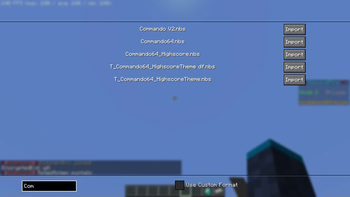
/nbs guito view songs.
Features:
/nbs loadImports songs using the format on Recode/nbs load_customImports songs in a similar format, but the pitch values are rawkey + fine pitchvalues multiplied by 1000/nbs guiOpens an experimental GUI for importing songs/nbs playerObtains a simple nbs player to play nbs songs
Planned Features
- Gui shows more data about each song file
- Config Menu
- (Maybe) Client-Side player for previewing and reducing noteblock ping lag.
You Can Help:
- Clone the GitHub Repository.
- Make changes to help improve the mod.
- Create a Pull Request.
It has only been me and RedVortex working on this, but code suggestions can help further this mod. You can even add your own personal touches to existing parts. (e.g. UI adjustments.)
Available Versions
How to Install NBS Extensions on Your Server
Order Server
Order a Minecraft Java server with at least 3 GB RAM (4 GB recommended).
Set fabric Loader
In the panel under "Egg", select the fabric loader and matching Minecraft version (1.21.11).
Install Mod
Open the mod browser in the dashboard and search for "NBS Extensions". Click "Install" – done! Alternatively, upload the .jar via SFTP to the /mods folder.
Compatibility
Mod Loaders
Minecraft Versions
1.21.11, 1.21.8, 1.21.4 (+2 more)
Server-side
✗ UnsupportedRecommended RAM
4 GB(min. 3 GB)Frequently Asked Questions
NBS Extensions server crashes on startup – what to do?
Most common cause: wrong fabric version or insufficient RAM. Check the server log (latest.log) for "OutOfMemoryError" or "Mixin" errors. With Mado Hosting: ensure at least 3 GB RAM is allocated and the loader matches the mod version (1.21.11). You can switch loaders with one click in the panel.
Is NBS Extensions compatible with fabric?
NBS Extensions officially supports fabric for Minecraft 1.21.11, 1.21.8, 1.21.4. The Mado dashboard automatically detects incompatible loader combinations.
Server lagging with NBS Extensions – how to optimize performance?
Recommended RAM: 4 GB (per 8 players). Use /spark profiler to check if NBS Extensions consumes the most tick time. Common fixes: reduce server view-distance to 8-10, install "performant" or "starlight" as supplementary mods on Forge. With Mado Hosting, your server runs on NVMe SSDs with dedicated CPU cores for minimal latency.
Similar Mods




![[ETF] Entity Texture Features](https://cdn.modrinth.com/data/BVzZfTc1/af683d206d50b05258d865b0d6e4aa2f2cee12f2_96.webp)
![[EMF] Entity Model Features](https://cdn.modrinth.com/data/4I1XuqiY/6e5bbd0d06b1741bfdab6c0cfab6de8fdaf0064c_96.webp)
Rent Modded Server
Install NBS Extensions with just one click on your server.