
Near World Spawn
Customize the way your world spawn is set
Screenshots
About this Mod



NO PORT TO FORGE PLANNED! (but feel free to port it by yourself and link it)
Description
This mod allows you to change the way the worldspawn is set! Whether a player is joining an old server for the first time or a player died with no spawn point set, this player will roll the dice to set a new world spawn location. The random location is chosen in an area around the online players that you can customize.
For a better experience with the mod, its configuration can be changed directly in-game
through new commands!
This is a short description, full description below.
FAQ
Do I need it on my server? Yes. This mod is server side, so you don't need it on your client
Can I include it in my modpack? Yes, you are free to include this mod into your modpack
For any other things: Feel free to share your experience, problems, enhancement ideas in the Discord server, or directly creating issues on the GitHub
Full description
If the changing area is enabled (the main purpose of the mod), when a player joins a server for the first time or dies without a spawn point set, a new worldspawn is randomly set around alive and online players from the Overworld.
Note that if no other player is found, last worldspawn will be used.
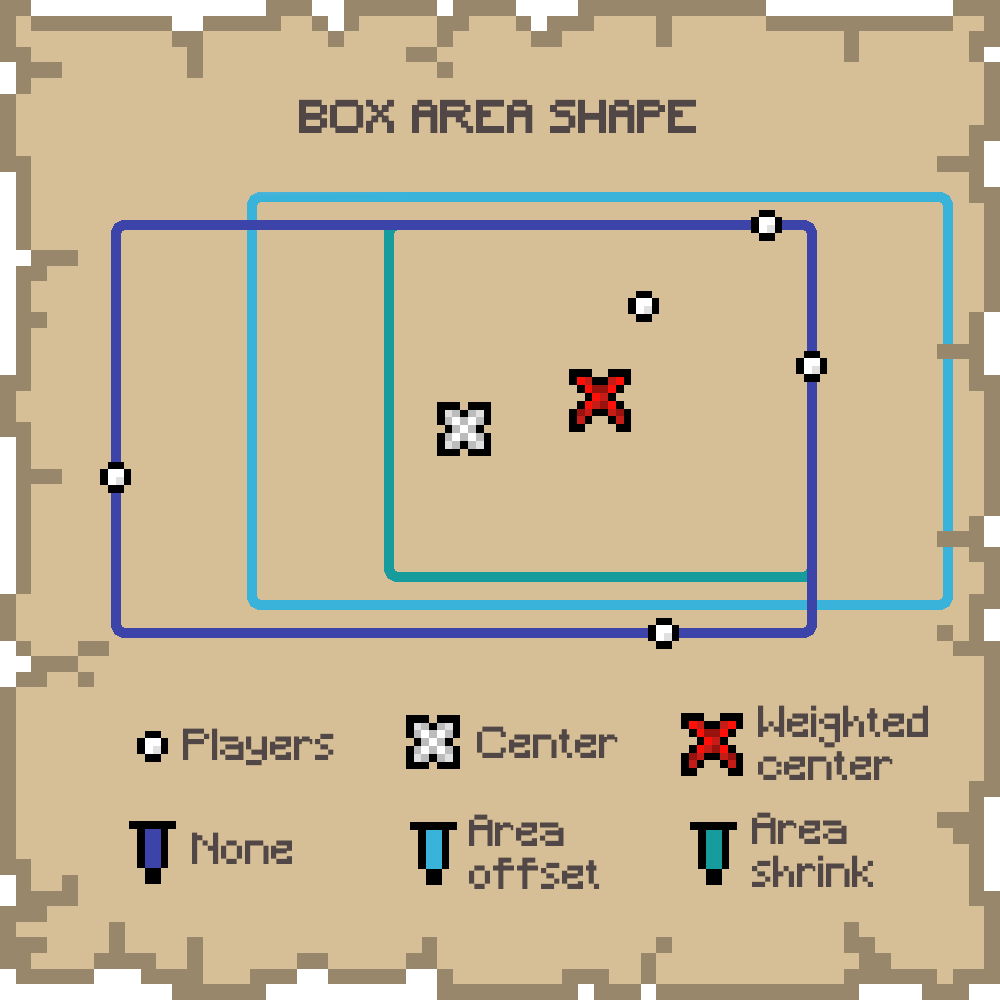
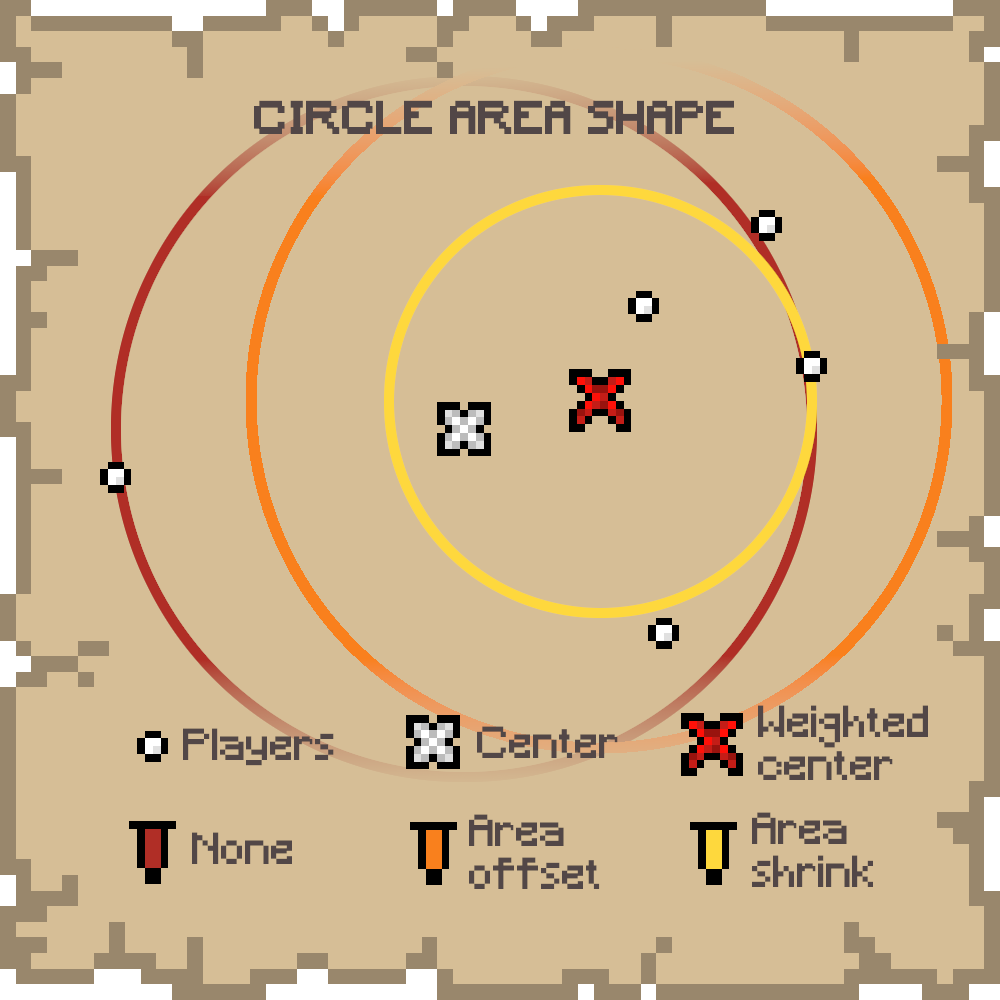
Area Shape
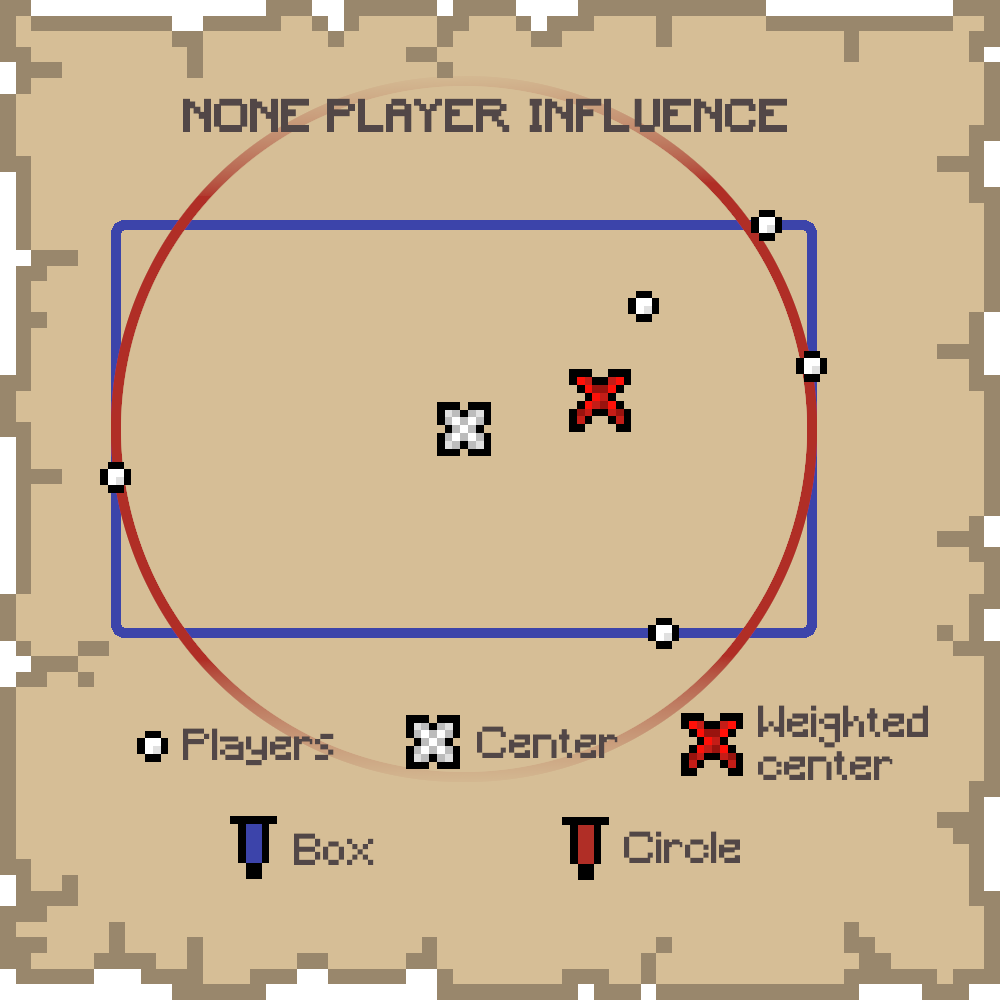
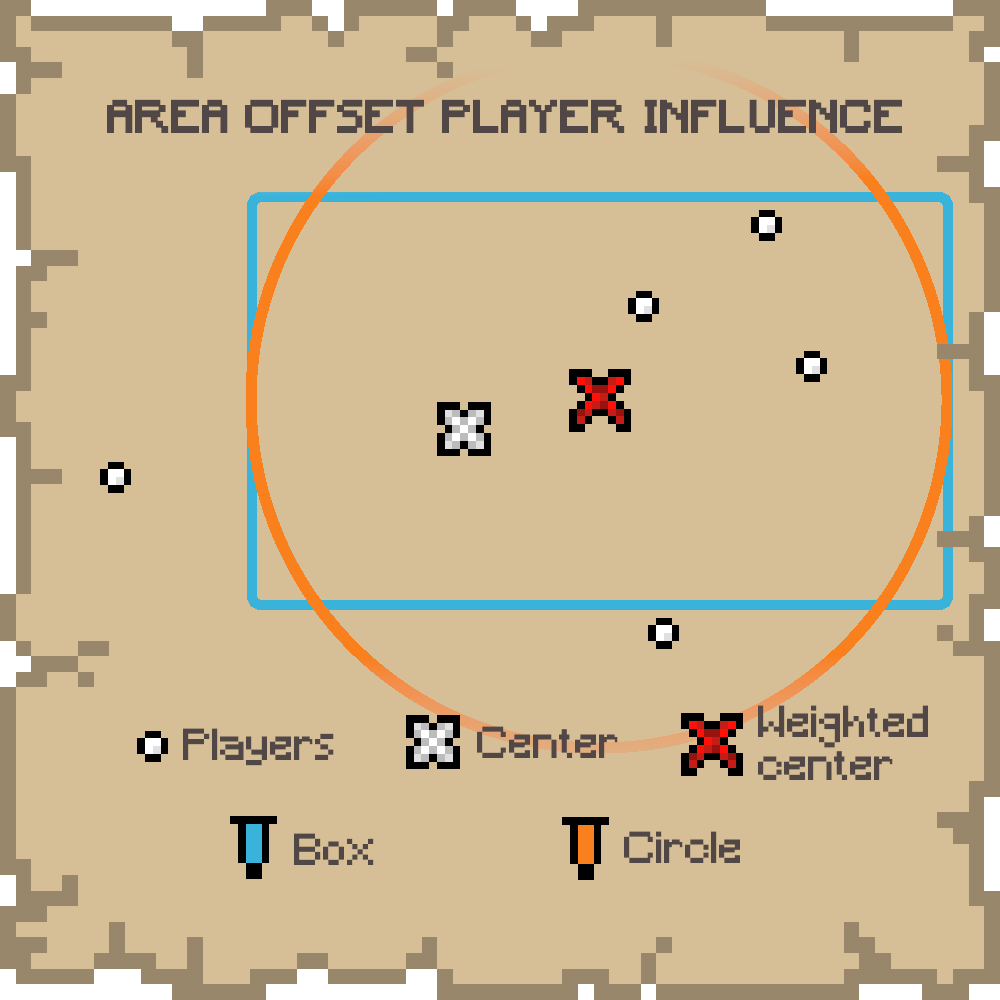
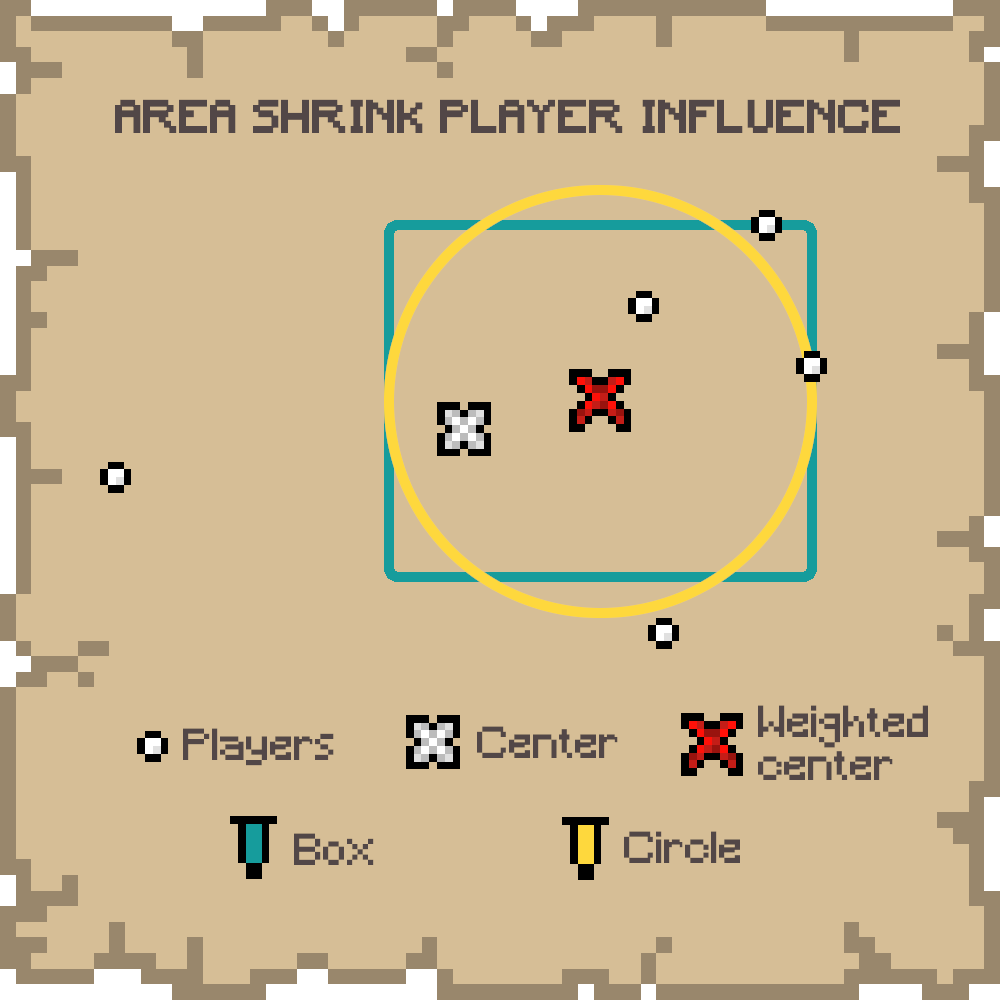
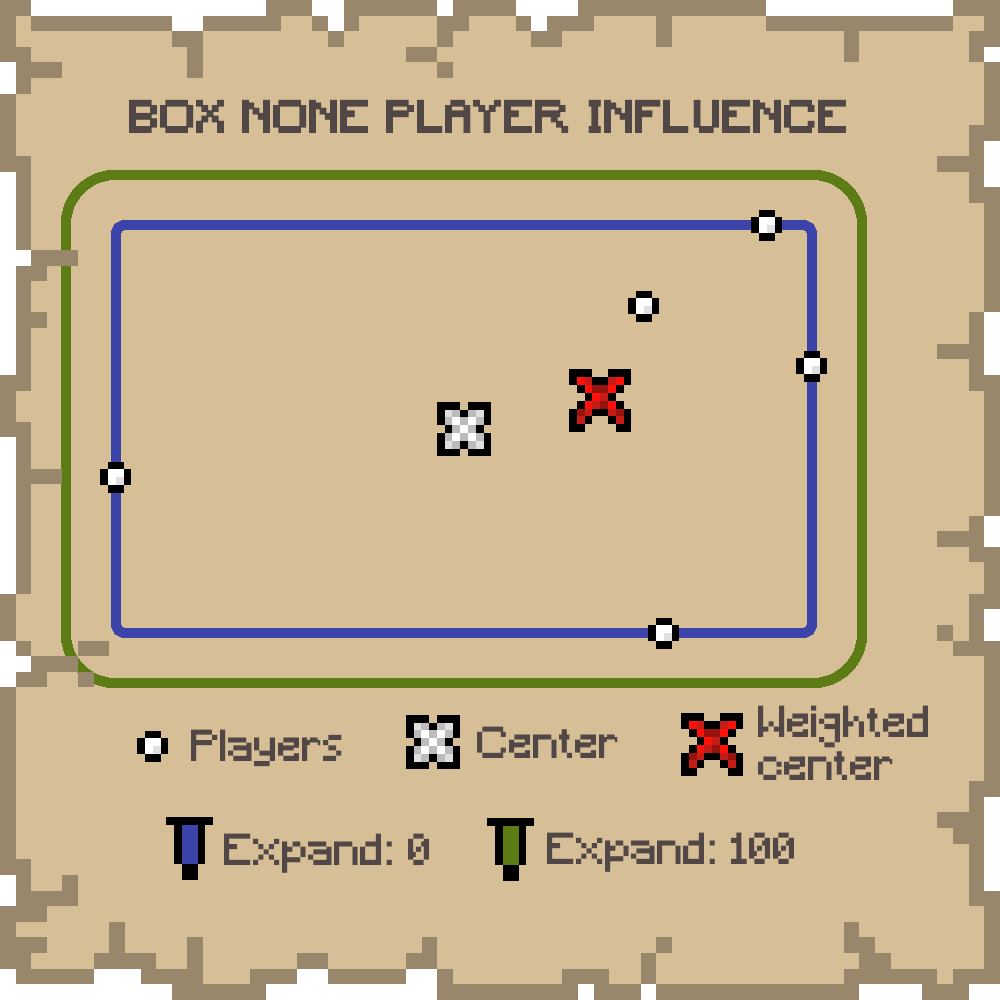
The shape of the area from which a random position is chosen may not necessarily contains every player. This is only the case for the BOX shape. If the player influence is different from NONE, even the BOX may not contain every player.
If only only one other player is found, the shape is necessarily a point. So, unless an expand is set, the worldspawn will be set to the other player's position.
- BOX: A box containing every player
- CIRCLE: A circle centered on the box, with a radius equals to the longest side of the box. If players are far from each other in one direction, this shape will contain a lot more of "empty space". Note than this is not yet the smallest bounding circle.
Player Influence
To avoid the area being too big (with too much "empty space") or too far from players, a player influence can be set. This means if there are more players in one side of the shape, the world spawn will be more likely on this side.
- NONE: No player influence on the shape
- AREA OFFSET: A weighted center is computed and the shape is moved toward this new center
- AREA SHRINK: A weighted center is computed and the shape is shrink in a way that makes the shape's center match the computed one
Expand
The area, no matter the shape or the player influence, may be too small if you want to encourage a bit of running, even though this mod aims to avoid loooong runs. So, you can set an expand value that will expand the shape of this number of blocks in every direction.
Spawn Chunks
In Minecraft, worldspawn chunks are always loaded. Having a worldspawn that can change might be annoying if you plan to setup always loaded machines. Also, it could possibly create lags if your server is not very efficient and your worldspawn chunk radius (future gamerule) is too big.
To avoid this, you can set the (0,0,0) to be the position used for the worldspawn chunks with an option of the mod. You can always update this behavior with the command, but note that the change will be effective only after someone joins or dies.
Commands
Commands require level 2 of permission.
/worldspawn-modded
Print whether the worldspawn changing area is enabled/worldspawn-modded <enabled>
Enable/Disable the worldspawn changing area/worldspawn
Print every custom worldspawn parameters/worldspawn (box|circle) <expand> (none|area_offset|area_shrink)
Set every custom worldspawn parameters/worldspawn-areashape
Print worldspawn area shape/worldspawn-areashape (box|circle)
Set worldspawn area shape/worldspawn-playerinfluence
Print worldspawn player influence/worldspawn-playerinfluence (none|area_offset|area_shrink)
Set worldspawn player influence/worldspawn-expand
Print worldspawn expand value/worldspawn-expand <expand>
Set worldspawn expand value/spawnchunks
Print whether the worldspawn chunks use the (0,0,0) or the last worlspawn position/spawnchunks (fixed|worldspawn)
Set whether we want the worldspawn chunks to use the (0,0,0) or the last worlspawn position
<enabled> is a boolean value, and <expand> is a positive integer.
Available Versions
How to Install Near World Spawn on Your Server
Order Server
Order a Minecraft Java server with at least 3 GB RAM (4 GB recommended).
Set fabric Loader
In the panel under "Egg", select the fabric loader and matching Minecraft version (1.21.3).
Install Mod
Open the mod browser in the dashboard and search for "Near World Spawn". Click "Install" – done! Alternatively, upload the .jar via SFTP to the /mods folder.
Compatibility
Mod Loaders
Minecraft Versions
1.21.3, 1.21.1, 1.21 (+5 more)
Server-side
✓ RequiredRecommended RAM
4 GB(min. 3 GB)Frequently Asked Questions
Near World Spawn server crashes on startup – what to do?
Most common cause: wrong fabric version or insufficient RAM. Check the server log (latest.log) for "OutOfMemoryError" or "Mixin" errors. With Mado Hosting: ensure at least 3 GB RAM is allocated and the loader matches the mod version (1.21.3). You can switch loaders with one click in the panel.
Is Near World Spawn compatible with fabric?
Near World Spawn officially supports fabric for Minecraft 1.21.3, 1.21.1, 1.21. The Mado dashboard automatically detects incompatible loader combinations.
Server lagging with Near World Spawn – how to optimize performance?
Recommended RAM: 4 GB (per 8 players). Use /spark profiler to check if Near World Spawn consumes the most tick time. Common fixes: reduce server view-distance to 8-10, install "performant" or "starlight" as supplementary mods on Forge. With Mado Hosting, your server runs on NVMe SSDs with dedicated CPU cores for minimal latency.
Similar Mods




Rent Modded Server
Install Near World Spawn with just one click on your server.