
Necromancers Shadow
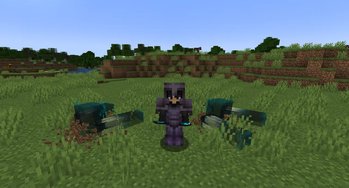
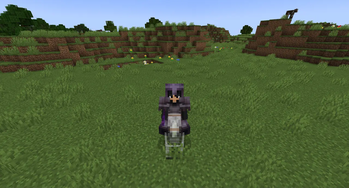
Allows you to capture and summon the souls of mobs!
Screenshots
About this Mod
Allows you to capture and summon the souls of mobs!
Shadows
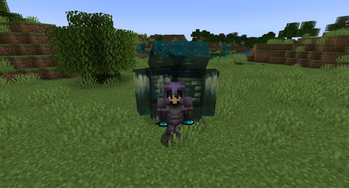
- The ghostly entities which you can summon
- Can be obtained by killing an entity while holding a sculk totem in your main hand or offhand
- A small entity displaying soul particles will be spawned where the entity died, right clicking this entity will add it
to you shadow inventory - The shadow inventory can be seen in the tooltip of any sculk totem and is not lost on death
- The summoned shadows keep most behaviours from their original entities (removes hostility and fleeing from entities)
- Shadows keep any extra data the entity had and are re-saved on each despawn, this allows them to keep data such as form
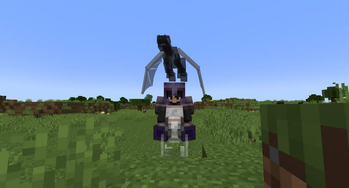
and equipment not only from the original entity, but also allows you to give your shadows extra equipment which they will keep - There are no limits! - even boss mobs such as the dragon, wither and warden work
- Compatibility with other mods has not been tested, but there is a good chance of it working!
Soul energy
- This energy is required to spawn shadows, it is obtained by holding a sculk totem while absorbing xp (1 soul energy =
30 xp points (NOT LEVELS)), keep in mind that it takes the xp instead of mending or your xp bar. - The cost to spawn each shadow is determined based on its health, 1 health = 1 soul energy
- When despawning a shadow the soul energy is returned if the shadow is still alive
- If a spawned shadow dies, its soul won't disappear from your inventory, but you won't receive any soul energy back when
despawning the shadows. - The max soul energy capacity is 10 by default, but it can be infinitely increased by eating echo shards
(1 shard gives +10 max soul energy) - All soul energy requirements are ignored while in creative mode
Sculk Totem
- Can be crafted from a totem of undying and an echo shard
- Is fireproof
- Right click to spawn/despawn shadows present in your shadow inventory
- Hitting an entity with this totem makes all spawned shadows target it
- Shift right clicking stops the shadows from attacking
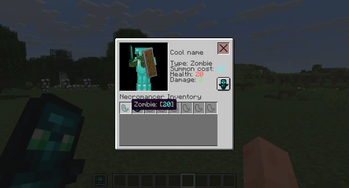
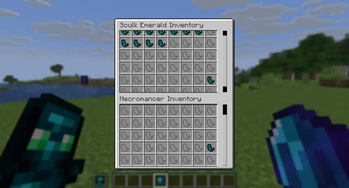
- Right clicking on the item in your inventory opens the necromancer inventory ui, where you can view, move, and individually summon/unsummon your shadows
- If you forget something, pressing shift while hovering the item will show a description of its features
Sculk Emerald
- Can be crafted from an emerald and an echo shard
- Is fireproof
- Right-clicking a soul with this item adds it to the items inventory instead of your own
- Right-clicking opens the emeralds inventory, where you can store some shadows
/soulEnergy
A simple command which allows the manipulation of both soul energy and max soul energy, requires op
Available Versions
How to Install Necromancers Shadow on Your Server
Order Server
Order a Minecraft Java server with at least 3 GB RAM (4 GB recommended).
Set fabric Loader
In the panel under "Egg", select the fabric loader and matching Minecraft version (26.1).
Install Mod
Open the mod browser in the dashboard and search for "Necromancers Shadow". Click "Install" – done! Alternatively, upload the .jar via SFTP to the /mods folder.
Compatibility
Mod Loaders
Minecraft Versions
26.1, 1.21.11, 1.21.10 (+3 more)
Server-side
✓ RequiredRecommended RAM
4 GB(min. 3 GB)Frequently Asked Questions
Necromancers Shadow server crashes on startup – what to do?
Most common cause: wrong fabric version or insufficient RAM. Check the server log (latest.log) for "OutOfMemoryError" or "Mixin" errors. With Mado Hosting: ensure at least 3 GB RAM is allocated and the loader matches the mod version (26.1). You can switch loaders with one click in the panel.
Is Necromancers Shadow compatible with fabric?
Necromancers Shadow officially supports fabric for Minecraft 26.1, 1.21.11, 1.21.10. The Mado dashboard automatically detects incompatible loader combinations.
Server lagging with Necromancers Shadow – how to optimize performance?
Recommended RAM: 4 GB (per 8 players). Use /spark profiler to check if Necromancers Shadow consumes the most tick time. Common fixes: reduce server view-distance to 8-10, install "performant" or "starlight" as supplementary mods on Forge. With Mado Hosting, your server runs on NVMe SSDs with dedicated CPU cores for minimal latency.
Similar Mods




Rent Modded Server
Install Necromancers Shadow with just one click on your server.