
NeoMTR
Fully-automatic and realistic railway system. This is a fork of Minecraft Transit Railway v3.
Screenshots
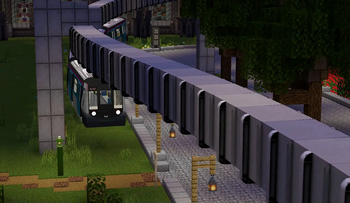
About this Mod
⚠️ WARNING: Not yet production-ready
For now, DO NOT use this mod for servers, or worlds you plan to put lots of effort into!
DO back up your existing save before loading it with this mod!
We're still developing this, so future backward compatibility with current version might not be guaranteed.
⚠️ 警告: 本模组暂时还不适合生产环境
现在来说,先不要将其用于服务器,或者计划长期建设的存档!
要将已有的 MTR 存档在此模组下加载时,请先备份!
本模组还在开发过程中,所以可能不保证未来版本模组能向后兼容地加载现在版本模组创建的存档。
NeoMTR
A fork of Minecraft Transit Railway v3.x that runs on a newer Minecraft version, with some additional features.
Major new features
- 1.21.1 support
- NTE built-in
- "Virtual" manual driving system
- Vehicle sway
- Custom destination, individual settings for PIDS, Map and train display
- Generic one-way gate
- Server-side train simulation keeps working at low TPS
- Some more miscellaneous fixes
Available Versions
How to Install NeoMTR on Your Server
Order Server
Order a Minecraft Java server with at least 3 GB RAM (4 GB recommended).
Set fabric Loader
In the panel under "Egg", select the fabric loader and matching Minecraft version (1.21.1).
Install Mod
Open the mod browser in the dashboard and search for "NeoMTR". Click "Install" – done! Alternatively, upload the .jar via SFTP to the /mods folder.
Compatibility
Mod Loaders
Minecraft Versions
1.21.1, 1.21
Server-side
✓ RequiredRecommended RAM
4 GB(min. 3 GB)Frequently Asked Questions
NeoMTR server crashes on startup – what to do?
Most common cause: wrong fabric version or insufficient RAM. Check the server log (latest.log) for "OutOfMemoryError" or "Mixin" errors. With Mado Hosting: ensure at least 3 GB RAM is allocated and the loader matches the mod version (1.21.1). You can switch loaders with one click in the panel.
Is NeoMTR compatible with fabric and neoforge?
NeoMTR officially supports fabric, neoforge for Minecraft 1.21.1, 1.21. The Mado dashboard automatically detects incompatible loader combinations.
Server lagging with NeoMTR – how to optimize performance?
Recommended RAM: 4 GB (per 8 players). Use /spark profiler to check if NeoMTR consumes the most tick time. Common fixes: reduce server view-distance to 8-10, install "performant" or "starlight" as supplementary mods on Forge. With Mado Hosting, your server runs on NVMe SSDs with dedicated CPU cores for minimal latency.
Similar Mods

![[ETF] Entity Texture Features](https://cdn.modrinth.com/data/BVzZfTc1/af683d206d50b05258d865b0d6e4aa2f2cee12f2_96.webp)
![[EMF] Entity Model Features](https://cdn.modrinth.com/data/4I1XuqiY/6e5bbd0d06b1741bfdab6c0cfab6de8fdaf0064c_96.webp)



Rent Modded Server
Install NeoMTR with just one click on your server.