Netherrocks
SimpleOres add-on: adds 6 new unique ores to the Nether, and a special furnace.
Screenshots
About this Mod

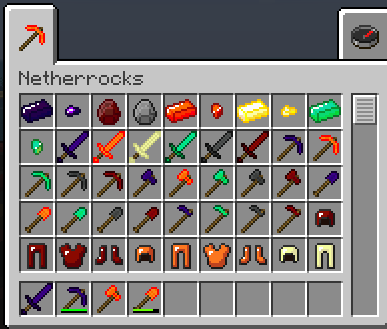
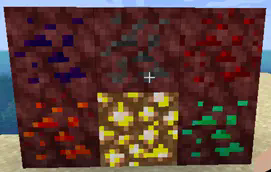
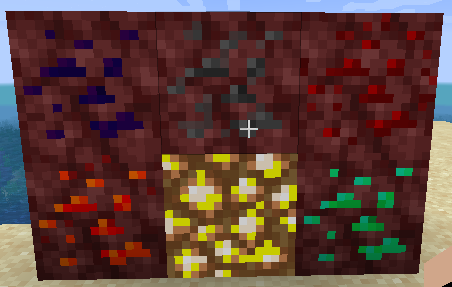
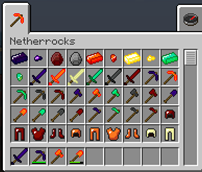
Netherrocks adds 6 more ores to the base game that are found only in the Nether: Argonite, Ashstone, Dragonstone, Fyrite, Illumenite, and Malachite. Each ore has its own unique properties, armor and tool sets, and more. Dragonstone, ashstone, and argonite range from tough to extremely tough. Fyrite is a metal of heat and fire; fyrite tools set things on fire or cook them, while fyrite armor protects the wearer from lava. Illumenite glows brightly, and an illumenite sword lets you see in darkness for a short time when you attack someone, and may blind your target briefly. Malachite armor is very light, and lets you jump higher, while malachite swords are poisonous to their targets.

Netherrocks for 1.16.3 and later REQUIRES SimpleCoreLib.
Netherrocks for 1.14.4 through 1.16.1 does not require SimpleOres API.
As of 1.18.2, version 4.1.3.0, Netherrocks now has a special option for peaceful mode. Set "EnableAshstoneGhastOre" = true in the config file (default is false), and the "Ashstone Ore" that generates in the Nether is actually its evil clone, Ghast Ore. Ghast Ore looks exactly like Ashstone Ore, and for the most part, behaves exactly like it, including dropping Ashstone Gems when mined. However, when mined adjacent to lava, it will drop ghast tears instead, and if you can obtain "Ashstone" (Ghast) Ore blocks, say by using silk touch, then 8 blocks of Ashstone (Ghast) Ore can be combined with a lava bucket in the crafting table to make ghast tears. Please note that in 1.18.2 already-existing Ashstone Ore will not turn into Ghast Ore just because you change the config setting; only newly-generated Ashstone will be Ghast Ore. However, in 1.19 and later, it will. Thank you to Wuppy29, whose old mod Peaceful Pack inspired this feature.
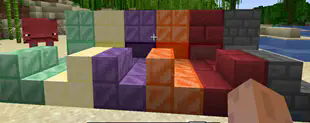
We have also overhauled the Netherrocks Aesthetics textures and replaced the old "metal brick" textures with more appropriate cut metal, stone brick, or small stone brick textures.
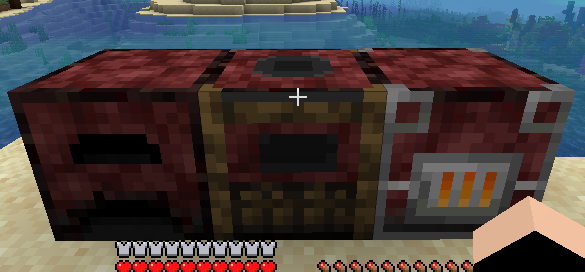
Netherrocks also adds a furnace, smoker and blast furnace powered by nether fuels such as netherrack, blaze rods, or fyrite.

Nether Furnaces have some unique properties that are unlike regular Furnaces. The most obvious of these is that they do not take normal Furnace fuels. Instead, there are only a few fuels they can use.
- Netherrack: Smelts 2 items each.
- Fyrite Ingot: Smelts 80 items each.
- Fyrite Dust: Smelts 40 items each.
- Blaze Rod : Smelts 24 items each.
- Blaze Powder: Smelts 8 items each.
- Fyrite Tools: smelt 26 or 27 items each.
In addition to requiring these special fuels, Nether Furnaces smelt at twice (2x) the speed of the corresponding regular Furnace.
The original Minecraft Forums thread is here: http://www.minecraftforum.net/forums/mapping-and-modding/minecraft-mods/1279863-simpleores-2-by-alexndrthegr8st. The original mod was by AleXndrTheGr8st, aka Skrallexy. Sinhika is the current off-and-on maintainer. The current code is licensed under LGPL 3.0, so go wild, modpack makers!
Netherrocks has been ported to 1.15.2 and back-ported to 1.14.4.
Other Compatible Mods:
Silent's Mechanisms - In 1.16.4, Crusher recipes have been added for argonite ore, fyrite ore, Illumenite ore, and malachite ore. Ashstone and Dragonstone gems cannot be processed in the crusher because of their excessive hardness.
Available Versions
How to Install Netherrocks on Your Server
Order Server
Order a Minecraft Java server with at least 4 GB RAM (6 GB recommended).
Set forge Loader
In the panel under "Egg", select the forge loader and matching Minecraft version (1.20.6).
Install Mod
Open the mod browser in the dashboard and search for "Netherrocks". Click "Install" – done! Alternatively, upload the .jar via SFTP to the /mods folder.
Compatibility
Mod Loaders
Minecraft Versions
1.20.6, 1.20.1, 1.19.2 (+5 more)
Server-side
✓ RequiredRecommended RAM
6 GB(min. 4 GB)Frequently Asked Questions
Netherrocks server crashes on startup – what to do?
Most common cause: wrong forge version or insufficient RAM. Check the server log (latest.log) for "OutOfMemoryError" or "Mixin" errors. With Mado Hosting: ensure at least 4 GB RAM is allocated and the loader matches the mod version (1.20.6). You can switch loaders with one click in the panel.
Is Netherrocks compatible with forge and neoforge?
Netherrocks officially supports forge, neoforge for Minecraft 1.20.6, 1.20.1, 1.19.2. The Mado dashboard automatically detects incompatible loader combinations.
Server lagging with Netherrocks – how to optimize performance?
Recommended RAM: 6 GB (per 5 players). Use /spark profiler to check if Netherrocks consumes the most tick time. Common fixes: reduce server view-distance to 8-10, install "performant" or "starlight" as supplementary mods on Forge. With Mado Hosting, your server runs on NVMe SSDs with dedicated CPU cores for minimal latency.
Similar Mods

![[ETF] Entity Texture Features](https://cdn.modrinth.com/data/BVzZfTc1/af683d206d50b05258d865b0d6e4aa2f2cee12f2_96.webp)
![[EMF] Entity Model Features](https://cdn.modrinth.com/data/4I1XuqiY/6e5bbd0d06b1741bfdab6c0cfab6de8fdaf0064c_96.webp)



Rent Modded Server
Install Netherrocks with just one click on your server.