
New World Of Color
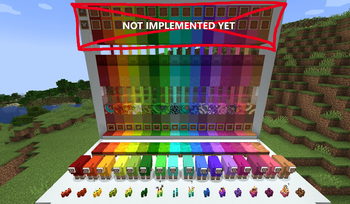
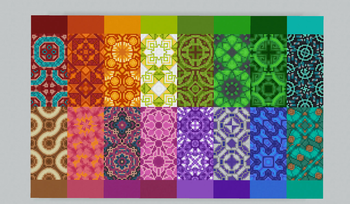
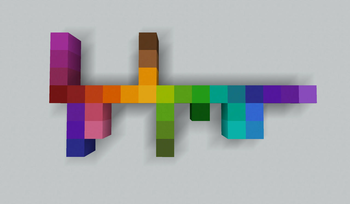
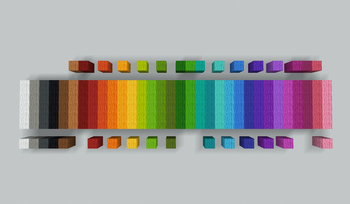
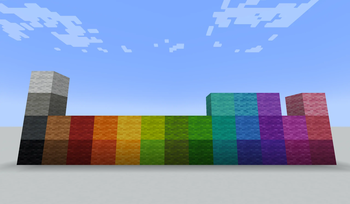
Adds 16 new dye colors (and all associated blocks) to expand the vanilla color palette!
Screenshots
About this Mod
About New World Of Color
This mod adds 16 new dye colors to the game! Dyes are will be compatible with all vanilla use cases and make an effort to be as vanilla-friendly as possible. All recipes should unlock in the recipe book when you collect the needed ingredients.
THIS MOD IS CURRENTLY IN BETA! The following features are missing for the new colors at the moment:
- Banners
- Dying leather/wolf armor
- Dying pet collars
- Fireworks
- Llama carpets
Additionally, these are known parity issues that may or may not get resolved:
- Villagers will not recognize beds that are dyed with a new color as a valid home
- Text on signs CAN be dyed using the new dyes, but it will apply the closest available vanilla color instead of one perfectly matching the dye used
Mod Compatability
Dyed items from other mods will naturally not be able to use the new colors until/unless support is added, but otherwise this mod should generally be compatible with other mods! However, there is one possible concern with the way sheep are handled. This mod will replace all sheep with a modded duplicate that supports the new colors, so if another mod modifies sheep or relies specifically on vanilla sheep for something it may cause issues.
Additionally, the stained glass from this mod has built in support for this colored lighting mod!: https://www.curseforge.com/minecraft/mc-mods/colorful-lighting/files/6948201
Dye Colors And Sources:
(All dyes can also be crafted using all of the basic dyes that make up their main color components,
ex. Teal is Cyan+Green but can also be made with Blue+Green+Green)
- Crimson -- Darker shade of red
- Red + Black
- Crafting Crimson Roots gives 1 dye
- Vermilion -- Red-Orange
- Red + Orange
- Amber -- Yellow-Orange
- Orange + Yellow
- Smelting Honeycomb gives 1 dye
- Chartreuse -- Yellow-Green
- Lime + Yellow
- Olive -- Lighter shade of vanilla green
- Green + White
- Spring Green -- Brighter, more vibrant shade of green than the vanilla dye
- Green + Green
- Jade -- Vibrant dark green
- Spring Green + Black
- Teal -- Blue-Green
- Cyan + Green
- Crafting Warped Roots gives 1 dye
- Turquoise -- Lighter Blue-Green
- Cyan + White
- Azure -- Medium Blue
- Blue + White
- Crafting Azure Bluets gives 1 dye
- Indigo -- Darker, more blue shade of purple
- Purple + Blue
- Mauve -- Light Purple
- Purple + White
- Crafting Chorus Fruit gives 1 dye
- Fuchsia -- Dark Magenta
- Purple + Crimson
- Crafting Spore Blossoms gives 4 dye
- Coral -- Dark, somewhat orangey pink
- Orange + Pink
- Smelting Brain Coral (Normal or fans, not blocks) gives 1 dye
- Burgundy -- Dark, reddish purple. You might also know the color as "wine" or "maroon"
- Crafting Torchflowers gives 4 dye
- (Cannot by made by mixing colors)
- Light Brown -- Light Brown
- Brown + White
Vanilla Tweaks:
The mod makes a very small number of tweaks to vanilla recipes/textures(All of which can be easily undone/overrided with a resource pack if needed):
- Lime Dye had its recipe changed to not overlap with Olive, which had no other logical recipe
- Lime Dye is now made with: Green + Yellow dye
- Light Blue dye had its recipe changed to make room for Azure as a step between it and normal blue
- Light Blue Dye is now made with: Azure + White dye
- The Azure Bluet texture was updated to give the flowers a noticeable blue color(without straying too far from vanilla, it's still subtle), and they now craft into Azure dye instead of Light Gray
- (The real life flowers are in fact most often blue, hence azure being in the name, so I honestly don't know why they didn't already reflect that and give light blue dye in vanilla)
- The Torchflower texture was updated to further emphasize the reddish-purple elements to make the burgundy dye connection clearer
Available Versions
How to Install New World Of Color on Your Server
Order Server
Order a Minecraft Java server with at least 3 GB RAM (4 GB recommended).
Set neoforge Loader
In the panel under "Egg", select the neoforge loader and matching Minecraft version (1.21.1).
Install Mod
Open the mod browser in the dashboard and search for "New World Of Color". Click "Install" – done! Alternatively, upload the .jar via SFTP to the /mods folder.
Compatibility
Mod Loaders
Minecraft Versions
1.21.1
Server-side
✓ RequiredRecommended RAM
4 GB(min. 3 GB)Frequently Asked Questions
New World Of Color server crashes on startup – what to do?
Most common cause: wrong neoforge version or insufficient RAM. Check the server log (latest.log) for "OutOfMemoryError" or "Mixin" errors. With Mado Hosting: ensure at least 3 GB RAM is allocated and the loader matches the mod version (1.21.1). You can switch loaders with one click in the panel.
Is New World Of Color compatible with neoforge?
New World Of Color officially supports neoforge for Minecraft 1.21.1. The Mado dashboard automatically detects incompatible loader combinations.
Server lagging with New World Of Color – how to optimize performance?
Recommended RAM: 4 GB (per 8 players). Use /spark profiler to check if New World Of Color consumes the most tick time. Common fixes: reduce server view-distance to 8-10, install "performant" or "starlight" as supplementary mods on Forge. With Mado Hosting, your server runs on NVMe SSDs with dedicated CPU cores for minimal latency.
Similar Mods

![[ETF] Entity Texture Features](https://cdn.modrinth.com/data/BVzZfTc1/af683d206d50b05258d865b0d6e4aa2f2cee12f2_96.webp)
![[EMF] Entity Model Features](https://cdn.modrinth.com/data/4I1XuqiY/6e5bbd0d06b1741bfdab6c0cfab6de8fdaf0064c_96.webp)



Rent Modded Server
Install New World Of Color with just one click on your server.