
NhatJS's Enhanced Furniture Mod
Add reimplemented and new enhanced furnitures and cool electronic to your new Minecraft from old Furniture Mod!
Screenshots

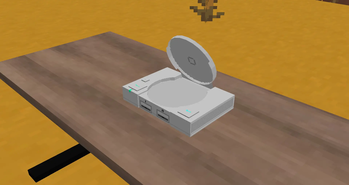
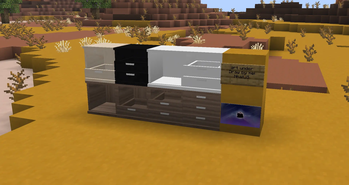
About this Mod
NOTE: This mod will be always alpha/beta because even it released, this mod was still development in order to complete several unfinished stuffs. Until the mod is 100% complete, it will be switched from alpha/beta to release.
Welcome to NhatJS's Enhanced Furniture Mod. This is basically the enhanced version of NhatJS's Furniture Mod, for some reason:
- In newest 26.1, cutout and transculent systems are now automatically used depending on how textures work, but when it comes this, there are annoying glitch/invisible issues when put on several furnitures, especially some realistic furnitures aren't working.
- Because the newest Minecraft version starts opening new era with new version numbering system.
Those are reasons why I decided to create new Enhanced mod to fix that textures applied issues by remaking several furnitures to make low-poly blocky but realism a bit better, but also create new furnitures never before seen in my mod. However, there are some furnitures from old mod that I decided to keep, and several other stuffs that I (kinda) have to remove for unnecessary reasons.
As always, you can use many objects or items to build your own decorations based on your imaginations. Join Discord server if there is any issues, and also share any ideas if you will! (but don't make it difficult... I'm sorry)
Screenshots: in "Gallery" tab
Available Versions
How to Install NhatJS's Enhanced Furniture Mod on Your Server
Order Server
Order a Minecraft Java server with at least 3 GB RAM (4 GB recommended).
Set fabric Loader
In the panel under "Egg", select the fabric loader and matching Minecraft version (26.1.2).
Install Mod
Open the mod browser in the dashboard and search for "NhatJS's Enhanced Furniture Mod". Click "Install" – done! Alternatively, upload the .jar via SFTP to the /mods folder.
Compatibility
Mod Loaders
Minecraft Versions
26.1.2, 26.1.1
Server-side
~ OptionalRecommended RAM
4 GB(min. 3 GB)Frequently Asked Questions
NhatJS's Enhanced Furniture Mod server crashes on startup – what to do?
Most common cause: wrong fabric version or insufficient RAM. Check the server log (latest.log) for "OutOfMemoryError" or "Mixin" errors. With Mado Hosting: ensure at least 3 GB RAM is allocated and the loader matches the mod version (26.1.2). You can switch loaders with one click in the panel.
Is NhatJS's Enhanced Furniture Mod compatible with fabric and neoforge?
NhatJS's Enhanced Furniture Mod officially supports fabric, neoforge for Minecraft 26.1.2, 26.1.1. The Mado dashboard automatically detects incompatible loader combinations.
Server lagging with NhatJS's Enhanced Furniture Mod – how to optimize performance?
Recommended RAM: 4 GB (per 8 players). Use /spark profiler to check if NhatJS's Enhanced Furniture Mod consumes the most tick time. Common fixes: reduce server view-distance to 8-10, install "performant" or "starlight" as supplementary mods on Forge. With Mado Hosting, your server runs on NVMe SSDs with dedicated CPU cores for minimal latency.
Similar Mods

![[ETF] Entity Texture Features](https://cdn.modrinth.com/data/BVzZfTc1/af683d206d50b05258d865b0d6e4aa2f2cee12f2_96.webp)
![[EMF] Entity Model Features](https://cdn.modrinth.com/data/4I1XuqiY/6e5bbd0d06b1741bfdab6c0cfab6de8fdaf0064c_96.webp)



Rent Modded Server
Install NhatJS's Enhanced Furniture Mod with just one click on your server.