
NoHassleQuickConnect
A simple mod that lets you instantly switch Minecraft servers using /connect [ip]. Features tab completion for your saved servers and lets you switch servers without touching your mouse or navigating menus, making server hopping quick and accessible.
Screenshots
About this Mod
What does NoHassleQuickConnect (aka. NHQC) do:
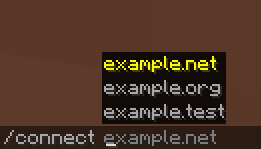
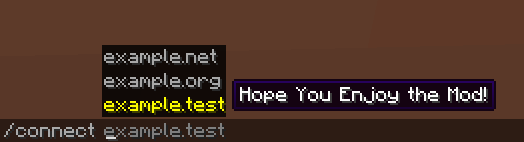
Adds a /connect command that lets you quickly connect to Minecraft servers
Includes tab completion for servers from your server list
Provides instant server switching without going through menus
1. Keyboard-only navigation:
Switch servers without touching your mouse
Perfect for players who prefer keyboard controls or have limited mouse mobility
Great for accessibility when mouse usage is difficult or uncomfortable
2. Time-saving:
No need to:
Exit to main menu,
Click multiplayer,
Scroll through server list,
Click connect.
Just type /connect + server address and you're there
3. Server list integration:
Press TAB after /connect to see all your saved servers
Start typing a server name/address and use TAB to auto-complete
No need to remember exact server addresses
4. Basicly Instant switching:
Switch between servers quickly without menu transitions
Useful for server hopping, when playing on multiple servers, aswell as pvp scenarios
Available Versions
How to Install NoHassleQuickConnect on Your Server
Order Server
Order a Minecraft Java server with at least 3 GB RAM (4 GB recommended).
Set fabric Loader
In the panel under "Egg", select the fabric loader and matching Minecraft version (1.20.6).
Install Mod
Open the mod browser in the dashboard and search for "NoHassleQuickConnect". Click "Install" – done! Alternatively, upload the .jar via SFTP to the /mods folder.
Compatibility
Mod Loaders
Minecraft Versions
1.20.6, 1.20.5, 1.20.4 (+3 more)
Server-side
✗ UnsupportedRecommended RAM
4 GB(min. 3 GB)Frequently Asked Questions
NoHassleQuickConnect server crashes on startup – what to do?
Most common cause: wrong fabric version or insufficient RAM. Check the server log (latest.log) for "OutOfMemoryError" or "Mixin" errors. With Mado Hosting: ensure at least 3 GB RAM is allocated and the loader matches the mod version (1.20.6). You can switch loaders with one click in the panel.
Is NoHassleQuickConnect compatible with fabric?
NoHassleQuickConnect officially supports fabric for Minecraft 1.20.6, 1.20.5, 1.20.4. The Mado dashboard automatically detects incompatible loader combinations.
Server lagging with NoHassleQuickConnect – how to optimize performance?
Recommended RAM: 4 GB (per 8 players). Use /spark profiler to check if NoHassleQuickConnect consumes the most tick time. Common fixes: reduce server view-distance to 8-10, install "performant" or "starlight" as supplementary mods on Forge. With Mado Hosting, your server runs on NVMe SSDs with dedicated CPU cores for minimal latency.
Similar Mods




Rent Modded Server
Install NoHassleQuickConnect with just one click on your server.