
Nice Actions
Adding a simple, user-friendly menu for actions like RTP, sitting, and setting a home - no complicated commands required. Perfect for Single and Multiplayer.
Screenshots

About this Mod
📖 Description
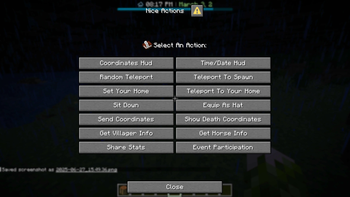
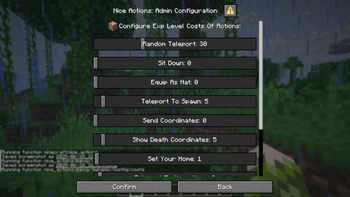
Nice Actions is a lightweight and user-friendly Minecraft data pack that introduces an in-game menu (opened with the new hotkey - default G) for players to perform useful actions like teleporting, sitting, managing their home, toggling HUD elements, and sharing stats - all without typing commands. Admins and operators can easily configure features directly in-game, making setup and management quick and intuitive.
Command to open the Config Menu
/function nice_actions
📋 Features
Coordinates HUD
Displays your current coordinates and facing direction via a sleek bossbar HUD.
Time/Date HUD
Shows the in-game time and a fully-featured calendar system with custom days, months, years, and 12/24-hour time options.
Random Teleport (RTP)
Instantly teleport to a random location within a configurable radius.
Home Actions
Set and teleport to your personal home location with ease.
Spawn Teleportation
Allows players to teleport to a defined spawn point - by default, the location where the first player joined after the data pack was installed.
Sitting
Sit almost anywhere safely - only when there's solid ground beneath you.
Send Coordinates
Instantly share your current location in chat - no more messing with F3.
Show Death Coordinates
Quickly check where you last died to find your items again.
Villager Info
Get detailed info about the nearest villager, including job, job block location, and inventory.
Horse Info
Inspect the nearest horse’s speed, jump height, and health.
Share Player Stats
Compare and share gameplay stats with nearby players (within 32 blocks).
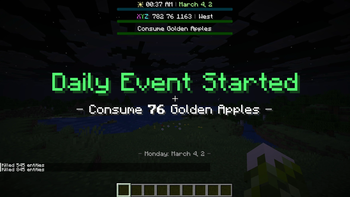
Random Daily Events
A configurable system of daily challenges (e.g., fishing or combat tasks) with rewards - great for encouraging players to get out of their comfort zones.
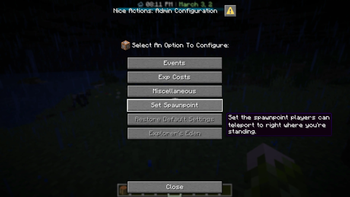
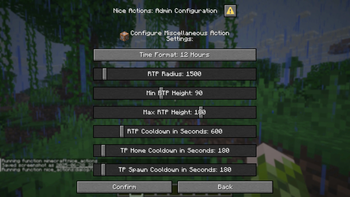
Extensive Admin/OP Config Menu
Easily adjust cooldowns, EXP Level costs, event settings, and more directly in-game.
🛠️ Technical Gibberish
Custom Dialogs/Menus were first introduced in Minecraft 1.21.6 - Therefore a backport to older versions is simply not possible!
For PaperMC users, it is recommended to set the paper.maxChatCommandInputSize property to a value between 512 and 1024. More information can be found in the PaperMC Docs. Also make sure to have allow-non-player-entities-on-scoreboards enabled in your paper configs.
📝 Translations
Want to play in your own language? You can help us out by contributing on our Crowdin Page! Once a translation for a language is finished, it’ll be added to the data pack for you to enjoy.
✍️ Feedback, Questions & Suggestions
We're here to help! If you happen to have questions, suggestions or just encountered a bug, then feel free to hop on our discord server to ask for help in our Data Pack Section. Click to join the server
🎮 Explorer's Eden SMP
Join A Realm Recrafted, our Minecraft SMP! Enjoy a world featuring all of our (actively maintained) data packs, as well as some exclusive ones. It’s completely free without any microtransactions. Come build, explore, and craft with us today!
Available Versions
How to Install Nice Actions on Your Server
Order Server
Order a Minecraft Java server with at least 3 GB RAM (4 GB recommended).
Set datapack Loader
In the panel under "Egg", select the datapack loader and matching Minecraft version (26.1.2).
Install Mod
Open the mod browser in the dashboard and search for "Nice Actions". Click "Install" – done! Alternatively, upload the .jar via SFTP to the /mods folder.
Compatibility
Mod Loaders
Minecraft Versions
26.1.2, 26.1.1, 26.1 (+6 more)
Server-side
✓ RequiredRecommended RAM
4 GB(min. 3 GB)Frequently Asked Questions
Nice Actions server crashes on startup – what to do?
Most common cause: wrong datapack version or insufficient RAM. Check the server log (latest.log) for "OutOfMemoryError" or "Mixin" errors. With Mado Hosting: ensure at least 3 GB RAM is allocated and the loader matches the mod version (26.1.2). You can switch loaders with one click in the panel.
Is Nice Actions compatible with datapack and fabric and forge and neoforge and quilt?
Nice Actions officially supports datapack, fabric, forge, neoforge, quilt for Minecraft 26.1.2, 26.1.1, 26.1. Note: Forge and Fabric mods are NOT cross-compatible – pick one loader and stick with it. The Mado dashboard automatically detects incompatible loader combinations.
Server lagging with Nice Actions – how to optimize performance?
Recommended RAM: 4 GB (per 8 players). Use /spark profiler to check if Nice Actions consumes the most tick time. Common fixes: reduce server view-distance to 8-10, install "performant" or "starlight" as supplementary mods on Forge. With Mado Hosting, your server runs on NVMe SSDs with dedicated CPU cores for minimal latency.
Similar Mods




Rent Modded Server
Install Nice Actions with just one click on your server.