
Nice Mob Equipment
Randomizes the Equipment Mobs spawn with.
Screenshots
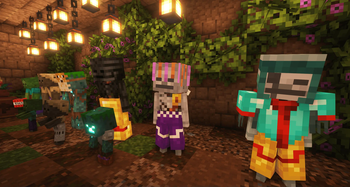
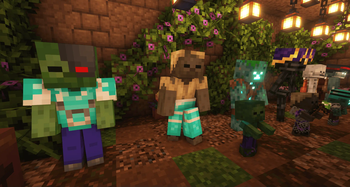
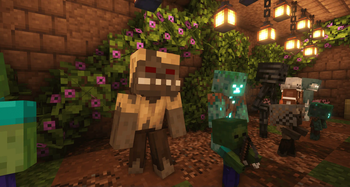
About this Mod
📖 Description
Nice Mob Equipment randomizes the Equipment of Mobs spawning throughout your world. From Armor itself to Trims and Main-/Offhand Weapons. With or without enchantments. Some Mobs even spawn with Playerheads. Either one of the manys which have been added by this data pack, or with a Playerhead from one of the players on a Server (Or just you when you use it in a singleplayer world).
Starting with the 1.21.5 release, the mob equipment gets stronger the further away a mob spawns from the center of a world (XZ:0).
Data Pack user can add or remove mobs which spawn with randomized equipment simply by adding or removing the mobs to the tag list found in:
/data/eden/tags/entity_type/valid_for_equipment.json
🛠️ How to, Instructions & Commands
The datapack usually just needs to be installed. There is nothing else you have to do. It just works out of the box.
But if you are playing on a PaperMC Server (or a PaperMC Fork like Purpur) make sure to set allow-non-player-entities-on-scoreboards in your paper config files to true in order for everything to work properly.
✍️ Feedback, Questions & Suggestions
We're here to help! If you happen to have questions, suggestions or just encountered a bug, then feel free to hop on our discord server to ask for help in our Data Pack Section. Click to join the server
🎮 Explorer's Eden SMP
Join A Realm Recrafted, our Minecraft SMP! Enjoy a world featuring all of our (actively maintained) data packs, as well as some exclusive ones. It’s completely free without any microtransactions. Come build, explore, and craft with us today!

Available Versions
How to Install Nice Mob Equipment on Your Server
Order Server
Order a Minecraft Java server with at least 3 GB RAM (4 GB recommended).
Set datapack Loader
In the panel under "Egg", select the datapack loader and matching Minecraft version (1.21.5).
Install Mod
Open the mod browser in the dashboard and search for "Nice Mob Equipment". Click "Install" – done! Alternatively, upload the .jar via SFTP to the /mods folder.
Compatibility
Mod Loaders
Minecraft Versions
1.21.5, 1.21.4, 1.21.3
Server-side
✓ RequiredRecommended RAM
4 GB(min. 3 GB)Frequently Asked Questions
Nice Mob Equipment server crashes on startup – what to do?
Most common cause: wrong datapack version or insufficient RAM. Check the server log (latest.log) for "OutOfMemoryError" or "Mixin" errors. With Mado Hosting: ensure at least 3 GB RAM is allocated and the loader matches the mod version (1.21.5). You can switch loaders with one click in the panel.
Is Nice Mob Equipment compatible with datapack and fabric and forge and neoforge and quilt?
Nice Mob Equipment officially supports datapack, fabric, forge, neoforge, quilt for Minecraft 1.21.5, 1.21.4, 1.21.3. Note: Forge and Fabric mods are NOT cross-compatible – pick one loader and stick with it. The Mado dashboard automatically detects incompatible loader combinations.
Server lagging with Nice Mob Equipment – how to optimize performance?
Recommended RAM: 4 GB (per 8 players). Use /spark profiler to check if Nice Mob Equipment consumes the most tick time. Common fixes: reduce server view-distance to 8-10, install "performant" or "starlight" as supplementary mods on Forge. With Mado Hosting, your server runs on NVMe SSDs with dedicated CPU cores for minimal latency.
Similar Mods




Rent Modded Server
Install Nice Mob Equipment with just one click on your server.