
Nick Hider
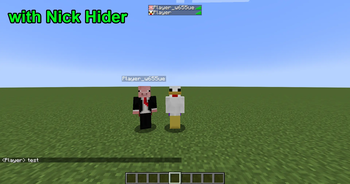
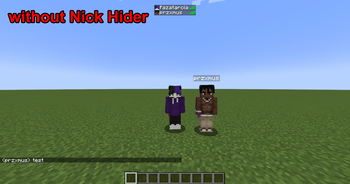
Hide your & your friends' nicknames, skins and capes.
Screenshots
About this Mod
Nick Hider
Client-side privacy masking for Minecraft player names, skins, capes and UUIDs.



What This Mod Does
Nick Hider masks player identity details in common vanilla client rendering and text paths.
- Local player: replace your shown name, skin, and cape.
- Other players: replace names with a template and swap skins/capes from configured source accounts.
- Global switch: instantly enable or disable all masking behavior.
Quick Start Tutorial
- Download the jar for your exact Minecraft + loader combination.
- Put the jar in your Minecraft
modsfolder. - Launch the game and open settings from Mod Menu (Fabric + Mod Menu), Mod List (Forge/NeoForge), keybind
Open Nick Hider Settings(default unbound), or command/nickhider. - First-time setup suggestion: enable
Hide Local Name,Hide Local Skin, andHide Local Cape, then setLocal Replacement Nameto a neutral alias. - Join a world/server and verify your own name and skin/cape are masked; enable
Hide Other Names/Skins/Capesif you also want to mask other players. - After config save/reload, Nick Hider automatically refreshes skin/cape sources in the background.
Features At A Glance
| Area | Behavior |
|---|---|
| Local name | Replaces your local displayed name |
| Local skin | Replaces your local rendered skin |
| Local cape | Replaces your local cape and cape-based elytra texture |
| Other names | Template-based replacement with [ID] token support |
| Other skins/capes | Shared configured source usernames |
| External fallback | Optional mineskin.eu + api.capes.dev (default: off) |
| Runtime toggle | Global Enable Nick Hider on/off switch |
| Open config | Keybind + /nickhider command |
Compatibility
- Supported Minecraft versions:
1.20.1and1.21.1 - Loader support policy:
1.20.1: Fabric, Forge1.21.1: Fabric, NeoForge
Short matrix:
1.20.1: Fabric, Forge1.21.1: Fabric, NeoForge
Configuration
Toggle Controls
- Hide local: name, skin, cape
- Hide others: names, skins, capes
- Global master toggle:
Enable Nick Hider - Optional switch:
Enable External Skin/Cape Fallbacks(default: off)
Replacement Inputs
- Local replacement name
- Local skin source username
- Local cape source username
- Other players name template
- Other players skin source username
- Other players cape source username
Validation and Fallbacks
- Replacement usernames must be empty or match
[A-Za-z0-9_]{3,16}. - Local replacement name must match
[A-Za-z0-9_]{3,16}. - If cape masking is enabled but no valid cape source resolves, cape rendering is hidden instead of showing the original cape.
- External fallbacks are queried only after official skin/cape lookups fail.
- Saving or reloading config clears runtime cache and starts an automatic source prefetch.
Diagnostics Logs
- Skin/cape runtime diagnostics use stable
NH-*codes (for exampleNH-SKIN-FETCH,NH-SKIN-RECOVERED,NH-HOOK-FAIL). - Repeated identical failures are throttled per source user to avoid console spam.
- Hook failures log the first incident as warning, and subsequent repeats as debug.
Known Limits
Nick Hider is aggressive on vanilla client paths, but masking is still best-effort. Third-party mods or custom render/UI pipelines can display unmasked data outside covered paths.
License
Licensed under the GNU Affero General Public License v3.0 (AGPLv3).
See LICENSE.
Maintainer and Links
- Author:
przxmus - Source: GitHub Repository
- Issues: GitHub Issues
Available Versions
How to Install Nick Hider on Your Server
Order Server
Order a Minecraft Java server with at least 3 GB RAM (4 GB recommended).
Set fabric Loader
In the panel under "Egg", select the fabric loader and matching Minecraft version (1.21.11).
Install Mod
Open the mod browser in the dashboard and search for "Nick Hider". Click "Install" – done! Alternatively, upload the .jar via SFTP to the /mods folder.
Compatibility
Mod Loaders
Minecraft Versions
1.21.11, 1.21.10, 1.21.9 (+16 more)
Server-side
✗ UnsupportedRecommended RAM
4 GB(min. 3 GB)Frequently Asked Questions
Nick Hider server crashes on startup – what to do?
Most common cause: wrong fabric version or insufficient RAM. Check the server log (latest.log) for "OutOfMemoryError" or "Mixin" errors. With Mado Hosting: ensure at least 3 GB RAM is allocated and the loader matches the mod version (1.21.11). You can switch loaders with one click in the panel.
Is Nick Hider compatible with fabric and forge and neoforge?
Nick Hider officially supports fabric, forge, neoforge for Minecraft 1.21.11, 1.21.10, 1.21.9. Note: Forge and Fabric mods are NOT cross-compatible – pick one loader and stick with it. The Mado dashboard automatically detects incompatible loader combinations.
Server lagging with Nick Hider – how to optimize performance?
Recommended RAM: 4 GB (per 8 players). Use /spark profiler to check if Nick Hider consumes the most tick time. Common fixes: reduce server view-distance to 8-10, install "performant" or "starlight" as supplementary mods on Forge. With Mado Hosting, your server runs on NVMe SSDs with dedicated CPU cores for minimal latency.
Similar Mods




![[ETF] Entity Texture Features](https://cdn.modrinth.com/data/BVzZfTc1/af683d206d50b05258d865b0d6e4aa2f2cee12f2_96.webp)
![[EMF] Entity Model Features](https://cdn.modrinth.com/data/4I1XuqiY/6e5bbd0d06b1741bfdab6c0cfab6de8fdaf0064c_96.webp)
Rent Modded Server
Install Nick Hider with just one click on your server.