
Night Lights
Night Lights adds a variety of modern lights and medieval lights to decorate and illuminate the world.
Screenshots
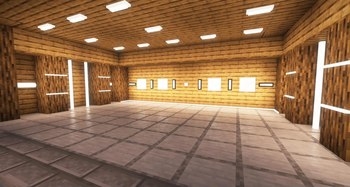
About this Mod

Night Lights is a mod that adds more than 20
types of modern and functional lights to
decorate and illuminate the Minecraft world.
With elegant designs and advanced technology,
this mod is ideal for modern, urban and futuristic constructions.
Features:
More than 20 Types of Lights: There are more than 10 different models, each with its dark version, providing variety for any construction.
Versatile Placement: The lights can be placed in any direction, on walls, ceilings and floors, adapting to any architectural design.
Underwater Lighting: All lights can be placed and work perfectly underwater, ideal for underwater bases or aquatic decorations.
Interactive Lights:
You can turn any light on or off simply by clicking on it, without the need for a redstone.
Remote Control:
A special device allows several lights to be turned on and off at the same time within a certain radius, facilitating lighting management in large constructions.

Wall Switch:
A wall switch that allows you to turn multiple devices on and off at once without the need for a redstone.

Candle lighter:
With a lighter you can turn the candles on and off.

Use:
Ideal for decorating modern houses, cities, offices, factories, streets and any construction that needs advanced and stylized lighting.


Forge and NeoForge soon...

!
Available Versions
How to Install Night Lights on Your Server
Order Server
Order a Minecraft Java server with at least 3 GB RAM (4 GB recommended).
Set fabric Loader
In the panel under "Egg", select the fabric loader and matching Minecraft version (1.21.1).
Install Mod
Open the mod browser in the dashboard and search for "Night Lights". Click "Install" – done! Alternatively, upload the .jar via SFTP to the /mods folder.
Compatibility
Mod Loaders
Minecraft Versions
1.21.1
Server-side
✓ RequiredRecommended RAM
4 GB(min. 3 GB)Frequently Asked Questions
Night Lights server crashes on startup – what to do?
Most common cause: wrong fabric version or insufficient RAM. Check the server log (latest.log) for "OutOfMemoryError" or "Mixin" errors. With Mado Hosting: ensure at least 3 GB RAM is allocated and the loader matches the mod version (1.21.1). You can switch loaders with one click in the panel.
Is Night Lights compatible with fabric and neoforge?
Night Lights officially supports fabric, neoforge for Minecraft 1.21.1. The Mado dashboard automatically detects incompatible loader combinations.
Server lagging with Night Lights – how to optimize performance?
Recommended RAM: 4 GB (per 8 players). Use /spark profiler to check if Night Lights consumes the most tick time. Common fixes: reduce server view-distance to 8-10, install "performant" or "starlight" as supplementary mods on Forge. With Mado Hosting, your server runs on NVMe SSDs with dedicated CPU cores for minimal latency.
Similar Mods

![[ETF] Entity Texture Features](https://cdn.modrinth.com/data/BVzZfTc1/af683d206d50b05258d865b0d6e4aa2f2cee12f2_96.webp)
![[EMF] Entity Model Features](https://cdn.modrinth.com/data/4I1XuqiY/6e5bbd0d06b1741bfdab6c0cfab6de8fdaf0064c_96.webp)



Rent Modded Server
Install Night Lights with just one click on your server.
Details
- License
- Creative Commons Attribution Non Commercial Share Alike 4.0 International
- Server-side
- Required