
Screenshots

About this Mod
🛡️ No Sound PvP
Focus on skill — not noise.
No Sound PvP lets you individually control or completely mute every PvP-related sound in Minecraft.
Explosions, eating, totems, potions, pearls, water, lava, footsteps, wind charges — every sound that distracts you during fights can now be silenced or adjusted.
Whether you want total silence or just lower annoying sounds, you have full control.
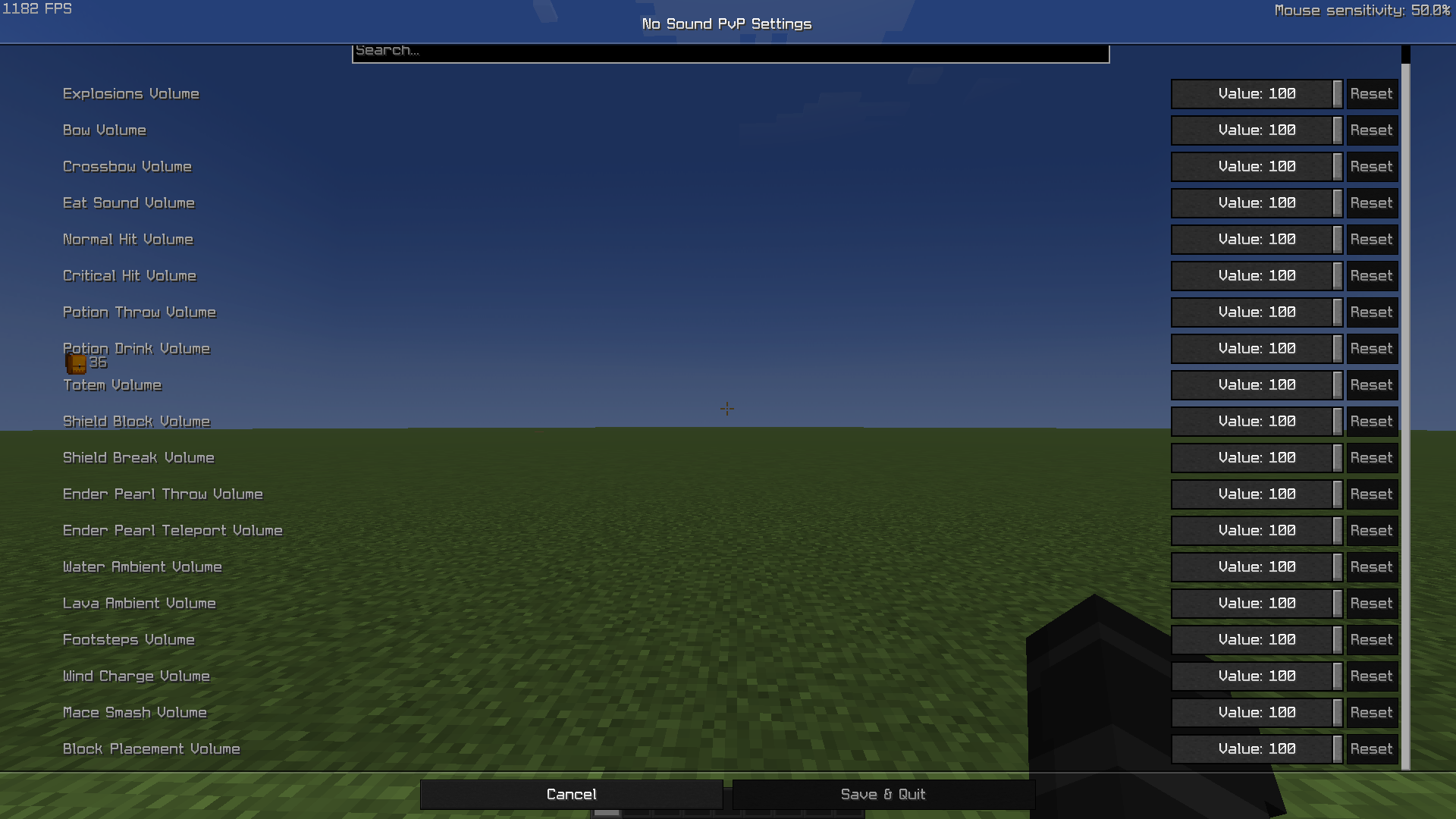
🖼️ Screenshot
⚙️ Features
🎚️ Individual volume sliders for each PvP sound (0–100).
Explosions
Bow & Crossbow
Eating & Drinking
Normal & Critical hits
Totem activation
Ender Pearls (throw & teleport)
Shield Block & Shield Break
Wind Charge
Block placement
Water & Lava ambience
Footsteps
Mace Smash (new in 1.21!)
🧩 Fully client-side (works on any server).
🖥️ Works seamlessly with ModMenu and Cloth Config.
💡 Set any value:
100 → normal volume
50 → half volume
0 → completely silent
🧱 Dependencies
Fabric API
(required)
Cloth Config
(required)
ModMenu
(optional, for settings menu)
📦 Compatibility
✅ Minecraft 1.21.x
🧩 Fabric Loader 0.15+
Works with any PvP modpack — purely client-side, no server installation needed.
💬 Why use it?
Because PvP is about reaction and precision — not sound spam.
Mute distractions like explosions, pearls, or totems, and keep your focus sharp.
🧑💻 Author
Created by Varlock
Available Versions
How to Install No Sound PvP on Your Server
Order Server
Order a Minecraft Java server with at least 3 GB RAM (4 GB recommended).
Set fabric Loader
In the panel under "Egg", select the fabric loader and matching Minecraft version (1.21.7).
Install Mod
Open the mod browser in the dashboard and search for "No Sound PvP". Click "Install" – done! Alternatively, upload the .jar via SFTP to the /mods folder.
Compatibility
Mod Loaders
Minecraft Versions
1.21.7
Server-side
✗ UnsupportedRecommended RAM
4 GB(min. 3 GB)Frequently Asked Questions
No Sound PvP server crashes on startup – what to do?
Most common cause: wrong fabric version or insufficient RAM. Check the server log (latest.log) for "OutOfMemoryError" or "Mixin" errors. With Mado Hosting: ensure at least 3 GB RAM is allocated and the loader matches the mod version (1.21.7). You can switch loaders with one click in the panel.
Is No Sound PvP compatible with fabric?
No Sound PvP officially supports fabric for Minecraft 1.21.7. The Mado dashboard automatically detects incompatible loader combinations.
Server lagging with No Sound PvP – how to optimize performance?
Recommended RAM: 4 GB (per 8 players). Use /spark profiler to check if No Sound PvP consumes the most tick time. Common fixes: reduce server view-distance to 8-10, install "performant" or "starlight" as supplementary mods on Forge. With Mado Hosting, your server runs on NVMe SSDs with dedicated CPU cores for minimal latency.
Similar Mods




![[ETF] Entity Texture Features](https://cdn.modrinth.com/data/BVzZfTc1/af683d206d50b05258d865b0d6e4aa2f2cee12f2_96.webp)
![[EMF] Entity Model Features](https://cdn.modrinth.com/data/4I1XuqiY/6e5bbd0d06b1741bfdab6c0cfab6de8fdaf0064c_96.webp)
Rent Modded Server
Install No Sound PvP with just one click on your server.