
NoChangeTheGame
A modification for modern versions that reverts behaviour changes since Minecraft 1.8.9 that are often disliked by PVP players. Intended for use on Hypixel only.
Screenshots
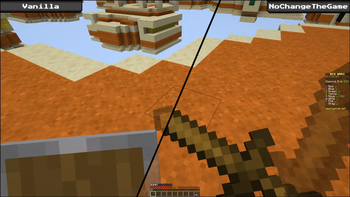
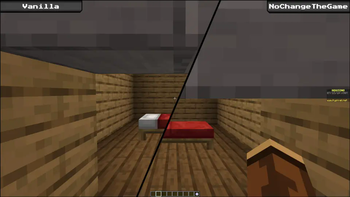
About this Mod
This is a client side modification that restores the feel of 1.8.9 combat on Hypixel in modern Minecraft versions.
Please note that the modification is designed for use only on Hypixel at this time.
🌟 Feature Highlights
(All features can be disabled using the config menu (requires Mod Menu) or the nochangethegame.toml config file)
⚔️ Sword Blocking
Right clicking while holding a sword will block, just as it does in 1.8.9.
(This feature is automatically disabled for certain Hypixel SkyBlock)
👣 Sneaking Height & Interpolation
Sneaking height is restored to that of 1.8.9. The smooth sneaking animation is disabled too.
🏊 Swimming and Crawling
All swimming and crawling animations are disabled.
[TODO: Add visual comparison]
📋 Other Features
- Removes the blocking delay caused by high latency.
- Hides offhand hotbar slot and disable the swap hand hotkey.
- Hides held shields.
- Disables interpolation for head movements.
- Disables the enderpearl cooldown.
- Disables automatic sneaking when in low height areas.
- Hides portal background textures when switching dimensions/worlds.
(Use with a resource pack to restore the dirt background)
❓ Questions?
Will this modification work on Forge/NeoForge?
Not right now, but maybe in the future.
Will this modification work on Lunar?
Lunar appears to be incompatible with Fabric modifications written in Kotlin.
I do not personally use Lunar so it is unlikely that a fix will be implemented into this modification.
Can I use this on other servers and/or single player?
By default, the modification will prevent you from doing so. While this safety feature can be disabled in the config, it is not recommended.
I'm happy to discuss requests to support other servers in issues.
Where can I submit bug reports or make feature requests?
Please create an issue here. Just make sure to have a quick check to see if someone else posted the same thing already.
⚙️ Server Information
The NoChangeTheGame modification provides a simple plugin message based protocol for servers.
nochangethegame:announce (Serverbound)
Upon connecting to a server, the modification will announce itself with this packet.
Type Value Short The length (in bytes) of the version string String The UTF-8 encoded version string of the modification
nochangethegame:config_override (Clientbound)
All modification settings can be overridden by servers with this packet.
Type Value NBT An NBT compound tag containing each setting to override
(Any settings not specified in the NBT compound will not be overridden)
Setting Key Default Value Vanilla Value sneakHeight.eyeHeight 1.54 1.27 sneakHeight.hitboxHeight 1.8 1.5 movementInterpolation.disableForSneaking true false movementInterpolation.disableForHeads true false swordBlocking.hideShields true false swordBlocking.hideOffhandSlot true false swordBlocking.animateSword true false swordBlocking.preventCombinedAnimation true false swordBlocking.fakeShield true false itemCooldowns.disableEnderpearlCooldown true false poses.disableCrouchToFit true false poses.disableCrawlToFit true false poses.disableSwimming true false worldLoadingBackgrounds.disableNether true false worldLoadingBackgrounds.disableEnd true false dangerZone.disableOnNonHypixelServers true N/A dangerZone.disableOnHypixelSMP true N/A The sword blocking animation can also be disabled on a per-itemstack basis by setting a
nochangethegame:blockableboolean tag tofalseon the custom data component of the item stack.
- Setting this tag to
trueforce allows blocking, even with non-swords. However, this is not officially supported.
nochangethegame:kill_switch (Clientbound)
- Alternatively, all settings can be overridden to their vanilla values with this packet.
Type Value Boolean true(0x01) to activate the kill switch
false(0x00) to deactivate the kill switch
Other information
- The kill switch and all setting overrides are cleared automatically upon disconnection.
- It is not possible to override the kill switch using setting overrides, as the kill switch takes precedence over all settings.
Available Versions
How to Install NoChangeTheGame on Your Server
Order Server
Order a Minecraft Java server with at least 3 GB RAM (4 GB recommended).
Set fabric Loader
In the panel under "Egg", select the fabric loader and matching Minecraft version (1.21.1).
Install Mod
Open the mod browser in the dashboard and search for "NoChangeTheGame". Click "Install" – done! Alternatively, upload the .jar via SFTP to the /mods folder.
Compatibility
Mod Loaders
Minecraft Versions
1.21.1, 1.21, 1.20.6 (+2 more)
Server-side
✗ UnsupportedRecommended RAM
4 GB(min. 3 GB)Frequently Asked Questions
NoChangeTheGame server crashes on startup – what to do?
Most common cause: wrong fabric version or insufficient RAM. Check the server log (latest.log) for "OutOfMemoryError" or "Mixin" errors. With Mado Hosting: ensure at least 3 GB RAM is allocated and the loader matches the mod version (1.21.1). You can switch loaders with one click in the panel.
Is NoChangeTheGame compatible with fabric?
NoChangeTheGame officially supports fabric for Minecraft 1.21.1, 1.21, 1.20.6. The Mado dashboard automatically detects incompatible loader combinations.
Server lagging with NoChangeTheGame – how to optimize performance?
Recommended RAM: 4 GB (per 8 players). Use /spark profiler to check if NoChangeTheGame consumes the most tick time. Common fixes: reduce server view-distance to 8-10, install "performant" or "starlight" as supplementary mods on Forge. With Mado Hosting, your server runs on NVMe SSDs with dedicated CPU cores for minimal latency.
Similar Mods

![[ETF] Entity Texture Features](https://cdn.modrinth.com/data/BVzZfTc1/af683d206d50b05258d865b0d6e4aa2f2cee12f2_96.webp)
![[EMF] Entity Model Features](https://cdn.modrinth.com/data/4I1XuqiY/6e5bbd0d06b1741bfdab6c0cfab6de8fdaf0064c_96.webp)



Rent Modded Server
Install NoChangeTheGame with just one click on your server.