
NoMorePowder
No more sinking. No more freezing. Just snow.
Screenshots

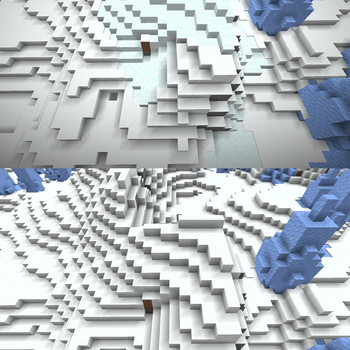
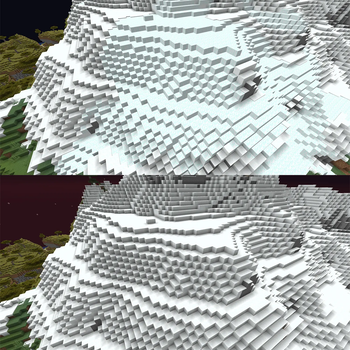
About this Mod
NoMorePowder
🌨️ No more sinking. No more freezing. Just snow.
Overview
You're sprinting across a snowy mountain, the landscape looks solid and safe — and then you sink. Powder snow: invisible, silent, and one of Minecraft's most frustrating terrain hazards. No warning, no indication, just a slow freeze creeping up your health bar.
NoMorePowder fixes this at the root. Instead of patching around powder snow after the fact, the mod intercepts world generation itself and replaces every naturally-spawned powder snow block with a regular snow block before it ever touches the world. The terrain looks identical — it just doesn't swallow you whole anymore.
Your mountain biomes stay snowy and beautiful. You just stop falling through them.
Features
- 🏔️ Seamless terrain — Powder snow patches in frozen and mountain biomes are silently replaced with regular snow blocks during world generation. No visual difference, no more hidden traps.
- 🪣 Powder snow is not gone — You can still collect it the intended way: place a cauldron outside during a snowstorm and wait. It can still be placed and used as a block in survival or creative.
- 🏛️ Trial Chambers untouched — The powder snow traps inside Trial Chambers are deliberately preserved. They are a designed part of that dungeon's challenge and are generated through a completely different system that this mod does not touch.
- ⚡ Zero overhead — No config files, no commands, no runtime processing. The replacement happens once, at worldgen time, and that's it.
What is and isn't affected
| Source | Result |
|---|---|
| Naturally generated powder snow (frozen/mountain biomes) | ✅ Replaced with snow blocks |
| Powder snow collected via cauldron in snowfall | ❌ Unchanged — works as normal |
| Powder snow placed manually (survival/creative) | ❌ Unchanged |
| Trial Chamber powder snow traps | ❌ Unchanged — intentionally preserved |
| Powder snow added by other world generation mods | ⚠️ Only replaced if placed via surface rules |
Installation
- Install Fabric Loader for Minecraft.
- Download the latest
nomorepowder-x.x.x.jar. - Download the latest compatible
Fabric APIversion. - Drop the
.jarinto yourmods/folder. - Launch the game.
Server note: This mod modifies world generation. It must be installed server-side (or in singleplayer). Players connecting to a modded server do not need to install it themselves.
Existing worlds: Chunks that were already generated before installing this mod will not be retroactively changed. The effect only applies to newly generated chunks.
Compatibility
- Fabric Loader
- Java 21+ for Minecraft 1.21.11 / Java 25+ for Minecraft 26.1+
- Compatible with other mods — the intercept targets only
SurfaceRules$StateRule.tryApply()and does not affect feature-based placement or structure generation
How it works
Powder snow in frozen biomes (Frozen Peaks, Snowy Slopes, Grove, etc.) is placed via Minecraft's surface rule system — not via world generation features. Surface rules determine which block appears at the terrain surface for each biome, and are applied directly to each chunk column during generation, completely bypassing the feature placement pipeline.
NoMorePowder uses a single Mixin on SurfaceRules$StateRule.tryApply() with @ModifyReturnValue from MixinExtras. This method returns the BlockState that a surface rule wants to place. If that state is POWDER_SNOW, the mod returns SNOW_BLOCK instead — before it ever reaches the chunk.
Trial Chamber powder snow is placed via StructureTemplate (NBT-driven structure files) after terrain generation, which is an entirely separate system that never goes through surface rules. It is therefore completely unaffected by this mod.
Test Server
Feel free to join my Minecraft server to test my mods: play.swordfishbe.eu
Available Versions
How to Install NoMorePowder on Your Server
Order Server
Order a Minecraft Java server with at least 4 GB RAM (6 GB recommended).
Set fabric Loader
In the panel under "Egg", select the fabric loader and matching Minecraft version (26.2).
Install Mod
Open the mod browser in the dashboard and search for "NoMorePowder". Click "Install" – done! Alternatively, upload the .jar via SFTP to the /mods folder.
Compatibility
Mod Loaders
Minecraft Versions
26.2, 26.1.2, 26.1.1 (+2 more)
Server-side
✓ RequiredRecommended RAM
6 GB(min. 4 GB)Frequently Asked Questions
NoMorePowder server crashes on startup – what to do?
Most common cause: wrong fabric version or insufficient RAM. Check the server log (latest.log) for "OutOfMemoryError" or "Mixin" errors. With Mado Hosting: ensure at least 4 GB RAM is allocated and the loader matches the mod version (26.2). You can switch loaders with one click in the panel.
Is NoMorePowder compatible with fabric?
NoMorePowder officially supports fabric for Minecraft 26.2, 26.1.2, 26.1.1. The Mado dashboard automatically detects incompatible loader combinations.
Server lagging with NoMorePowder – how to optimize performance?
Recommended RAM: 6 GB (per 5 players). Use /spark profiler to check if NoMorePowder consumes the most tick time. Common fixes: reduce server view-distance to 8-10, install "performant" or "starlight" as supplementary mods on Forge. With Mado Hosting, your server runs on NVMe SSDs with dedicated CPU cores for minimal latency.
Similar Mods




Rent Modded Server
Install NoMorePowder with just one click on your server.