
NoNoLife
This is a server side mod to limit playtime. So no one can "no-life" the game.
Screenshots



About this Mod
NoNoLife
This is a fabric server side mod to limit daily playtime on a minecraft server.
So no one can "no-life" the game.
How it works
Each player has some playtime available, while playing your available playtime is counted down.
When it reaches 0 you get kicked from the server.
Every day a configurable amount of playtime is granted to all players.
When playtime is not used up it stacks up to a configurable limit.
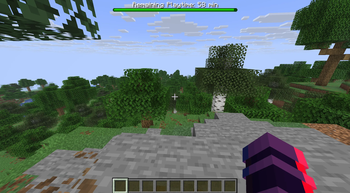
Remaining playtime is indicated with a bar at the top of the screen.
Total playtime is also tracked and displayed in the player (tab) list.
Installation
This mod is fully server side, so no client mod required!
Make sure you have the Fabric API,
then just add the nonolife-X.X.X.jar file to your server's mod folder and off you go.
Config
To configure the mod to your liking create a file json in your servers config folder.
The file should be called nonolife.json
Example file content (with default values):
{
  "dailyPlaytime": 3600,
  "initialPlaytime": 3600,
  "maximumPlaytime": 14400,
  "addPlaytimeAtHour": 4,
  "showTotalPlaytime": true
}
- dailyPlaytime sets the playtime in seconds each player is granted every day (default: 3600)
- initialPlaytime sets the playtime in seconds a player is granted when he/she first joins the server (default: 3600)
- maximumPlaytime sets the maximum amount of playtime in seconds that one can accumulate (default: 14400)
- addPlaytimeAtHour sets at which full hour the daily playtime is granted (default: 4)
- showTotalPlaytime controlls if the total playtime is shown in the player (tab) list (default: true)
If you want to use a default value you do not have to provide the configuration key. If you want to use all defaults you can just not create the file at all.
Commands
/playtime hidehides the remaining playtime indicator bar/playtime showshows the remaining playtime indicator bar
Available Versions
How to Install NoNoLife on Your Server
Order Server
Order a Minecraft Java server with at least 3 GB RAM (4 GB recommended).
Set fabric Loader
In the panel under "Egg", select the fabric loader and matching Minecraft version (1.21.11).
Install Mod
Open the mod browser in the dashboard and search for "NoNoLife". Click "Install" – done! Alternatively, upload the .jar via SFTP to the /mods folder.
Compatibility
Mod Loaders
Minecraft Versions
1.21.11
Server-side
✓ RequiredRecommended RAM
4 GB(min. 3 GB)Frequently Asked Questions
NoNoLife server crashes on startup – what to do?
Most common cause: wrong fabric version or insufficient RAM. Check the server log (latest.log) for "OutOfMemoryError" or "Mixin" errors. With Mado Hosting: ensure at least 3 GB RAM is allocated and the loader matches the mod version (1.21.11). You can switch loaders with one click in the panel.
Is NoNoLife compatible with fabric?
NoNoLife officially supports fabric for Minecraft 1.21.11. The Mado dashboard automatically detects incompatible loader combinations.
Server lagging with NoNoLife – how to optimize performance?
Recommended RAM: 4 GB (per 8 players). Use /spark profiler to check if NoNoLife consumes the most tick time. Common fixes: reduce server view-distance to 8-10, install "performant" or "starlight" as supplementary mods on Forge. With Mado Hosting, your server runs on NVMe SSDs with dedicated CPU cores for minimal latency.
Similar Mods




![[ETF] Entity Texture Features](https://cdn.modrinth.com/data/BVzZfTc1/af683d206d50b05258d865b0d6e4aa2f2cee12f2_96.webp)
![[EMF] Entity Model Features](https://cdn.modrinth.com/data/4I1XuqiY/6e5bbd0d06b1741bfdab6c0cfab6de8fdaf0064c_96.webp)
Rent Modded Server
Install NoNoLife with just one click on your server.