
NoRealmsFix
Completely removes Realms from the game.
Screenshots
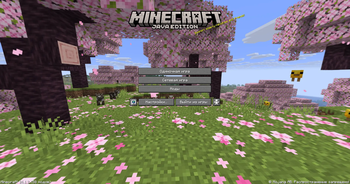
About this Mod
NoRealmsFix
Completely strips Minecraft Realms out of your client — no more log errors, no authentication spam, and no Realms button on the title screen.
A lightweight client-side Fabric mod. It breaks nothing, requires no account login, and works the moment you install it.
⚡ What it does
- 🚫 Disables all Realms network checks — gone are
RealmsServiceException,NullPointerException, andFailed to fetch Realms feature flags - 🧹 Removes Realms spam from your logs — your console stays clean
- 🎛️ Hides the "Minecraft Realms" button from the title screen
- 📐 Cleanly re-lays out the menu — no empty gap is left where the button was; the other buttons shift up to fill it
- 🤝 Full Mod Menu compatibility — the "Mods" tab stays right where it belongs
⚙️ Configuration
Everything is configurable in config/norealmsfix.json:
| Option | Default | Description |
|---|---|---|
disableRealmsChecks |
true |
Disables Realms network checks |
hideRealmsButton |
true |
Hides the Realms button from the title screen |
Just want to silence the errors but keep the button? Set hideRealmsButton to false.
📦 Compatibility
- Minecraft:
26.1.x - Loader: Fabric Loader
0.16.0+ - Dependencies: Fabric API, Java
25+ - Side: client only (
client)
Tested with Sodium, Iris, Mod Menu, and Cloth Config — no conflicts.
🛠️ Installation
- Install Fabric Loader and Fabric API
- Download
NoRealmsFix-1.0.0.jar - Drop the
.jarinto yourmodsfolder - Launch the game — Realms won't bother you anymore ✅
📄 License
All Rights Reserved (ARR)
Author: Kasperoid
NoRealmsFix
Полностью вырезает Minecraft Realms из клиента — никаких ошибок в логе, никакого спама авторизации и никакой кнопки Realms на главном экране.
Лёгкий клиентский мод для Fabric. Ничего не ломает, не требует захода в аккаунт и работает сразу после установки.
⚡ Что делает
- 🚫 Отключает все сетевые проверки Realms — пропадают
RealmsServiceException,NullPointerExceptionиFailed to fetch Realms feature flags - 🧹 Убирает спам Realms из логов — консоль остаётся чистой
- 🎛️ Скрывает кнопку «Minecraft Realms» с главного экрана
- 📐 Аккуратно перестраивает меню — на месте кнопки не остаётся пустоты, остальные кнопки сдвигаются
- 🤝 Полная совместимость с Mod Menu — вкладка «Моды» остаётся на месте
⚙️ Настройка
Все функции настраиваются в файле config/norealmsfix.json:
| Параметр | По умолчанию | Описание |
|---|---|---|
disableRealmsChecks |
true |
Отключает сетевые проверки Realms |
hideRealmsButton |
true |
Скрывает кнопку Realms с главного экрана |
Хочешь только убрать ошибки, но оставить кнопку? Поставь hideRealmsButton в false.
📦 Совместимость
- Minecraft:
26.1.x - Загрузчик: Fabric Loader
0.16.0+ - Зависимости: Fabric API, Java
25+ - Сторона: только клиент (
client)
Проверено с Sodium, Iris, Mod Menu и Cloth Config — конфликтов нет.
🛠️ Установка
- Установи Fabric Loader и Fabric API
- Скачай
NoRealmsFix-1.0.0.jar - Положи
.jarв папкуmods - Запусти игру — Realms больше не побеспокоит ✅
📄 Лицензия
All Rights Reserved (ARR)
Автор: Kasperoid
Available Versions
How to Install NoRealmsFix on Your Server
Order Server
Order a Minecraft Java server with at least 3 GB RAM (4 GB recommended).
Set fabric Loader
In the panel under "Egg", select the fabric loader and matching Minecraft version (26.1.2).
Install Mod
Open the mod browser in the dashboard and search for "NoRealmsFix". Click "Install" – done! Alternatively, upload the .jar via SFTP to the /mods folder.
Compatibility
Mod Loaders
Minecraft Versions
26.1.2, 26.1.1, 26.1
Server-side
✗ UnsupportedRecommended RAM
4 GB(min. 3 GB)Frequently Asked Questions
NoRealmsFix server crashes on startup – what to do?
Most common cause: wrong fabric version or insufficient RAM. Check the server log (latest.log) for "OutOfMemoryError" or "Mixin" errors. With Mado Hosting: ensure at least 3 GB RAM is allocated and the loader matches the mod version (26.1.2). You can switch loaders with one click in the panel.
Is NoRealmsFix compatible with fabric?
NoRealmsFix officially supports fabric for Minecraft 26.1.2, 26.1.1, 26.1. The Mado dashboard automatically detects incompatible loader combinations.
Server lagging with NoRealmsFix – how to optimize performance?
Recommended RAM: 4 GB (per 8 players). Use /spark profiler to check if NoRealmsFix consumes the most tick time. Common fixes: reduce server view-distance to 8-10, install "performant" or "starlight" as supplementary mods on Forge. With Mado Hosting, your server runs on NVMe SSDs with dedicated CPU cores for minimal latency.
Similar Mods


Rent Modded Server
Install NoRealmsFix with just one click on your server.