
Nostalgic MC Music.
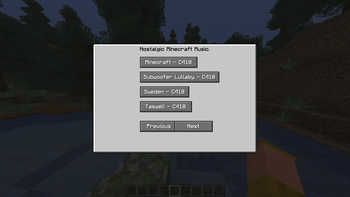
Adds a menu to play all of the nostalgic songs from the early days of Minecraft.
Screenshots
About this Mod
Consider joining the Discord server for updates!
Adds a brand-new in-game menu dedicated to playing all the nostalgic Minecraft tracks from the early days of the game. Relive the calm, ambient vibes that made those first worlds feel so magical and unforgettable. With four full pages of carefully selected music, you can easily browse and play your favorite tracks anytime—whether you're deep underground on a late-night mining trip, building something epic, or just chilling and soaking in the atmosphere. The menu is simple, smooth, and designed to keep you immersed without interrupting your gameplay. More features, tracks, and customization options are planned for future updates, so the nostalgia only gets better from here!
Available Versions
How to Install Nostalgic MC Music. on Your Server
Order Server
Order a Minecraft Java server with at least 3 GB RAM (4 GB recommended).
Set fabric Loader
In the panel under "Egg", select the fabric loader and matching Minecraft version (26.1).
Install Mod
Open the mod browser in the dashboard and search for "Nostalgic MC Music.". Click "Install" – done! Alternatively, upload the .jar via SFTP to the /mods folder.
Compatibility
Mod Loaders
Minecraft Versions
26.1, 1.21.11, 1.21.10 (+3 more)
Server-side
✓ RequiredRecommended RAM
4 GB(min. 3 GB)Frequently Asked Questions
Nostalgic MC Music. server crashes on startup – what to do?
Most common cause: wrong fabric version or insufficient RAM. Check the server log (latest.log) for "OutOfMemoryError" or "Mixin" errors. With Mado Hosting: ensure at least 3 GB RAM is allocated and the loader matches the mod version (26.1). You can switch loaders with one click in the panel.
Is Nostalgic MC Music. compatible with fabric?
Nostalgic MC Music. officially supports fabric for Minecraft 26.1, 1.21.11, 1.21.10. The Mado dashboard automatically detects incompatible loader combinations.
Server lagging with Nostalgic MC Music. – how to optimize performance?
Recommended RAM: 4 GB (per 8 players). Use /spark profiler to check if Nostalgic MC Music. consumes the most tick time. Common fixes: reduce server view-distance to 8-10, install "performant" or "starlight" as supplementary mods on Forge. With Mado Hosting, your server runs on NVMe SSDs with dedicated CPU cores for minimal latency.
Similar Mods




Rent Modded Server
Install Nostalgic MC Music. with just one click on your server.