
Not Enough Vulkan
Not Enough Vulkan is a fork of Sodium Extra that is focused on improving VulkanMod
Screenshots
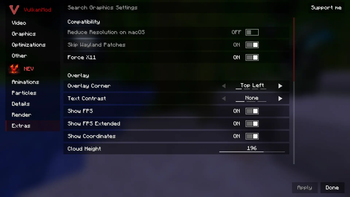

About this Mod
What is Not Enough Vulkan?
Not Enough Vulkan is a fork of Sodium Extra that aims to bring most of OptiFine's eye-candy options to VulkanMod which is another optimization mod like Sodium.
Features
Here is a basic rundown of what this mod does.
- Animations Settings (Control fire, water, lava, block animations and etc...)
- Particles Settings (Control all types of particles, including ones from other mods)
- Details Settings (Control sky, stars, sun/moon, weather, and much more)
- Render Settings (Control fog, static entities, and other miscellaneous renderings)
- Extra Settings (Display FPS, coordinates, toast notifications, clouds, and much more)
Other than all the above settings, Not Enough Vulkan also brings compatibility patches to help some mods work better alongside VulkanMod.
Improves Compatibility With VulkanMod:
- Includes Patches for Bobby
- Includes Patches for Linux Wayland (Optional)
- Adds a monitor selector for use with multiple monitors
Modpack Permissions
This is a free and open-source project; you can include it in your mod pack as long as you provide attribution!
Common Questions
- Do I need VulkanMod installed for this mod to work? Yes, You will need to download VulkanMod for this mod to work.
- Can I re-host/upload this mod somewhere else? Yes, as long as you provide the mod source code.
- Will you add x features to this mod? No, unless It's added to Sodium Extra first.
- I have more questions! Join our Discord!
Special Thanks to Sodium Extra
Available Versions
How to Install Not Enough Vulkan on Your Server
Order Server
Order a Minecraft Java server with at least 3 GB RAM (4 GB recommended).
Set fabric Loader
In the panel under "Egg", select the fabric loader and matching Minecraft version (26.1.2).
Install Mod
Open the mod browser in the dashboard and search for "Not Enough Vulkan". Click "Install" – done! Alternatively, upload the .jar via SFTP to the /mods folder.
Compatibility
Mod Loaders
Minecraft Versions
26.1.2, 26.1.1, 26.1 (+2 more)
Server-side
✗ UnsupportedRecommended RAM
4 GB(min. 3 GB)Frequently Asked Questions
Not Enough Vulkan server crashes on startup – what to do?
Most common cause: wrong fabric version or insufficient RAM. Check the server log (latest.log) for "OutOfMemoryError" or "Mixin" errors. With Mado Hosting: ensure at least 3 GB RAM is allocated and the loader matches the mod version (26.1.2). You can switch loaders with one click in the panel.
Is Not Enough Vulkan compatible with fabric?
Not Enough Vulkan officially supports fabric for Minecraft 26.1.2, 26.1.1, 26.1. The Mado dashboard automatically detects incompatible loader combinations.
Server lagging with Not Enough Vulkan – how to optimize performance?
Recommended RAM: 4 GB (per 8 players). Use /spark profiler to check if Not Enough Vulkan consumes the most tick time. Common fixes: reduce server view-distance to 8-10, install "performant" or "starlight" as supplementary mods on Forge. With Mado Hosting, your server runs on NVMe SSDs with dedicated CPU cores for minimal latency.
Similar Mods




![[ETF] Entity Texture Features](https://cdn.modrinth.com/data/BVzZfTc1/af683d206d50b05258d865b0d6e4aa2f2cee12f2_96.webp)
![[EMF] Entity Model Features](https://cdn.modrinth.com/data/4I1XuqiY/6e5bbd0d06b1741bfdab6c0cfab6de8fdaf0064c_96.webp)
Rent Modded Server
Install Not Enough Vulkan with just one click on your server.