
Notch, Please!
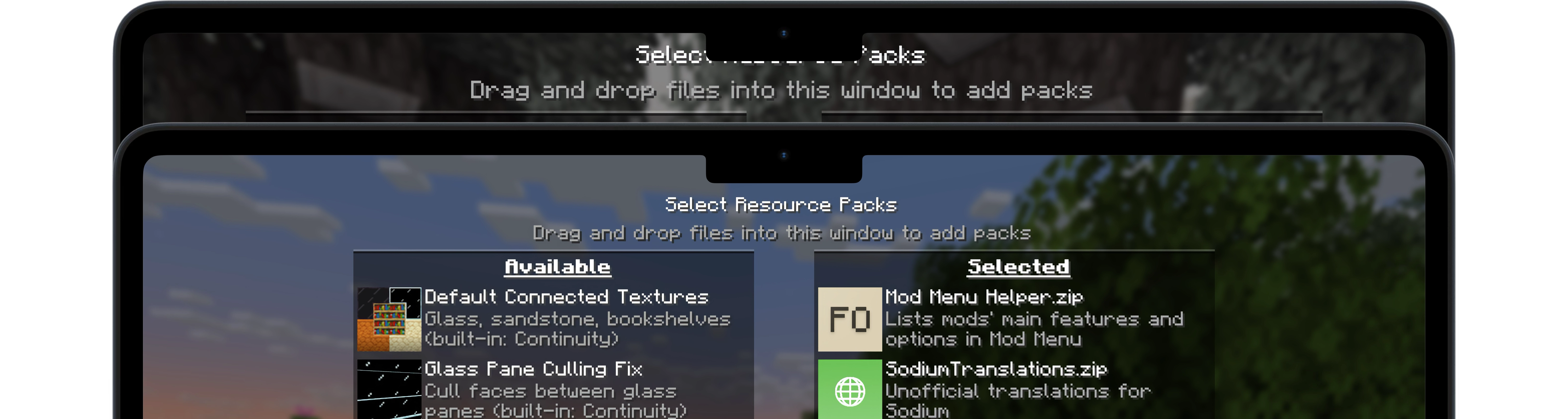
A simple Fabric mod for Minecraft 1.21.4 – 1.21.10 that aims to make vanilla UI elements fit better on Apple's notched MacBooks.
Screenshots


About this Mod
Notch, Please!
A simple Fabric mod for Minecraft 1.21.4 – 1.21.10 that aims to make vanilla UI elements fit better on Apple's notched MacBooks when in fullscreen mode.
🖥️ Installation
Notch, Please! requires the Fabric mod loader & the Fabric API.
Notch, Please! is designed specifically for MacBooks with display notches (M1 Pro, M2 and later) running macOS.
🔧 Usage
Since macOS's default fullscreen mode doesn't allow the game to extend into the notched area, you'll first need to enable Fullscreen under Options → Video Settings.
Then, make sure your screen resolution is set to something like 2560x1664 (not the notch-less 2560x1600) to take full advantage of the available space.
Once that's set up, I recommend using RenderScale to reduce your resolution to Retina levels (typically by half). This can significantly improve performance with little to no visible loss in quality on a MacBook display.
📜 License
Except where otherwise stated, the content of this repository is provided under the GPL v3 license by namekeptanonymous.
Available Versions
How to Install Notch, Please! on Your Server
Order Server
Order a Minecraft Java server with at least 3 GB RAM (4 GB recommended).
Set fabric Loader
In the panel under "Egg", select the fabric loader and matching Minecraft version (1.21.10).
Install Mod
Open the mod browser in the dashboard and search for "Notch, Please!". Click "Install" – done! Alternatively, upload the .jar via SFTP to the /mods folder.
Compatibility
Mod Loaders
Minecraft Versions
1.21.10, 1.21.9, 1.21.8 (+4 more)
Server-side
✗ UnsupportedRecommended RAM
4 GB(min. 3 GB)Frequently Asked Questions
Notch, Please! server crashes on startup – what to do?
Most common cause: wrong fabric version or insufficient RAM. Check the server log (latest.log) for "OutOfMemoryError" or "Mixin" errors. With Mado Hosting: ensure at least 3 GB RAM is allocated and the loader matches the mod version (1.21.10). You can switch loaders with one click in the panel.
Is Notch, Please! compatible with fabric?
Notch, Please! officially supports fabric for Minecraft 1.21.10, 1.21.9, 1.21.8. The Mado dashboard automatically detects incompatible loader combinations.
Server lagging with Notch, Please! – how to optimize performance?
Recommended RAM: 4 GB (per 8 players). Use /spark profiler to check if Notch, Please! consumes the most tick time. Common fixes: reduce server view-distance to 8-10, install "performant" or "starlight" as supplementary mods on Forge. With Mado Hosting, your server runs on NVMe SSDs with dedicated CPU cores for minimal latency.
Similar Mods




![[ETF] Entity Texture Features](https://cdn.modrinth.com/data/BVzZfTc1/af683d206d50b05258d865b0d6e4aa2f2cee12f2_96.webp)
![[EMF] Entity Model Features](https://cdn.modrinth.com/data/4I1XuqiY/6e5bbd0d06b1741bfdab6c0cfab6de8fdaf0064c_96.webp)
Rent Modded Server
Install Notch, Please! with just one click on your server.