
NotchArrowUtils
An All-In-One Fabric Utility mod for the latest Minecraft versions.
Screenshots
About this Mod

Information
Highlighted Features:
- Auto Clicker
- Auto Elytra
- Auto Fish
- Auto Replant
- Auto Sprint
- Auto Tool
- Calculator
- Constant Music
- Hotbar Cycling & Refilling
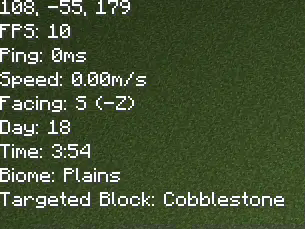
- Information Overlay
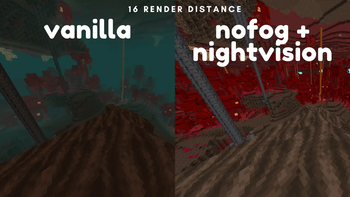
- Nightvision
- No Fog
- Notes
- Zoom
A comprehensive list of features can be found below.
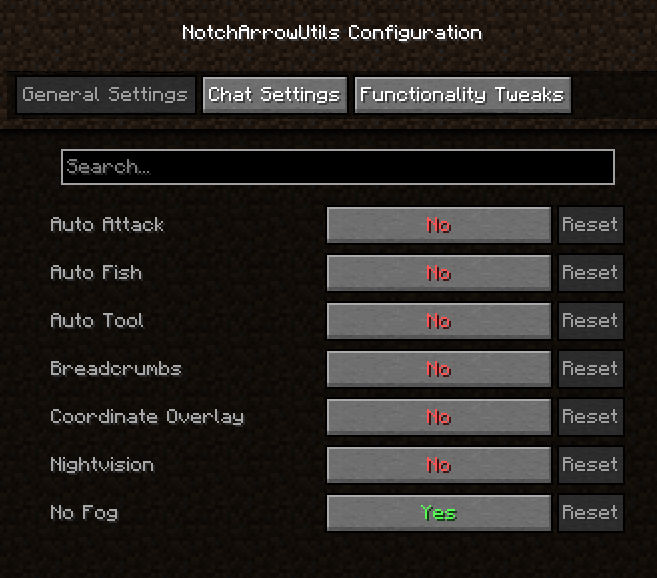
Mod Menu & Cloth Config are highly recommended for configuration, but many things can be done through commands.
This mod is entirely clientside meaning it can be used on any server, but some features may flag anticheat or be bannable. Use at your own risk.
Give requests and feedback in my Discord!
All Commands/Features
Everything is disabled by default. Pick exactly what you want to use!
Automation Commands
| Command | Description |
|---|---|
/utils autoattack |
Toggles automatic attacking on mobs you are looking at. |
/utils autoelytra |
Toggles swapping elytra and chestplate when you want to fly and when you land. |
/utils autofish |
Starts autofishing after casting into water. |
/utils autorefill |
Refills the hotbar when running out of an item. |
/utils autoreplant |
Automatically replants crops when right-clicking with seeds. |
/utils autorocket |
Uses firework rockets with elytra automatically. |
/utils autosprint |
Enables sprinting when moving forward. |
/utils autotool |
Switches to the best tool when breaking a block. |
/utils fastplace |
Enables fast block placing (1 per tick). |
Utility Commands
| Command | Description |
|---|---|
/utils afkoptimize |
Mutes sound & reduces FPS for AFK farming. |
/utils breadcrumbs |
Leaves a particle trail to help you find your way back. |
/utils cameralock |
Locks/unlocks camera position, useful with /utils travelangle. |
/utils coordinateoverlay |
Displays coordinates above the hotbar. |
/utils deathlocation |
Shows your most recent death location. |
/utils nightvision |
Enables client-side night vision. |
/utils nofog |
Disables fog effects. |
/utils notes |
Opens a Book & Quill GUI for storing notes. |
/utils stormpause |
Pauses singleplayer when it starts storming. |
Information Commands
| Command | Description |
|---|---|
/utils clock |
Shows current in-game day & time in 24-hour format. |
/utils durabilitywarnings |
Toggles tool/armor durability warnings. |
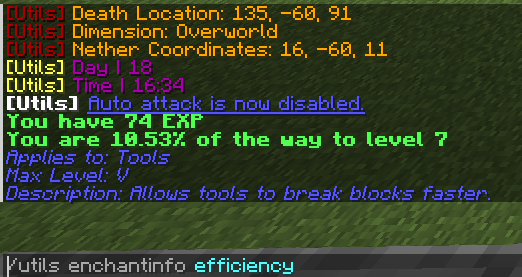
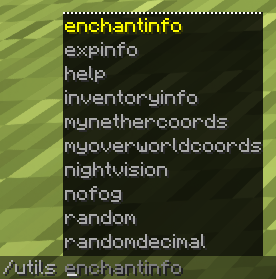
/utils enchantinfo (enchantment) |
Provides detailed information about the specified enchantment. |
/utils expinfo |
Displays experience level information. |
/utils inventory info |
Lists items in your inventory by quantity (descending). |
/utils jobblocks |
Lists all villager profession blocks and their matching jobs. |
/utils overlay |
Toggles the main information overlay. |
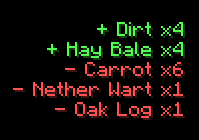
/utils pickupnotifier |
Toggles notifications for item pickups and drops. |
/utils statistics |
Displays session stats in the pause menu (Singleplayer only). |
Fun Commands
| Command | Description |
|---|---|
/utils coinflip |
Returns Heads! or Tails! at 50/50 odds. |
/utils constantmusic |
Removes the pauses between Minecraft music. |
/utils jukebox (disc) |
Plays the specified disc. Use /utils jukebox stop to stop playback. |
/utils projectiletrails |
Toggles particle trails following projectiles. |
/utils smoothcamera |
Toggles smooth camera movements, like using a spyglass or zooming. |
Math Commands
| Command | Description |
|---|---|
/utils calculate (expression) |
Evaluates a math expression using exp4j. |
/utils calculatorvariables |
Lists built-in and custom calculator variables. |
/utils mynethercoords |
Converts Overworld coordinates to Nether by dividing by 8. |
/utils myoverworldcoords |
Converts Nether coordinates to Overworld by multiplying by 8. |
/utils randomdecimal (min) (max) (places) |
Generates a random float within range. |
/utils randomnumber (min) (max) |
Generates a random integer within range. |
/utils travelangle (x) (z) |
Calculates optimal travel angle and adjusts camera. |
Misc Commands
| Command | Description |
|---|---|
/utils help |
Links to Modrinth. |
Features Without Commands
| Feature | Description | Type |
|---|---|---|
| Hotbar Cycling | Changes the active row of the inventory. | Keybind(s) |
| Secondary Hotbar Keybinds | A second set of hotkeys for the hotbar. | Keybind(s) |
| World Icon Updater | Take a screenshot that is saved as the world icon. | Keybind |
| Zoom | Zooms in the camera. | Keybind |
Available Versions
How to Install NotchArrowUtils on Your Server
Order Server
Order a Minecraft Java server with at least 3 GB RAM (4 GB recommended).
Set fabric Loader
In the panel under "Egg", select the fabric loader and matching Minecraft version (1.21.11).
Install Mod
Open the mod browser in the dashboard and search for "NotchArrowUtils". Click "Install" – done! Alternatively, upload the .jar via SFTP to the /mods folder.
Compatibility
Mod Loaders
Minecraft Versions
1.21.11, 1.21.10, 1.21.9 (+6 more)
Server-side
✗ UnsupportedRecommended RAM
4 GB(min. 3 GB)Frequently Asked Questions
NotchArrowUtils server crashes on startup – what to do?
Most common cause: wrong fabric version or insufficient RAM. Check the server log (latest.log) for "OutOfMemoryError" or "Mixin" errors. With Mado Hosting: ensure at least 3 GB RAM is allocated and the loader matches the mod version (1.21.11). You can switch loaders with one click in the panel.
Is NotchArrowUtils compatible with fabric?
NotchArrowUtils officially supports fabric for Minecraft 1.21.11, 1.21.10, 1.21.9. The Mado dashboard automatically detects incompatible loader combinations.
Server lagging with NotchArrowUtils – how to optimize performance?
Recommended RAM: 4 GB (per 8 players). Use /spark profiler to check if NotchArrowUtils consumes the most tick time. Common fixes: reduce server view-distance to 8-10, install "performant" or "starlight" as supplementary mods on Forge. With Mado Hosting, your server runs on NVMe SSDs with dedicated CPU cores for minimal latency.
Similar Mods




Rent Modded Server
Install NotchArrowUtils with just one click on your server.