
Note Block Master
Provides more timing and tuning options for your noteblock songs
Screenshots
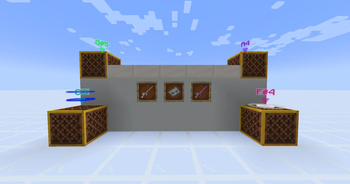
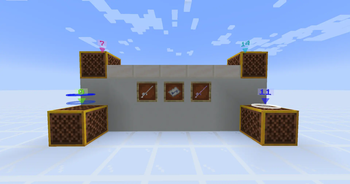
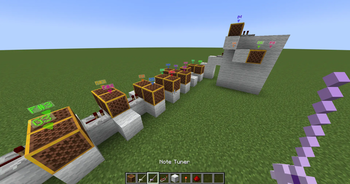
About this Mod
This mod adds several features to compose note block songs as a new advanced note block:
- Change the note range from C1 to A#7
- Set a delay of Subticks, 5ms each to a max. of 95ms (19 Subticks by default)
- Change the volume from 100% to 5%, removes decay per distance
- Add sustain to the note, causing it to play longer (alpha feature)
Multiple items for quality of life while composing are added
Items
- Advanced Note Block - the main block of the mod. A vanilla note block can be directly converted by right clicking it while holding a tuner and having 3 gold nuggets in your inventory
- Tuners - Render see through information in the world up to 16 blocks away while holding
- Note Tuner - set the key from C1 to A#7 (F#3 to F#6 by default)
- Tempo Tuner - set the delay from 0 to 19
- Add and Set mode - In set mode: If there is space above a clicked non-note block, an advanced note block will be placed in the specified state from your inventory. Also looks at a second tuner in offhand.
- Composers Note - calculates the delay for the next block based on set bpm. You can also set the current beat. If held in offhand with a Tempo Tuner in main hand will cause the clicked note block to be delayed according to current beat. Places repeaters based on the time between the current and next beat if held in main hand.
- Cores - Add them to a placed advanced note block by right clicking. Can only be modified with a tuner
- Mixing Core - set the volume from 100% to 5%. Removes the sound decay based on distance and increases range to 64 blocks
- Sustaining Core - set a sustain level. Sound extension depends on the instrument
You can adjust min and max note as well as the duration of a subtick in the startup config.
Only Harp, Bass and Flute has sustained notes so far. (Not happy with harp yet)
Available Versions
How to Install Note Block Master on Your Server
Order Server
Order a Minecraft Java server with at least 3 GB RAM (4 GB recommended).
Set neoforge Loader
In the panel under "Egg", select the neoforge loader and matching Minecraft version (1.21.3).
Install Mod
Open the mod browser in the dashboard and search for "Note Block Master". Click "Install" – done! Alternatively, upload the .jar via SFTP to the /mods folder.
Compatibility
Mod Loaders
Minecraft Versions
1.21.3, 1.21.2, 1.21.1
Server-side
✓ RequiredRecommended RAM
4 GB(min. 3 GB)Frequently Asked Questions
Note Block Master server crashes on startup – what to do?
Most common cause: wrong neoforge version or insufficient RAM. Check the server log (latest.log) for "OutOfMemoryError" or "Mixin" errors. With Mado Hosting: ensure at least 3 GB RAM is allocated and the loader matches the mod version (1.21.3). You can switch loaders with one click in the panel.
Is Note Block Master compatible with neoforge?
Note Block Master officially supports neoforge for Minecraft 1.21.3, 1.21.2, 1.21.1. The Mado dashboard automatically detects incompatible loader combinations.
Server lagging with Note Block Master – how to optimize performance?
Recommended RAM: 4 GB (per 8 players). Use /spark profiler to check if Note Block Master consumes the most tick time. Common fixes: reduce server view-distance to 8-10, install "performant" or "starlight" as supplementary mods on Forge. With Mado Hosting, your server runs on NVMe SSDs with dedicated CPU cores for minimal latency.
Similar Mods




![[ETF] Entity Texture Features](https://cdn.modrinth.com/data/BVzZfTc1/af683d206d50b05258d865b0d6e4aa2f2cee12f2_96.webp)
![[EMF] Entity Model Features](https://cdn.modrinth.com/data/4I1XuqiY/6e5bbd0d06b1741bfdab6c0cfab6de8fdaf0064c_96.webp)
Rent Modded Server
Install Note Block Master with just one click on your server.