
Not Enough Experience
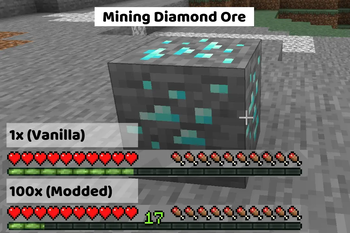
Adds configurable multipliers to various xp sources in game
Screenshots
About this Mod
Not Enough Experience❇️
Adds configurable multipliers to various xp sources.
Recommended Mods💡
These mods arent required, but I think they pair really well with this mod.
Clumps
- If you plan on using this mod to increase the xp dropped to insane amounts, I highly recommend installing this mod. It will not only help with the lag, but also reduce the time you are waiting to "soak up" the xp (without this mod, it can be several minutes if you have really high multipliers)
Configured
- Configured (and similar mods) will make editing the config a breeze and allow you to edit the file in-game
Configuration⚙️
The multipliers can be edited in the server config file. Scroll down to see the "Locating the Config File" section if your having trouble finding it.
Once opened, it should look something like this:
🟡Use Global Modifier?
This setting is to let the game/mod know which option you want to use.
- If you want to use the global modifier, set it to true and it will use the global modifier and ignore all individual modifiers
- If you want to use the individual modifiers, set it to false and it will use the individual modifiers and ignore the global modifier
This value can only be true or false. Default: true
🟢Global Multiplier
This multiplier is just for convenience. If you plan on using the same number for every category, you can just use this multiplier instead.
This value can be any number between 0 and 1000000 (one million). Default: 1.0
🔵Individual Multipliers
These multipliers are used for more fine tuning over the xp drops. It is broken down into 9 categories:
- Mining Ores
- Killing Mobs
- Smelting
- Trading
- Breeding
- Fishing
- Throwing Enchanting Bottles
- Getting Advancements
- Using The Grindstone
These values can be any number between 0 and 1000000 (one million). Default: 1.0
Locating the Config File
The config file will get generated when the world gets created, so make sure to do that first before trying the next steps.
The name of the file your looking for is notenoughexperience-server.toml
While in game you can enter the command
/config showfile notenoughexperience SERVER- This will send a clickable link to the file in the in-game chat (if the file exists). Example
If the file doesnt exist (for example, if you're on a server), you will need to manually navigate to the file location.
- Look for a folder named
saves, then just clicksaves>YourWorldName>serverconfigand you should see the file listed there
- Look for a folder named
Available Versions
How to Install Not Enough Experience on Your Server
Order Server
Order a Minecraft Java server with at least 3 GB RAM (4 GB recommended).
Set fabric Loader
In the panel under "Egg", select the fabric loader and matching Minecraft version (1.20.1).
Install Mod
Open the mod browser in the dashboard and search for "Not Enough Experience". Click "Install" – done! Alternatively, upload the .jar via SFTP to the /mods folder.
Compatibility
Mod Loaders
Minecraft Versions
1.20.1, 1.19.3, 1.19.2 (+3 more)
Server-side
✓ RequiredRecommended RAM
4 GB(min. 3 GB)Frequently Asked Questions
Not Enough Experience server crashes on startup – what to do?
Most common cause: wrong fabric version or insufficient RAM. Check the server log (latest.log) for "OutOfMemoryError" or "Mixin" errors. With Mado Hosting: ensure at least 3 GB RAM is allocated and the loader matches the mod version (1.20.1). You can switch loaders with one click in the panel.
Is Not Enough Experience compatible with fabric and forge and neoforge?
Not Enough Experience officially supports fabric, forge, neoforge for Minecraft 1.20.1, 1.19.3, 1.19.2. Note: Forge and Fabric mods are NOT cross-compatible – pick one loader and stick with it. The Mado dashboard automatically detects incompatible loader combinations.
Server lagging with Not Enough Experience – how to optimize performance?
Recommended RAM: 4 GB (per 8 players). Use /spark profiler to check if Not Enough Experience consumes the most tick time. Common fixes: reduce server view-distance to 8-10, install "performant" or "starlight" as supplementary mods on Forge. With Mado Hosting, your server runs on NVMe SSDs with dedicated CPU cores for minimal latency.
Similar Mods




Rent Modded Server
Install Not Enough Experience with just one click on your server.