
Nova's Music
NovaMusic - Bring the entirety of YouTube and SoundCloude into Minecraft. Import playlists with a single link, organize your library, and listen to your favorite tracks in-game without any performance drops.
Screenshots
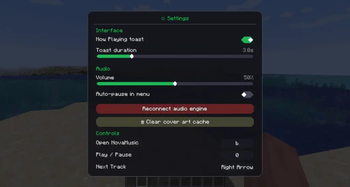
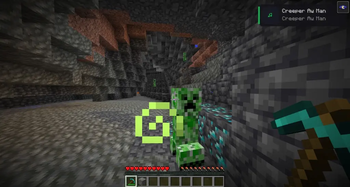
About this Mod
🎵 Nova's Music
Nova's Music is a modern, high-performance music player built directly into Minecraft. Stop Tab-switching and start listening. Whether you need an epic soundtrack for a boss fight or chill lo-fi for a long building session, Nova’s Music brings the world's audio library to your fingertips.
✨ Features
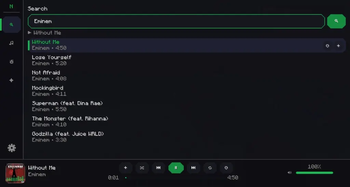
🔍 Global Search: Find any song or artist across multiple platforms in seconds.
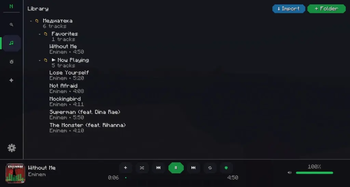
📂 Smart Library: Organize tracks into custom folders and import your favorite playlists from external sources.
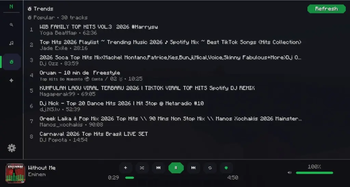
🔥 Real-time Trends: Stay updated with what’s hot right now using curated global charts.
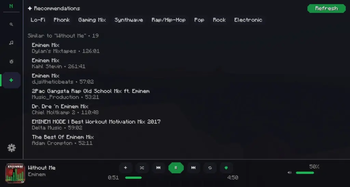
🧠 Intelligent Recommendations: Discover new music based on your current vibe and listening history.
📱 Modern UI/UX: Enjoy smooth animations, intuitive controls, and a sleek integrated player bar.
🔔 In-Game Notifications: Non-intrusive "Now Playing" popups keep you informed without blocking your view.
⌨️ Full Customization: Rebind hotkeys and fine-tune audio settings to fit your playstyle.
🛠️ Technical Details
Powered by a highly optimized audio engine, ensuring crystal-clear sound with zero impact on your FPS. It is completely client-side, meaning it works perfectly on any server!
🗺️ Roadmap
Personalization: Custom accent colors (RGB) and UI themes.
Social: Share your favorite tracks with friends via in-game chat.
Party Mode: Synchronized playback for listening together on servers.
RU:
🎵 Nova's Music
Nova's Music — это современный и производительный музыкальный плеер, встроенный прямо в Minecraft. Хватит постоянно сворачивать игру — слушай музыку, не отвлекаясь от геймплея. От эпичных саундтреков для битв с боссами до расслабляющего лоу-фай для стройки — вся мировая библиотека музыки теперь у тебя под рукой.
✨ Особенности
🔍 Глобальный поиск: Мгновенный поиск любых песен и исполнителей на разных платформах.
📂 Умная медиатека: Организуй музыку в папки и легко импортируй свои любимые плейлисты.
🔥 Актуальные тренды: Будь в курсе того, что сейчас слушает мир, благодаря глобальным чартам.
🧠 Умные рекомендации: Находи новую музыку на основе своих предпочтений и истории прослушивания.
📱 Современный UI: Плавные анимации, интуитивное управление и стильная панель плеера.
🔔 Игровые уведомления: Элегантные всплывающие окна с названием трека, не мешающие обзору.
⌨️ Полная настройка: Настраивай горячие клавиши и параметры звука так, как удобно тебе.
🛠️ Техническая часть
Мод работает на базе оптимизированного аудио-движка, что гарантирует чистый звук без влияния на ваш FPS. Это полностью клиентский мод — он будет работать на любом сервере!
🗺️ В планах
Персонализация: Кастомные цвета интерфейса (RGB) и темы оформления.
Социальные функции: Возможность делиться треками с другими игроками через чат.
Совместное прослушивание: Синхронное прослушивание музыки для компаний на сервере.
Available Versions
How to Install Nova's Music on Your Server
Order Server
Order a Minecraft Java server with at least 3 GB RAM (4 GB recommended).
Set fabric Loader
In the panel under "Egg", select the fabric loader and matching Minecraft version (1.21.1).
Install Mod
Open the mod browser in the dashboard and search for "Nova's Music". Click "Install" – done! Alternatively, upload the .jar via SFTP to the /mods folder.
Compatibility
Mod Loaders
Minecraft Versions
1.21.1
Server-side
✗ UnsupportedRecommended RAM
4 GB(min. 3 GB)Frequently Asked Questions
Nova's Music server crashes on startup – what to do?
Most common cause: wrong fabric version or insufficient RAM. Check the server log (latest.log) for "OutOfMemoryError" or "Mixin" errors. With Mado Hosting: ensure at least 3 GB RAM is allocated and the loader matches the mod version (1.21.1). You can switch loaders with one click in the panel.
Is Nova's Music compatible with fabric?
Nova's Music officially supports fabric for Minecraft 1.21.1. The Mado dashboard automatically detects incompatible loader combinations.
Server lagging with Nova's Music – how to optimize performance?
Recommended RAM: 4 GB (per 8 players). Use /spark profiler to check if Nova's Music consumes the most tick time. Common fixes: reduce server view-distance to 8-10, install "performant" or "starlight" as supplementary mods on Forge. With Mado Hosting, your server runs on NVMe SSDs with dedicated CPU cores for minimal latency.
Similar Mods




Rent Modded Server
Install Nova's Music with just one click on your server.